
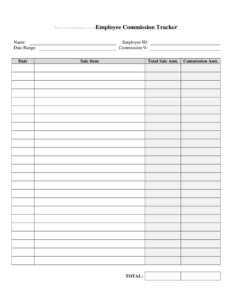
Employee Sales Commission Tracker
Track employee sales, rates, and payouts accurately with a free Employee Sales Commission Tracker template — free download in PDF and DOCX.
PDF
DOCX
2 downloads
0
likes
Download Files
- DOCX
An Employee Sales Commission Tracker is a simple worksheet that records each salesperson’s sales, the commission rate that applies, and the resulting payout for a given pay period. People most often use it to make sure commissions are calculated correctly and paid on time without disputes. You can download it free in PDF and DOCX with no signup required.
What Is an Employee Sales Commission Tracker?
An Employee Sales Commission Tracker is a record-keeping document used by managers, business owners, payroll staff, and salespeople to log sales activity and calculate the commission earned on it. It typically ties a named employee to specific sales transactions, applies an agreed commission percentage or flat rate, and totals the amount owed. The tracker serves as the bridge between what was sold and what gets paid, giving everyone a clear, written reference. Unlike a full payroll system, it focuses narrowly on the variable, performance-based portion of compensation, making it easy to review, share, and audit at the end of each week, month, or quarter.
When Do You Need an Employee Sales Commission Tracker?
Almost any business that pays staff partly or fully on commission benefits from a consistent way to track it. Common situations include:
- Monthly or quarterly payroll runs where commission must be calculated alongside base salary.
- Retail or showroom teams earning a percentage on each completed sale or unit moved.
- Real estate, insurance, or auto sales with larger, less frequent transactions that each carry a specific rate.
- Reconciling a commission dispute when an employee questions a payout and you need transaction-level detail.
- Onboarding a new sales rep and showing them exactly how their earnings are computed.
- Year-end reviews and bonus decisions, where cumulative commission data reveals top performers and trends.
Types of Commission Structures You Might Track
The same tracker can handle several pay models. A flat-rate percentage pays the same percent on every sale. A tiered structure increases the rate once an employee passes a sales threshold. A per-unit model pays a fixed dollar amount for each item sold rather than a percentage. Some teams use draw against commission, where an advance is later offset by earnings. Whatever the model, the tracker should make the rate and the math behind each line transparent so payouts are easy to verify.
What an Employee Sales Commission Tracker Should Have
A complete tracker captures enough detail to recreate every calculation. Key elements include:
- The employee’s name and identifier (employee ID or department).
- The pay period or date range the tracker covers.
- A line for each sale or transaction, with date, customer or order reference, and sale amount.
- The commission rate applied to each line.
- The commission earned per transaction and a running total.
- Any adjustments, such as returns, chargebacks, or a draw deducted.
- A final amount payable and a space for approval or sign-off.
How to Fill Out an Employee Sales Commission Tracker
- Enter the employee details. Write the salesperson’s full name, employee ID if you use one, and their team or territory at the top.
- Set the period. Record the start and end dates so the tracker reflects a single, defined pay cycle.
- List each sale. For every transaction, add the date, an order or invoice number, the customer name, and the gross sale amount.
- Add the commission rate. Enter the percentage or per-unit rate that applies to that line — note tier changes if your plan uses them.
- Calculate the commission. Multiply the sale amount by the rate (or apply the per-unit figure) to get the earned amount for each line.
- Record adjustments. Subtract returns, chargebacks, or any draw advanced earlier in the period.
- Total the column. Sum all earned commissions and adjustments to reach the net amount payable.
- Review and sign. Have the manager and, where appropriate, the employee confirm the figures before payroll processes them.
Tips for Accurate Commission Tracking
Update the tracker as sales close rather than reconstructing it at month-end from memory — fresh entries are far more reliable. Define when commission is “earned,” such as at sale, at delivery, or at payment received, and apply that rule consistently so a return next month is handled the same way every time. Keep supporting documents like invoices or signed orders attached or referenced by number, since these resolve disputes quickly. If you pay tiered rates, mark the line where the threshold is crossed so the higher percentage is easy to justify. Finally, store each period’s tracker so you build a clean audit trail across the year.
Common Mistakes to Avoid
- Mixing pay periods by leaving stale sales on a new tracker, which inflates the payout.
- Forgetting adjustments for returns or chargebacks, leading to overpayment that’s awkward to claw back.
- Using the wrong rate when a tier or product-specific percentage should apply.
- Recording gross instead of net sale amounts when your plan pays on net revenue.
- Skipping the customer or invoice reference, which makes disputes hard to investigate later.
- No approval step, so errors flow straight into payroll without a second set of eyes.
Frequently Asked Questions
What is an Employee Sales Commission Tracker used for? It is used to record each salesperson’s transactions, apply the agreed commission rate, and calculate exactly how much they are owed for a pay period. It keeps payouts transparent and provides a clear reference if questions ever arise about an employee’s earnings.
How do I calculate commission on the tracker? For a percentage plan, multiply each sale amount by the commission rate; for a per-unit plan, multiply the number of units by the fixed amount per unit. Then add or subtract any adjustments, such as returns or a draw, and total the column to get the net amount payable.
Does this tracker replace my payroll system? No. It is a focused tool for the variable, commission-based part of pay and is meant to feed accurate figures into whatever payroll or accounting process you already use. Many teams complete the tracker first, get it approved, then enter the totals into payroll.
Can I use it for tiered or per-unit commissions? Yes. The tracker accommodates flat-rate, tiered, and per-unit structures because you enter the applicable rate on each line. Just note where a tier threshold is crossed so the higher rate is clearly justified.
Is the Employee Sales Commission Tracker legally binding? The tracker itself is a record, not a contract — the binding terms live in your commission agreement or employment policy. It does, however, serve as valuable documentation supporting what was calculated and paid, which helps resolve disagreements.
How much does this template cost? Nothing. The Employee Sales Commission Tracker is completely free to download in PDF and DOCX, with no signup required, so you can start tracking commissions immediately and customize the fields to fit your pay plan.
This template is a general example provided for informational purposes only and does not constitute legal, financial, tax, or payroll advice. Commission rules, wage laws, and reporting requirements vary by jurisdiction and by employer policy — consult a qualified professional before relying on it for compensation decisions.
Official resource: for the rules that apply to your situation, see the Consumer Financial Protection Bureau.
Related Forms
- Lump Sum Payment Planning Form
- Payment Calculator per $10000
- Monthly Bank Reconciliation
- Credit Change Notice
- Customer Order Tracker
- Loan Deferral Request
Browse more in Money.