
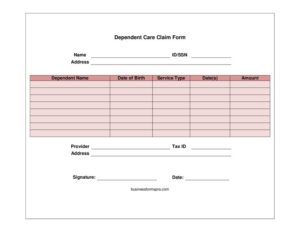
Dependent Care Claim Form
Download a free Dependent Care Claim Form template in PDF and DOCX to file FSA reimbursement claims for childcare and dependent care expenses fast.
PDF
DOCX
2 downloads
0
likes
Download Files
- DOCX
A Dependent Care Claim Form is the document you submit to your dependent care flexible spending account (FSA) or benefits administrator to be reimbursed for eligible childcare or adult dependent care expenses. People most often use it to recover pre-tax money set aside for daycare, after-school programs, or elder care so they can work. You can download this Dependent Care Claim Form free in PDF and DOCX, with no signup required.
What Is a Dependent Care Claim Form?
A Dependent Care Claim Form is a standardized request used to draw reimbursement from a dependent care assistance plan, typically a dependent care FSA offered through an employer. The employee (the account holder) fills it out and submits it to the plan administrator along with supporting documentation. The form documents who received care, what type of care was provided, when it took place, how much it cost, and who provided it — including the provider’s tax identification number. It serves as the paper trail your plan needs to verify that the expense qualifies under the dependent care rules and to issue payment from your pre-tax contributions back to you.
When Do You Need a Dependent Care Claim Form?
You generally complete this form whenever you have paid out of pocket for qualifying dependent care and want reimbursement from your account. Common situations include:
- Daycare or preschool for a child under 13 while you and your spouse work or look for work.
- Before- and after-school care or a school holiday camp that allows you to remain employed.
- Summer day camp (not overnight camp) for an eligible child.
- In-home babysitting or a nanny whose services let both parents work.
- Adult or elder day care for a spouse or dependent who cannot care for themselves.
- Periodic reimbursement — many people submit a claim monthly or each pay period as expenses add up rather than waiting until year-end.
What a Dependent Care Claim Form Should Have
A complete claim form ties the expense to an eligible person, an eligible service, and a verifiable provider. At minimum it should capture your identity as the account holder, the dependent who received care, the type and dates of the service, the dollar amount paid, and the provider’s name, address, and tax ID (or Social Security number for an individual caregiver). Your signature certifies that the information is accurate and the expense has not been reimbursed elsewhere. Most administrators also require an itemized receipt or a statement from the provider that matches the dates and amounts on the form. Without the provider’s tax ID, many plans cannot process the claim.
How to Fill Out a Dependent Care Claim Form
- Name: Enter your full legal name as the account holder or employee submitting the claim.
- Address: Provide your current mailing address so reimbursement checks or correspondence reach you.
- Dependent name: Write the full name of the child or dependent who received the care.
- Date of birth: Record the dependent’s date of birth, which helps confirm age eligibility.
- Service type: Describe the care provided, such as full-time daycare, after-school care, day camp, or adult day care.
- Date(s): List the specific date or date range the care was provided — this must match your receipts.
- Amount: Enter the dollar amount you actually paid for the service during those dates.
- Provider: Write the name of the daycare center, camp, or individual caregiver.
- Address: Add the provider’s business or home address.
- Tax ID: Enter the provider’s Employer Identification Number, or an individual caregiver’s Social Security number.
- Signature: Sign and date the form to certify the claim is accurate and unreimbursed.
Documentation and Reimbursement Tips
Reimbursement moves faster when your paperwork is consistent. Attach an itemized statement or receipt from the provider showing the dependent’s name, the dates of service, the amount, and the provider’s name — the dates and dollar figures should match the form exactly. A canceled check or credit card receipt alone is usually not enough, because it does not prove the service was dependent care. Many plans only reimburse for care that has already been provided, not care paid in advance, so submit after the service period when possible. Keep a copy of every form and receipt for your own records and for tax filing, since dependent care benefits interact with the information you report at year-end.
How It Differs From a Tax Credit Claim
A Dependent Care Claim Form for an FSA is not the same as claiming the federal child and dependent care tax credit. The FSA reimburses you from pre-tax dollars you already set aside through payroll; the tax credit is claimed on your annual return. You generally cannot use the same expense dollars for both, and the totals you can apply are limited. Because the rules around coordinating the two can be intricate, many filers track their dependent care spending carefully and consult a tax professional before deciding which approach maximizes their benefit.
Common Mistakes to Avoid
- Leaving the provider’s tax ID blank — most plans will reject or delay a claim without it.
- Mismatched dates or amounts between the form and the attached receipt.
- Claiming care paid in advance before the service has actually been provided.
- Submitting ineligible expenses such as overnight camp, tuition for kindergarten and above, or care for a dependent over the age limit.
- Forgetting to sign and date the certification line, which invalidates the claim.
- Missing the plan’s deadline — dependent care accounts have run-out periods after the plan year ends.
Frequently Asked Questions
What is a Dependent Care Claim Form used for? It is used to request reimbursement from a dependent care FSA or assistance plan for eligible childcare or dependent care expenses. You list the dependent, the service, the dates, the amount, and the provider, then submit it to your plan administrator. The form is your formal request to be paid back from money you set aside pre-tax.
How do I fill out the form correctly? Enter your name and address, the dependent’s name and date of birth, the service type and dates, the amount paid, and the provider’s name, address, and tax ID, then sign it. Make sure every figure matches your itemized receipt. Accurate, consistent details are the single biggest factor in getting a claim approved quickly.
Do I need to attach receipts? Almost always, yes. Most plans require an itemized statement from the provider showing the dependent’s name, dates of service, amount, and the provider’s name. A bank or credit card statement alone usually is not sufficient documentation.
Why does the form ask for the provider’s tax ID? The tax ID — an EIN for a business or an SSN for an individual caregiver — lets the plan verify the provider and ties the expense to a real, reportable service. Claims are frequently denied or held when this field is missing, so request it from your provider early.
Does this form need to be notarized? No. A Dependent Care Claim Form only requires your signature certifying the information is accurate; it does not need a notary or witnesses. Your administrator may have additional submission steps, but notarization is not one of them.
Is this template free to download? Yes. You can download this Dependent Care Claim Form free in both PDF and DOCX with no signup. Use the DOCX version if you want to customize fields, or print the PDF to complete by hand before submitting to your plan.
This template is a general example provided for informational purposes only and is not legal, financial, or tax advice. Dependent care plan rules and eligible expenses vary by employer and jurisdiction. Consult your plan administrator or a qualified tax professional before submitting a claim.
Official resource: for the rules that apply to your situation, see the Consumer Financial Protection Bureau.
Related Forms
- Monthly Receipts List
- Release Of UCC Financing Statement
- Kids Cash Envelope
- Credit Memo
- Brokerage Accounts Ledger
- Request Credit Card Chargeback
Browse more in Money.