
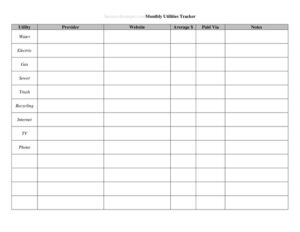
Utilities Tracker
Track electricity, water, gas, and internet bills with our free Utilities Tracker template — monitor usage, spot spikes, and budget better. Free download.
PDF
DOCX
3 downloads
0
likes
Download Files
- DOCX
A Utilities Tracker is a simple spreadsheet-style form you use to record every utility bill — electricity, water, gas, internet, trash, and more — so you can see exactly what you spend each month. People most often reach for one when household bills creep up and they want a clear, month-by-month picture of where the money goes. It’s free to download here in PDF and DOCX, with no signup required.
What Is a Utilities Tracker?
A Utilities Tracker is a record-keeping document that logs your recurring utility expenses over time. It’s used by renters, homeowners, roommates splitting bills, small landlords, and anyone running a home office who needs to separate personal and business costs. The form documents the provider, the billing period, the amount due, the due date, when you paid, and often the meter reading or usage amount behind each charge. By keeping every bill in one place, the tracker turns scattered statements into a usable history you can compare across months and seasons. That history makes it easy to catch billing errors, plan a realistic budget, and decide whether it’s time to shop for a cheaper provider.
When Do You Need a Utilities Tracker?
Almost anyone who pays recurring service bills benefits from tracking them. Common situations include:
- Budgeting a new home or apartment — to learn what your monthly utility load really costs before locking in other expenses.
- Splitting bills with roommates — to fairly divide electricity, water, and internet and show everyone the math.
- Spotting a usage spike — when a water or power bill suddenly jumps and you need to compare it against past months.
- Claiming a home-office deduction — to document the share of utilities tied to business use at tax time.
- Managing a rental property — when a landlord covers some utilities and needs records for accounting and reimbursement.
- Comparing providers or plans — to see whether a new rate, supplier, or energy-saving habit actually lowered the bill.
What a Utilities Tracker Should Have
A complete and genuinely useful tracker captures enough detail to answer “what did I pay, when, and why.” At minimum, each entry should include the utility type (electric, gas, water, internet, etc.), the service provider’s name, the account number, the billing or service period the charge covers, the amount due, the due date, the payment date, and the payment method. Many trackers also include a column for the meter reading or units consumed (kilowatt-hours, gallons, therms), a running monthly total, and a notes field for anything unusual — a late fee, an estimated reading, or a seasonal adjustment. The most valuable trackers add a comparison view so you can place this month next to the same month last year and instantly see the trend.
How to Fill Out a Utilities Tracker
- Set the period. At the top, write the month and year (or the date range) the page covers so each sheet stays organized.
- List each utility type. Add a row for every service — electricity, water, gas, internet, phone, trash, sewer — so nothing is missed.
- Record the provider and account number. Enter the company name and your account or customer number for each line, which speeds up disputes and customer-service calls.
- Enter the billing period. Note the start and end dates the bill covers, since utility cycles rarely match calendar months.
- Log the amount due and due date. Copy these straight from the statement to avoid late fees.
- Add the usage figure. Where the form has a meter-reading or units column, record kWh, gallons, or therms used.
- Mark payment details. Once paid, fill in the payment date and method (autopay, card, check).
- Total the month and add notes. Sum the column for a monthly figure and jot any anomalies in the notes field.
Reading the Numbers: Spotting Trends and Savings
The real power of a Utilities Tracker shows up after a few months of data. Once you have several entries, look down each column and ask what changed. A water bill that doubles with no change in habits often points to a running toilet or a hidden leak. An electric bill that climbs every summer is simply your air conditioner — useful to know so you can budget for it rather than be surprised. Comparing your usage figures (not just dollar amounts) separates rate increases from behavior changes: if your kilowatt-hours stayed flat but the bill rose, your provider raised rates. Keeping notes about weather, new appliances, or guests staying over helps explain spikes later, so a single glance tells the whole story.
Tips for Keeping Your Tracker Accurate
Consistency beats complexity. Update the tracker the moment a bill arrives rather than letting statements pile up, and always record figures from the official statement instead of estimating. If you use autopay, still log the bill so you can verify the charge matched what was billed. For shared households, keep one master copy everyone can see, and note who paid which portion. Save your paper or digital statements alongside the tracker for at least a year so you can verify any disputed line item. If you switch providers, start a fresh note rather than overwriting old data — that history is exactly what makes future comparisons valuable.
Common Mistakes to Avoid
- Recording only the total, not the usage. Without kWh or gallons, you can’t tell a rate hike from heavier use.
- Skipping the billing period. Utility cycles overlap months, so undated entries get confusing fast.
- Forgetting one-off charges. Late fees, deposits, and connection fees distort your averages if left out.
- Letting entries fall behind. Batch entry from memory invites errors; log each bill when it arrives.
- Not noting estimated readings. Estimated bills get “trued up” later and can look like a spike if unflagged.
- Mixing personal and business use. If you claim a deduction, keep the shared portion clearly marked.
Frequently Asked Questions
What is a Utilities Tracker used for? It’s used to record and monitor recurring utility bills — electricity, water, gas, internet, and more — in one organized place. People use it to build a budget, catch billing errors, split costs with roommates, and document expenses for taxes or rentals.
How do I fill out a Utilities Tracker? Set the month at the top, then add a row for each utility with the provider, account number, billing period, amount due, due date, payment date, and usage figure. Total the column at month’s end and note anything unusual so future comparisons make sense.
Is a Utilities Tracker a legal document? No, it’s a personal record-keeping tool, not a contract or filing. It carries no legal weight on its own, but it can support a budget, an expense claim, or a dispute with a provider by showing a clear payment history.
How much does this Utilities Tracker template cost? Nothing — it’s completely free to download from Business Forms Pro in both PDF and DOCX formats. There’s no signup, subscription, or hidden fee, and you can edit the DOCX version to add or remove columns.
Should I track usage or just the dollar amount? Track both whenever your bill shows it. The dollar amount tells you what you paid, but the usage figure (kWh, gallons, therms) reveals whether a higher bill came from using more or from a rate increase — which guides how you respond.
How often should I update it? Update it each time a new bill arrives, typically monthly. Logging promptly keeps the data accurate and lets you spot a problem — like a leak or an unexpected fee — before it repeats the next cycle.
This Utilities Tracker template is a general example provided for informational purposes only and is not financial, accounting, or tax advice. Billing practices and record-keeping requirements vary by provider and jurisdiction; consult a qualified professional for guidance on your specific situation.
Official resource: for the rules that apply to your situation, see the Consumer Financial Protection Bureau.
Related Forms
- Charity Cash Envelope
- Petty Cash
- Advertising Budget
- Grocery Cash Envelope
- Savings Breakdown
- Monthly Receipts List
Browse more in Money.