
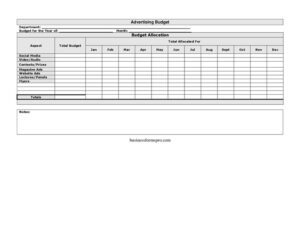
Advertising Budget
Plan and track marketing spend with our free Advertising Budget template, breaking costs down by channel and month — free download in PDF and DOCX.
PDF
DOCX
2 downloads
0
likes
Download Files
- DOCX
An Advertising Budget is a planning document that lays out how much a department or company intends to spend on marketing over a year, broken down by channel and by month. Most people use it to allocate a fixed pool of marketing dollars across activities like social media, video, and print so spending stays controlled and accountable. You can download this template free in PDF and DOCX, with no signup required.
What Is an Advertising Budget?
An Advertising Budget is a structured worksheet that documents how a business plans to distribute its promotional spending across a calendar year. It is typically prepared by a marketing manager, department head, or small-business owner and reviewed by finance or leadership before the year begins. The form captures a total budget figure, the categories of advertising the money will fund, and the amount allocated to each month from January through December. By organizing planned spend in one place, it helps teams see at a glance where money is going, compare planned versus actual costs over time, and justify requests for additional funds. It is part planning tool and part accountability record.
When Do You Need an Advertising Budget?
This form is useful any time marketing spending needs to be planned in advance and tracked against a cap. Common situations include:
- Annual planning season — when leadership sets next year’s budget and each department must submit a spending plan.
- Launching a new product or campaign that requires coordinated spend across social media, video, and print over several months.
- Managing a small business where every advertising dollar matters and the owner wants to avoid overspending early in the year.
- Reporting to a board or investor who expects a clear breakdown of how promotional funds are allocated.
- Comparing channel performance by tracking how much was budgeted for each aspect — flyers, website ads, contests — versus what was actually spent.
- Reallocating funds mid-year when one channel underperforms and money needs to shift to a stronger one.
What an Advertising Budget Should Have
A complete Advertising Budget should clearly identify the department and the year it covers, state the total budget available, and break that total into recognizable advertising categories. Each category should show a planned allocation, and the plan should be distributed across all twelve months so cash flow is visible. The form should total both vertically (across channels) and horizontally (across months) so the numbers reconcile to the overall budget. A notes section gives room to explain assumptions, seasonal spikes, or pending approvals. Accurate, reconciled totals are what turn a list of numbers into a usable planning document.
How to Fill Out an Advertising Budget
- Enter the Department name responsible for the spending, such as Marketing or Communications.
- Fill in the Budget for the Year of field with the calendar or fiscal year the plan covers.
- Record the Total Budget — the full amount of money approved or available for advertising that year.
- List each Aspect down the rows: Social Media, Video/Audio, Contests/Prizes, Magazine Ads, Website Ads, Lectures/Panels, and Flyers.
- For each aspect, enter a planned Budget Allocation showing how much of the total goes to that channel.
- Distribute each channel’s allocation across the month columns — Jan through Dec — reflecting when you expect to spend.
- Add the Total Allocated for each month at the bottom of every monthly column.
- Sum each row in the Totals column and confirm the grand total matches the Total Budget.
- Use the Notes field to flag assumptions, seasonal campaigns, or amounts awaiting approval.
Types of Advertising Aspects to Track
The template breaks spending into channels so you can see exactly where money flows. Social Media covers paid posts, boosted content, and platform ad campaigns. Video/Audio includes video production, streaming ads, podcast sponsorships, and radio. Contests/Prizes captures giveaways and promotional incentives. Magazine Ads and Flyers represent traditional print. Website Ads may include display networks, search ads, or banner placements, while Lectures/Panels accounts for event sponsorships, speaking slots, and conference appearances. Grouping costs this way makes it easy to spot whether you are over-investing in one channel and under-investing in another. You can rename or add aspects in the DOCX version to match the channels your business actually uses.
Tips for Building a Realistic Budget
Tie each allocation to a goal rather than spreading money evenly out of habit — a channel that drove results last year usually deserves more. Plan for seasonality by loading more spend into the months when your audience is most active, such as a retail push toward year-end. Leave a small contingency within the total so an unexpected opportunity does not force you to overrun. Revisit the worksheet monthly: compare planned figures to actual invoices and adjust upcoming months while the year is still in motion. Keeping the file in DOCX makes these mid-year edits quick.
Common Mistakes to Avoid
- Totals that do not reconcile — the sum of monthly columns or channel rows should always equal the Total Budget.
- Front-loading every dollar in January and leaving no room for second-half campaigns.
- Forgetting hidden costs like creative production, agency fees, or platform taxes within each channel.
- Leaving the Notes field blank, so assumptions and pending approvals get lost.
- Not labeling the year, which causes confusion when last year’s plan is reused.
- Treating the budget as final instead of a living document you update against actual spend.
Frequently Asked Questions
What is an Advertising Budget used for? It is used to plan and control how a company spends its marketing money over a year. The form distributes a total budget across channels like social media, video, and print, and across all twelve months, so teams can manage cash flow and avoid overspending. It also serves as a record to compare planned versus actual spending.
How do I fill out the monthly columns? For each advertising aspect, spread that channel’s total allocation across the months you expect to spend it, entering amounts under Jan through Dec. At the bottom of each month, add the Total Allocated for that month. The monthly totals and the channel-row totals should both reconcile to your overall Total Budget.
Can I change the advertising categories? Yes. The aspects listed — social media, video/audio, contests/prizes, magazine ads, website ads, lectures/panels, and flyers — are common examples. In the DOCX version you can rename, remove, or add rows so the categories match the channels your business actually invests in.
Is this Advertising Budget template free? Yes. You can download it free in both PDF and DOCX formats with no signup required. The PDF is handy for printing or sharing a finalized plan, while the DOCX lets you edit figures, totals, and categories directly.
How often should I update the budget? Treat it as a living document and review it at least monthly. Compare your planned allocations against actual invoices, then adjust the remaining months so the plan stays accurate. Regular updates make it far easier to spot overspending early and reallocate funds where they perform best.
What is the difference between an advertising budget and a marketing budget? An advertising budget focuses specifically on paid promotional channels — the ads and placements that buy attention. A marketing budget is broader and may also include things like staff salaries, software, research, and content creation. This template centers on advertising spend by channel and month.
This Advertising Budget template is a general example provided for informational purposes only and is not financial, accounting, or tax advice. Budgeting practices and reporting requirements vary by organization and jurisdiction, so consult a qualified financial professional before relying on it for business decisions.
Official resource: for the rules that apply to your situation, see the Consumer Financial Protection Bureau.
Related Forms
- Projected Sales
- Simple Payroll Cost Report
- Business Checking Record
- Saving Cash Envelope
- Debt Repayment Plan
- Account Balance
Browse more in Money.