
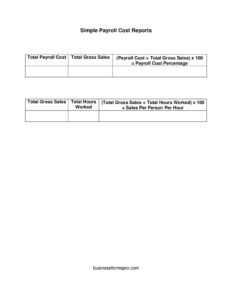
Simple Payroll Cost Report
Track wages, taxes, and benefits with a free Simple Payroll Cost Report template, available as a free download in PDF and DOCX formats.
PDF
DOCX
2 downloads
0
likes
Download Files
- DOCX
A Simple Payroll Cost Report is a one-page summary that totals what your business spends on labor for a given pay period or date range. People most often use it to see the full cost of payroll — wages plus taxes and benefits — in one clear snapshot for budgeting or bookkeeping. It’s free to download here in both PDF and DOCX, with no signup required.
What Is a Simple Payroll Cost Report?
A Simple Payroll Cost Report is a financial document that consolidates all payroll-related expenses for a specific period into a single, easy-to-read summary. It is typically prepared by a small business owner, bookkeeper, office manager, or payroll administrator. Rather than digging through individual pay stubs, the report rolls up gross wages, employer payroll taxes, benefit contributions, and any other labor costs so you can see the true cost of employing your team. It documents both per-employee figures and overall totals, making it useful for comparing periods, forecasting cash flow, and supporting tax or accounting records. The “simple” version keeps formatting minimal so it works for a handful of employees without specialized software.
When Do You Need a Simple Payroll Cost Report?
- You run a small business and want to know your real labor cost beyond just the wages line.
- You are preparing a monthly or quarterly budget and need accurate payroll figures.
- Your accountant or bookkeeper requests a payroll summary for the books or tax filings.
- You are applying for a loan, grant, or program that asks for documented payroll spending.
- You want to compare payroll costs across pay periods to spot overtime spikes or staffing changes.
- You’re pricing a new project or service and need to know the loaded cost of an hour of work.
Types of Payroll Costs to Capture
A complete payroll cost report goes beyond take-home pay. Gross wages cover salaries, hourly pay, and overtime. Employer taxes include Social Security and Medicare contributions, federal and state unemployment, and any local levies. Benefit costs may include health insurance premiums, retirement matching, and paid time off accruals. Some businesses also track workers’ compensation premiums and bonuses or commissions. Separating these categories helps you understand which part of your labor budget is growing and why.
What a Simple Payroll Cost Report Should Have
- A title and the reporting period or date range covered.
- Business name and the name of the person preparing the report.
- An employee or department list, depending on the level of detail you want.
- Gross wages, including regular and overtime pay.
- Employer payroll taxes broken out separately.
- Benefit and other employer contributions.
- Subtotals per category and a grand total of all payroll costs.
- Optional notes for one-off items like bonuses or corrections.
How to Fill Out a Simple Payroll Cost Report
- Enter the report header: add your business name, the report title, and the pay period or date range the figures cover.
- Add preparer details: note who compiled the report and the date it was completed for accountability.
- List employees or groups: enter each employee by name, or summarize by department if you prefer totals only.
- Record gross wages: for each line, enter regular pay and overtime so the wage base is complete.
- Add employer payroll taxes: fill in Social Security, Medicare, unemployment, and any local tax amounts the business owes.
- Enter benefit contributions: include health insurance, retirement matches, and other employer-paid benefits.
- Note other costs: capture bonuses, commissions, or workers’ compensation where relevant.
- Calculate subtotals: total each column or category so you can see where the money goes.
- Compute the grand total: add all categories for the period’s full payroll cost.
- Review and save: check the math against your payroll records and keep a copy with your accounting files.
Tips for Accurate Payroll Reporting
Pull your figures directly from payroll registers or pay stubs rather than estimating, and use the same pay period boundaries each time so reports stay comparable. If you pay weekly or biweekly, decide whether your report covers calendar months or pay-period months and stay consistent. Round to the cent rather than to the dollar to keep totals reconciling. When you use the DOCX version, you can add or remove employee rows and rename columns to match your benefit structure; the PDF is handy when you simply need a clean copy to share or print. Keeping a folder of monthly reports makes year-end review and audits far easier.
How It Differs From a Pay Stub or Payroll Register
A pay stub shows one employee’s earnings and deductions for one paycheck, and a payroll register lists every employee’s pay line by line for a single run. A Simple Payroll Cost Report sits above both: it summarizes the employer’s total cost — including taxes and benefits the employee never sees on a stub — across a period. Think of the register as the detailed source data and the cost report as the management-level summary built from it.
Common Mistakes to Avoid
- Reporting only net or gross wages and leaving out employer taxes and benefits, which understates true cost.
- Mixing pay periods so one report covers more or fewer days than another, making comparisons misleading.
- Forgetting one-time items like bonuses or commissions that inflate a particular period.
- Letting subtotals and the grand total drift out of sync after editing rows.
- Confusing the employer’s share of taxes with the employee’s withholding.
- Failing to label the date range, so the report’s meaning is unclear later.
Frequently Asked Questions
What is a Simple Payroll Cost Report used for? It is used to summarize the total cost of employing your staff for a period, including wages, employer taxes, and benefits. Business owners and bookkeepers rely on it for budgeting, forecasting, and supporting their accounting records. It turns scattered payroll details into one clear figure.
How do I fill out a Simple Payroll Cost Report? Start with the header and reporting period, then list each employee or department and enter gross wages, employer taxes, and benefit contributions. Calculate subtotals for each category and add them for a grand total. Always reconcile the numbers against your payroll register before saving.
Is this report a legal document? It is an internal management and accounting document rather than a filed legal form. While it is not submitted to a tax agency by itself, the figures should match the records you do file, so accuracy matters. Keep it with your books in case an accountant or lender asks for it.
Does a payroll cost report include employer taxes? Yes — that is the main reason to use it. A complete report adds the employer’s share of Social Security, Medicare, unemployment, and similar taxes on top of wages. Including these shows the true loaded cost of your workforce.
How much does this template cost? Nothing. The Simple Payroll Cost Report is a free download offered in both PDF and DOCX formats with no signup required. You can edit the DOCX version to match your own employee list and benefit categories.
How often should I prepare one? Many small businesses prepare a report each pay period or each month, then roll them up quarterly and annually. Choosing a consistent cadence makes trends easier to spot and simplifies tax-time reporting. Pick the schedule that matches how you review your finances.
This template is a general example provided for informational purposes only and is not legal, financial, or tax advice. Payroll and tax requirements vary by jurisdiction and change over time — consult a qualified accountant, payroll provider, or tax professional for guidance specific to your business.
Official resource: for the rules that apply to your situation, see the Consumer Financial Protection Bureau.
Related Forms
- Grocery Cash Envelope
- Automatic Payment Dates Tracker
- Appraisal Worksheet
- Daily Cash Sheet
- Payment Calculator per $10000
- Credit Card History
Browse more in Money.