
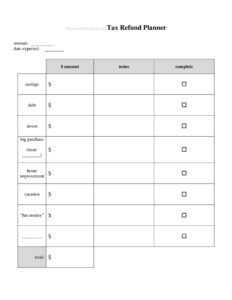
Tax Refund Planner
Plan your tax refund with this free Tax Refund Planner template—budget, allocate, and track your refund money wisely with a free download in PDF and DOCX.
PDF
DOCX
0
likes
Download Files
- DOCX
A Tax Refund Planner is a simple worksheet that helps you decide ahead of time exactly how your tax refund will be spent, saved, or invested—before the money arrives and disappears into everyday spending. Most people use it to turn a one-time windfall into lasting progress on debt, savings, or specific goals. It’s free to download here in both PDF and DOCX formats with no signup required.
What Is a Tax Refund Planner?
A Tax Refund Planner is a personal-finance worksheet used by individuals and households to map out where a tax refund will go. Rather than treating a refund as surprise cash, the planner documents the expected refund amount, lists your financial priorities, and assigns a portion of the refund to each goal—such as paying down a credit card, building an emergency fund, or covering a planned purchase. It’s typically completed by the taxpayer (or a couple together) once they know or can estimate their refund. The goal is intentional allocation: every dollar has a job before it lands in your account, which reduces impulse spending and makes the refund work harder.
When Do You Need a Tax Refund Planner?
This planner is useful any time a refund is on the horizon and you want a deliberate plan for it. Common situations include:
- You’ve filed your return and the IRS or state has confirmed an expected refund amount.
- You’re using a tax estimator and want to plan around a projected refund before filing.
- You’re carrying high-interest debt and want to commit part or all of the refund to paying it down.
- You’re trying to build or rebuild an emergency fund and need a head start.
- You and a partner want to agree on how shared refund money will be split between goals.
- You’re saving toward a specific purchase—car repairs, a vacation, home improvements, or a holiday fund—and want to earmark refund dollars in advance.
Types of Goals to Plan For
A good refund plan usually balances three categories. Debt reduction targets the highest-interest balances first to save on future interest. Savings and security covers emergency funds, retirement contributions, and sinking funds for predictable expenses. Spending and lifestyle sets aside a modest, guilt-free amount for something you’ll enjoy. Splitting your refund across all three—rather than putting it entirely into one bucket—often produces the best mix of financial progress and personal satisfaction.
What a Tax Refund Planner Should Have
An effective planner captures a few core pieces of information so the math stays honest. It should record the expected refund amount, a dated list of allocation categories (debt, savings, spending, investing, charity), the dollar amount or percentage assigned to each, a running total so allocations don’t exceed the refund, and a column for notes or target accounts. Many planners also include a priority ranking and a place to track whether each allocation has been completed once the refund arrives.
How to Fill Out a Tax Refund Planner
Because this is a flexible budgeting worksheet, fill it out in a logical order:
- Enter the tax year and the date you’re completing the plan at the top.
- Record your expected refund amount—use the figure from your filed return or a careful estimate if you haven’t filed yet.
- List your financial priorities, one per row, in order of importance (for example: emergency fund, credit card balance, car fund).
- For each priority, enter the amount or percentage of the refund you want to assign to it.
- Add the target account or destination in the notes column so you know exactly where the money goes.
- Tally a running total and confirm your allocations add up to—but not over—your expected refund.
- Once the refund arrives, mark each line complete as you transfer or spend the money, and note the actual amount received in case it differs from the estimate.
Tips for Making the Most of Your Refund
A few habits make this planner far more powerful. First, tackle high-interest debt before low-yield savings—paying off a 22% credit card is a guaranteed return no investment can match. Second, automate the transfers the same day your refund lands so the money never sits in your checking account tempting you. Third, consider whether a large refund signals over-withholding throughout the year; adjusting your W-4 can put more money in each paycheck instead of waiting twelve months for a lump sum. Finally, revisit the plan annually—your priorities change, and last year’s allocation may not fit this year’s goals.
Refund Planner vs. a General Budget
A Tax Refund Planner is narrower and more event-driven than a monthly budget. A budget tracks recurring income and expenses across an entire month or year, while this planner deals with a single lump sum and answers one question: where should this specific money go? Think of it as a companion to your regular budget. Once you’ve allocated the refund here, you can fold those decisions—like an extra debt payment or a new savings deposit—back into your broader financial plan.
Common Mistakes to Avoid
- Allocating before confirming the amount. Plans built on an overly optimistic estimate fall apart when the actual refund is smaller.
- Spending the refund mentally before it arrives. Treat it as available only once it’s deposited.
- Putting everything into one bucket. A balanced split usually beats an all-or-nothing approach.
- Ignoring high-interest debt. Saving at 1% while carrying 20% debt costs you money.
- Forgetting to update for a different actual amount. Reconcile your plan with the real deposit.
- Not automating the transfers. Money left in checking is money likely to vanish.
Frequently Asked Questions
What is a Tax Refund Planner used for? It’s a worksheet for deciding in advance how to spend, save, or invest your tax refund. By assigning every dollar a purpose before the money arrives, it helps you avoid impulse spending and make measurable progress toward your goals.
How do I fill out a Tax Refund Planner? Start by entering your expected refund amount, then list your financial priorities in order of importance. Assign a dollar amount or percentage to each priority, keep a running total so you don’t exceed the refund, and check off each line as you complete the transfers once the money lands.
Is a Tax Refund Planner an official tax document? No. It is a personal-finance planning tool, not a tax form. It does not get filed with the IRS or any state agency—it’s purely for your own budgeting and decision-making.
How much does this template cost? Nothing. You can download the Tax Refund Planner for free here in both PDF and DOCX formats, with no signup or payment required, and edit it to fit your situation.
Should I use it before or after I file my taxes? Either works. Many people plan after filing when they know the exact refund, but you can also use a careful estimate beforehand and adjust the numbers once your real refund is confirmed.
What’s the smartest way to use my refund? That depends on your finances, but a common approach is to pay off high-interest debt first, build or top up an emergency fund next, and reserve a small amount for something enjoyable. Splitting the refund across goals tends to give the best balance of progress and satisfaction.
This Tax Refund Planner template is a general example provided for informational purposes only and is not financial, tax, or legal advice. Individual circumstances and tax rules vary by jurisdiction and change over time—consult a qualified financial advisor or tax professional for guidance specific to your situation.
Official resource: for the rules that apply to your situation, see the Consumer Financial Protection Bureau.
Related Forms
- Full Page Check Register
- Tax Records
- Roommate Utilities Tracker
- Debit Register Wallet
- Debt Snowball Form
- Theme Park Cash Envelope
Browse more in Money.