
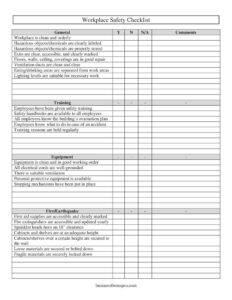
Workplace Safety Checklist
Download a free Workplace Safety Checklist template to inspect hazards, training, equipment, and fire readiness — free PDF and DOCX download.
PDF
DOC
0
likes
Download Files
- DOC
A Workplace Safety Checklist is a structured inspection form used to verify that a facility meets basic health and safety standards across housekeeping, training, equipment, and emergency readiness. People most often use it to run a routine walkthrough and document conditions before something goes wrong — and it’s free to download here in both PDF and DOCX formats with no signup required.
What Is a Workplace Safety Checklist?
A Workplace Safety Checklist is a one-page (or multi-page) inspection tool that lets a manager, safety officer, or designated employee systematically review a workspace against a set of known risk areas. Instead of relying on memory or a casual glance, the inspector works through grouped items — General conditions, Training, Equipment, and Fire/Earthquake readiness — and marks each as Yes, No, or N/A, adding notes in a Comments column. The completed form creates a dated record of what was checked, what passed, and what needs correction, which is invaluable for accountability, follow-up, and demonstrating that your organization takes hazard prevention seriously.
When Do You Need a Workplace Safety Checklist?
This checklist fits a wide range of office, warehouse, and light-industrial settings. Common situations include:
- Routine inspections — running weekly, monthly, or quarterly walkthroughs to catch hazards before they cause injuries.
- Opening a new location — confirming exits are marked, extinguishers are charged, and storage is secured before staff move in.
- Onboarding new employees — verifying that safety training, handbooks, and evacuation plans are in place for incoming hires.
- After an incident — documenting current conditions and identifying gaps following a near-miss or accident.
- Preparing for an audit or insurance review — building a paper trail that shows consistent, proactive safety monitoring.
- Seasonal or equipment changes — rechecking ventilation, grounding, and shelving after new machinery or furniture is installed.
What a Workplace Safety Checklist Should Have
A complete checklist groups items into logical categories so nothing is overlooked. This template covers four key areas. General addresses cleanliness, labeled and stored hazardous materials, clear exits, building repair, ventilation ducts, separated eating areas, and adequate lighting. Training confirms employees received safety instruction, that handbooks are available, that everyone knows the evacuation plan and accident procedures, and that sessions happen regularly. Equipment covers working condition, grounded electrical cords, ventilation, personal protective equipment, and stopping mechanisms. Fire/Earthquake verifies first aid supplies, annually updated extinguishers, sprinkler clearance, shelf heights, wall anchoring, and secured loose or fragile materials. Each line offers Y, N, or N/A plus a Comments space for context.
How to Fill Out a Workplace Safety Checklist
- Add the inspection date, location, and the name of the person conducting the review at the top of the form.
- Work through the General section, marking whether the workplace is clean, hazardous chemicals are labeled and stored, exits are clear and marked, surfaces are in good repair, ventilation ducts are clean, eating areas are separated, and lighting is suitable.
- Move to Training and confirm employees received safety training, handbooks are accessible, everyone knows the evacuation plan and accident response, and sessions are held regularly.
- In Equipment, check that machinery is clean and functional, electrical cords are grounded, ventilation is adequate, PPE is available, and stopping mechanisms exist.
- For Fire/Earthquake, verify first aid supplies, yearly-updated extinguishers, 18-inch sprinkler clearance, appropriate cabinet heights, wall anchoring, and secured loose or fragile materials.
- Mark each item Y, N, or N/A, and use the Comments column to note specifics, photos taken, or corrective deadlines.
- Sign and date the bottom, then assign follow-up actions for every “N” response.
Turning the Checklist Into Action
A checklist only improves safety if the findings lead somewhere. After completing your inspection, treat every “No” as an open action item. Assign a responsible person and a target date for each one, whether that’s relabeling a chemical container, ordering a new fire extinguisher tag, or anchoring a tall cabinet. Use the Comments column to record who will fix the issue and how. Many organizations file each completed form chronologically so they can compare results over time and spot recurring problems — for example, if ventilation ducts repeatedly fail, that signals a maintenance gap worth escalating. Keeping these records also helps demonstrate due diligence if an inspector or insurer ever asks about your safety program.
Tips for a Thorough Inspection
- Walk the space at the same time of day employees actually work, so lighting and ventilation reflect real conditions.
- Open cabinets and look behind shelving rather than scanning from a distance.
- Photograph any “No” item and attach it to the filed checklist for clear before-and-after evidence.
- Rotate who performs the inspection occasionally — a fresh pair of eyes catches what routine inspectors stop noticing.
- Cross-reference findings with your local fire code and OSHA-style requirements, which can be stricter than a generic checklist.
Common Mistakes to Avoid
- Marking items “Yes” without verifying — actually test extinguisher tags, cord grounding, and sprinkler clearance rather than assuming.
- Leaving the Comments column blank on failures — a bare “No” gives no guidance to whoever fixes the problem.
- Skipping the training section — physical hazards get attention while documentation that employees know the evacuation plan is overlooked.
- No follow-up — completing the form but never closing out the corrective actions defeats its purpose.
- Using one generic checklist for every space — adapt items for warehouses, labs, or kitchens that carry unique risks.
- Forgetting to date and sign — an undated checklist has little value as a record.
Frequently Asked Questions
What is a Workplace Safety Checklist used for? It is used to systematically inspect a workspace for hazards across housekeeping, training, equipment, and emergency readiness. The form documents which conditions pass, which fail, and what needs correction. It creates a dated record that supports accountability and follow-up.
Who should complete the checklist? Typically a manager, safety officer, or a designated employee trained to recognize workplace hazards performs the inspection. In smaller offices the owner or office manager often handles it. Rotating the role occasionally helps catch issues that become invisible to routine inspectors.
How often should I run a workplace safety inspection? Frequency depends on your industry and risk level, but many workplaces inspect monthly or quarterly, with high-hazard areas checked weekly. You should also inspect after any incident, renovation, or new equipment installation. Check your local regulations, as some jurisdictions specify minimum intervals.
Is this checklist legally required? The form itself is not legally mandated, but documented safety inspections are often expected or required under workplace safety laws and insurance policies. Requirements vary by location and industry, so confirm what applies to your business. This template provides a solid starting framework you can adapt.
Can I customize the items on the checklist? Yes. The DOCX version is fully editable, so you can add items specific to your facility — such as machine guarding, forklift checks, or chemical fume hoods — and remove anything that doesn’t apply. Tailoring the list to your real hazards makes the inspection far more useful.
How much does this template cost? It is completely free to download in both PDF and DOCX formats, with no signup or payment required. You can print it for on-site walkthroughs or edit the DOCX file to match your workplace. Use it as often as you need across multiple locations.
This template is a general example provided for informational purposes only and does not constitute legal, regulatory, or safety-compliance advice. Workplace safety requirements vary by jurisdiction, industry, and facility type. Consult a qualified safety professional or your local regulatory authority to ensure your program meets all applicable standards.
Official resource: for the rules that apply to your situation, see the U.S. Small Business Administration.
Related Forms
- Red Appointment Reminder Card
- 2026 Postal Holidays
- Job Application
- Market Map
- Venue Reservation Request
- Notice of Meeting
Browse more in Office.