
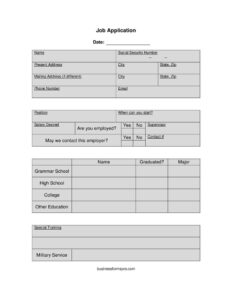
Job Application
Download a free job application form template in PDF and DOCX to collect applicant details, work history, and education quickly and consistently.
PDF
DOCX
2 downloads
0
likes
Download Files
- DOCX
A job application is a standardized form employers use to collect consistent, comparable information from everyone applying for a role. The most common reason people use one is to gather an applicant’s contact details, work history, education, and signed certification in a single, easy-to-review document. You can download this job application free in both PDF and DOCX formats, with no signup required.
What Is a Job Application?
A job application is a form completed by a person seeking employment, typically given to them by the hiring employer or downloaded from a company’s website. Unlike a resume, which the candidate designs freely, a job application asks every applicant the same questions in the same order. It documents identifying information, the position sought, education, prior employment, special skills, and a signed statement certifying that the details provided are accurate and that the applicant is legally permitted to work. Employers use it to screen candidates fairly, compare applicants on equal footing, and keep an organized record of who applied for what role and when.
When Do You Need a Job Application?
This form is useful any time you formalize the hiring intake process. Common scenarios include:
- A small business or franchise that wants every walk-in or online applicant to submit the same information.
- A retail, restaurant, or hospitality employer hiring for hourly positions where resumes are uncommon.
- An HR department standardizing applications across multiple departments or locations.
- A hiring manager who needs a candidate’s full employment history and references in one place.
- A company that requires a signed certification stating the applicant is authorized to work before scheduling interviews.
- A seasonal employer collecting a high volume of applications that must be sorted and compared quickly.
What a Job Application Should Have
A complete job application captures enough information to evaluate a candidate without becoming burdensome. The essentials include applicant contact details, the specific position and desired salary, availability to start, education and special training, a detailed employment history with reasons for leaving, references, and a dated signature line. A clear certification statement at the bottom—affirming the information is truthful and that the applicant is eligible to work—gives the document its weight. Optional fields like a list of employers the applicant prefers you not contact help protect candidates who are still employed. Keeping the form organized into logical sections makes it faster for reviewers to scan and reduces the chance of missing answers.
How to Fill Out a Job Application
- Enter your full legal name and, where requested, your social security number (provide this only when you are comfortable; many employers collect it after a job offer).
- Fill in your present address, city, state, zip, and a separate mailing address if it differs.
- Add your phone number and email so the employer can reach you.
- State the position you are applying for, when you can start, and your salary desired.
- Indicate whether you are employed, name your current supervisor, note whether the employer may contact this employer, and provide a contact number.
- Complete the education section: grammar school, high school, college, and other education, noting whether you graduated and your major.
- List any special training and military service.
- Detail your employment history: each name of employer, reason for leaving, job responsibilities, duties performed, and skills used.
- Note any employer you’d prefer not be contacted, and provide references with name, contact information, and relationship.
- Add your printed name and signature beneath the certification statement.
Understanding the Certification Statement
The line near the bottom—”I certify that all the foregoing information is true to the best of my knowledge. I avow that I am legally entitled to work in this country, and can provide proof of that upon hiring”—is more than a formality. By signing, the applicant confirms the accuracy of everything written and acknowledges that material misstatements can be grounds to deny employment or terminate it later. The work-authorization clause signals that the employer will request documentation after an offer is made. Applicants should read this statement carefully before signing, and employers should keep the signed copy on file in case any detail is later questioned.
Tips for Employers and Applicants
Employers should request only information that is relevant and legally permissible to collect at the application stage; some jurisdictions restrict questions about salary history, criminal records, or other topics, and many advise collecting sensitive identifiers like a social security number only after an offer. Applicants should fill out every field legibly, avoid leaving gaps in employment history unexplained, and be honest—employers commonly verify references and prior positions. Using the editable DOCX version, an employer can add or remove fields to match its own hiring practices, while the PDF works well for a clean, print-and-sign copy.
Common Mistakes to Avoid
- Leaving the signature or printed name blank, which makes the certification unenforceable.
- Skipping the reason for leaving for past jobs, a field reviewers pay close attention to.
- Forgetting to indicate whether a current employer may be contacted, risking an unwanted call to your present job.
- Providing incomplete employment history with unexplained gaps.
- Collecting or volunteering a social security number too early in the process.
- Listing references without confirming their contact information and relationship are current and accurate.
Frequently Asked Questions
What is a job application form used for? It is used to collect standardized information from every candidate applying for a role, including contact details, education, employment history, and references. This lets employers compare applicants fairly and keep an organized record. It also captures a signed certification that the information is accurate.
How do I fill out this job application? Start with your personal and contact details, then state the position, start date, and desired salary. Complete the education and employment history sections in full, list your references, and sign and print your name beneath the certification statement. Write clearly and answer every field that applies to you.
Do I have to provide my social security number? The form includes a field for it, but many employers and applicants prefer to provide a social security number only after a job offer is extended, when it is needed for tax and verification purposes. Requirements vary, so applicants can ask the employer about the timing. Never share it through an unsecured method.
Is a signed job application legally binding? The signature certifies that the information provided is true and that the applicant is authorized to work. While completing the form does not create an employment contract, knowingly providing false information can be grounds to withdraw an offer or end employment. Employers should retain the signed copy.
Can I edit the fields on this template? Yes. The DOCX version is fully editable, so you can add, remove, or rename fields to fit your company’s hiring process and local requirements. The PDF version is ready to print and sign as-is.
How much does this job application template cost? It is completely free to download in both PDF and DOCX formats, with no signup or payment required. You can use it for personal hiring needs or adapt it for your business at no charge.
This job application template is provided as a general example for informational purposes only and is not legal, employment, or compliance advice. Hiring and data-collection requirements vary by jurisdiction—consult a qualified human resources or legal professional to ensure your application complies with applicable laws.
Official resource: for the rules that apply to your situation, see the U.S. Small Business Administration.
Related Forms
- Appointment Reminder Card
- Return To Work Form
- Market Map Services
- Appointment Request Form
- Room Reservation Form
- Safety Violation Form
Browse more in Office.