
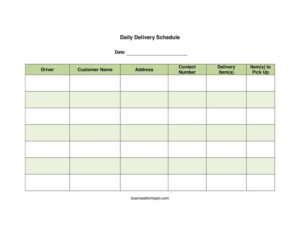
Daily Delivery Schedule
Organize routes and stops with this free Daily Delivery Schedule template, available as a free download in PDF and DOCX for drivers and dispatchers.
PDF
DOCX
7 downloads
0
likes
Download Files
- DOCX
A Daily Delivery Schedule is a simple planning sheet that lists every stop a driver must make on a given day, including who to visit, where, what to drop off, and what to pick up. People most commonly use it to give drivers a clear, organized route so deliveries arrive on time and nothing is forgotten. You can download this Daily Delivery Schedule free in both PDF and DOCX formats, with no signup required.
What Is a Daily Delivery Schedule?
A Daily Delivery Schedule is a one-day operational document that dispatchers, office managers, or small business owners create to organize delivery work for a single driver or vehicle. It captures the date, the assigned driver, and a row-by-row list of customers along with their addresses, contact numbers, and the items being delivered or collected. The form acts as both a route plan and a record: it tells the driver exactly where to go and gives the office a reference for what was sent out that day. Businesses ranging from florists and bakeries to parts suppliers, courier services, and equipment rental shops rely on this kind of schedule to keep daily logistics running smoothly and to avoid missed or duplicated stops.
When Do You Need a Daily Delivery Schedule?
Almost any operation that moves goods to customers can benefit from a written daily plan. Common situations include:
- Running a delivery route: A driver needs a clear list of stops, addresses, and items before leaving the warehouse each morning.
- Coordinating pickups and drop-offs: When the same trip involves both delivering new items and collecting returns, samples, or empties, the schedule keeps both clear.
- Managing a small fleet: A dispatcher splits the day’s orders across several drivers and prints one schedule per person.
- Handling time-sensitive goods: Florists, caterers, or pharmacies use the date and driver fields to confirm same-day commitments are covered.
- Onboarding a substitute or new driver: A written schedule with addresses and contact numbers lets an unfamiliar driver complete the route without guesswork.
- Keeping a daily record: Completed schedules give the office a paper trail showing what was sent to each customer and when.
What a Daily Delivery Schedule Should Have
A useful schedule is concise but complete. At minimum it should identify the day and the responsible driver, then provide a row for each stop. Each row needs the customer’s name, a full and accurate delivery address, a contact number in case the driver needs directions or a callback, a description of the item or items being delivered, and a separate note of anything to be picked up at that location. Listing stops in route order — or leaving room to number them — helps the driver work efficiently. Clear, legible entries reduce confusion and make the schedule easy to follow on the road.
How to Fill Out a Daily Delivery Schedule
- Date: Enter the calendar day the deliveries are scheduled for. This anchors the document and prevents an old route from being reused by mistake.
- Driver: Write the name of the person assigned to the route so responsibility is clear and the office knows who to contact.
- Customer name: For each stop, record the business or individual receiving the delivery. Use the exact name on the order to avoid mix-ups.
- Address: Enter the full street address, including unit, suite, or loading-dock details and any access notes that help the driver find the location.
- Contact number: Add a phone number for the recipient so the driver can call ahead, confirm arrival, or get directions if needed.
- Delivery item(s): List exactly what is being dropped off at that stop — quantities, product names, or order numbers — so the driver loads and hands over the right goods.
- Item(s) to pick up: Note anything to collect at the same address, such as returns, empty containers, paperwork, or exchanges. Leave blank if nothing is to be picked up.
Repeat the stop rows for each delivery, ideally in the order the driver will travel them.
Tips for Planning an Efficient Route
The order in which stops are listed matters as much as the information in each row. Group deliveries by geography so the driver moves logically across a region rather than backtracking. Place time-sensitive or appointment-based stops where they fit the customer’s window, even if that breaks the geographic flow. If a location has tricky parking, gated access, or specific delivery hours, add those details next to the address. For pickups, flag any stop that requires extra space in the vehicle so the driver leaves room. A quick review of the full schedule before departure helps catch a missing address or an unreachable phone number while there is still time to fix it.
Keeping a Daily Delivery Record
Beyond planning the route, a completed schedule doubles as a record of the day’s activity. Drivers can mark each stop as completed, note the time of delivery, or jot down anything unusual — a customer who wasn’t home, a refused item, or a damaged package. At the end of the shift, the office can file the schedule to reconcile what left the warehouse against what was actually delivered and picked up. Over time these records help spot recurring problems, support customer inquiries about a specific date, and provide evidence if a delivery is later disputed.
Common Mistakes to Avoid
- Incomplete addresses: Leaving off a unit number, building name, or access instructions sends drivers to the wrong door and wastes time.
- Missing contact numbers: Without a phone number, a driver who can’t find the location or reach the recipient has no quick way to resolve it.
- Vague item descriptions: Writing “order” instead of the actual items invites loading errors and wrong deliveries.
- Forgetting pickups: Overlooking the items-to-collect column means a second trip and an unhappy customer.
- Reusing an old schedule: Skipping the date or copying yesterday’s sheet can send goods to customers who didn’t order them today.
- Illegible handwriting: A schedule the driver can’t read defeats its purpose; print or write clearly.
Frequently Asked Questions
What is a Daily Delivery Schedule used for? It is used to plan and organize all of a driver’s deliveries and pickups for a single day. It lists each customer, address, contact number, and the items to be dropped off or collected, giving the driver a clear route and the office a record of the day’s work.
How do I fill out a Daily Delivery Schedule? Start by entering the date and the assigned driver, then complete one row per stop with the customer name, full address, contact number, delivery items, and anything to pick up. List the stops in the order the driver will travel them for the most efficient route.
Is this template free to download? Yes. You can download the Daily Delivery Schedule free from Business Forms Pro in both PDF and DOCX formats, with no signup or payment required. The DOCX version can be edited to match your business.
Can I customize the schedule for my business? Absolutely. The DOCX file lets you add columns such as time windows, order numbers, signature lines, or vehicle details, and you can add your company name or logo so it fits your daily operations.
Should drivers keep the completed schedule? Keeping completed schedules is good practice. They serve as a daily record of what was delivered and picked up, help resolve customer questions about a specific date, and make it easier to spot recurring delivery issues over time.
How many stops should one schedule cover? A single schedule typically covers one driver’s stops for one day, however many that may be. If you run multiple drivers, print or fill out a separate schedule for each so every route stays clear and easy to follow.
This template is a general example provided for informational purposes only and is not legal, financial, or operational advice. Delivery requirements and recordkeeping practices vary by business and jurisdiction — consult a qualified professional for guidance specific to your situation.
Official resource: for the rules that apply to your situation, see the U.S. Small Business Administration.
Related Forms
- Hoshin Kanri Matrix
- 2025 Postal Holidays
- Project Schedule
- Meeting Agenda Landscape
- Job Application
- Password List
Browse more in Office.