
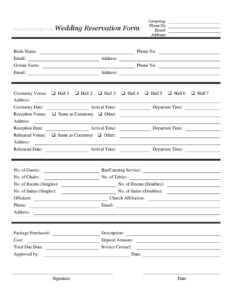
Wedding Reservation Form
Download a free Wedding Reservation Form template to book your venue, ceremony, reception, and catering with clear details — free download in PDF and DOCX.
PDF
DOCX
0
likes
Download Files
- DOCX
A Wedding Reservation Form is a document a venue, hotel, or event company uses to capture every detail of a couple’s wedding booking — from the ceremony hall and reception space to guest count, catering, lodging, and payment terms. Couples and planners most often reach for it to lock in dates and lock down expectations before deposits change hands. You can download this Wedding Reservation Form for free in both PDF and DOCX formats, with no signup required.
What Is a Wedding Reservation Form?
A Wedding Reservation Form is a booking and agreement document issued by a venue, banquet hall, hotel, or wedding services company to record a couple’s reservation. It gathers contact information for the company, the bride, and the groom; documents the chosen ceremony, reception, and rehearsal spaces with dates and times; and itemizes services such as catering, seating, and overnight rooms. It also captures the package purchased, its cost, deposit, and balance due date. Once signed by both the couple and an authorized company representative, it becomes a shared written record that helps prevent miscommunication and confirms what each party has agreed to deliver on the wedding day.
When Do You Need a Wedding Reservation Form?
- Booking a banquet hall or estate where you need to specify which of several halls (Hall 1 through Hall 7) is reserved for the ceremony.
- Reserving a hotel-and-venue package that bundles the reception space with overnight rooms and suites for the wedding party and out-of-town guests.
- Confirming a multi-event weekend with separate rehearsal, ceremony, and reception dates and arrival/departure windows.
- Arranging bar and catering service for a set guest count, where tables and chairs must be counted and laid out.
- Coordinating with an outside officiant whose church affiliation and contact details need to be on file with the venue.
- Securing a date with a deposit and putting the package cost, balance, and payment due date in writing before the big day.
What a Wedding Reservation Form Should Have
A complete Wedding Reservation Form ties together three groups of information: people, logistics, and money. The people section names the company, the bride, and the groom with full contact details, plus the officiant. The logistics section pins down each venue, its address, the relevant date, and arrival and departure times, alongside guest count, seating, catering, and lodging needs. The money section lists the package purchased, a clear description, the cost, the deposit collected, and the total due date. Finally, an approval block with names, signatures, and dates turns the worksheet into a binding confirmation. Together, these elements leave little room for the day-of surprises that derail celebrations.
How to Fill Out a Wedding Reservation Form
- Company details: Enter the venue or service company’s name, phone, email, and address at the top so the booking is clearly attributed.
- Couple’s information: Record the bride’s name, phone, email, and address, then the groom’s name, phone, email, and address.
- Ceremony venue: Check the assigned hall (Hall 1–7), and write its address, the ceremony date, and arrival and departure times.
- Reception venue: Mark Same as Ceremony or Other, add the address if different, then the reception date and times.
- Rehearsal venue: Indicate Same as Ceremony or Other, with its address, date, and times.
- Capacity and services: Fill in number of guests, whether bar/catering service applies, and counts for chairs, tables, single and double rooms, and single and double suites.
- Officiant: List the officiant’s name, church affiliation, phone, email, and address.
- Package and payment: Note the package purchased, a description, cost, deposit amount, total due date, and invoice contact.
- Approval: Have the approver sign and date, and the couple sign and date to confirm.
Coordinating Venues, Catering, and Lodging
Because this form separates ceremony, reception, and rehearsal, it shines for weddings that span more than one space or more than one day. Use the Same as Ceremony checkboxes to avoid re-entering an address when events share a location, and reserve Other for those held elsewhere. The arrival and departure times for each event help the venue schedule setup, turnover, and breakdown crews. The seating fields — chairs and tables — should match your final guest count and floor plan, and the room and suite counts let the venue block lodging for the wedding party and traveling guests well ahead of time. The bar and catering line signals whether food and beverage staff must be assigned.
Deposits, Balances, and Confirmation
The payment section is where a friendly inquiry becomes a real reservation. The package purchased and its description should spell out exactly what is and isn’t included, while the cost, deposit amount, and total due date set clear financial milestones. List an invoice contact so billing questions reach the right person. The deposit typically holds the date, with the remaining balance due by the total due date noted on the form. Keep a signed copy for your records and ask the venue for theirs; the matching Approved by, signature, and date fields give both sides proof of what was agreed.
Common Mistakes to Avoid
- Leaving the hall selection blank when multiple halls exist — always check the specific space reserved.
- Mismatched guest count and seating — chairs and tables should reflect the actual number of guests.
- Forgetting arrival and departure times, which the venue needs for setup and cleanup scheduling.
- Skipping the rehearsal section and assuming the rehearsal space is automatically included.
- Not naming an invoice contact, which delays billing and payment of the balance.
- Filing the form without signatures — an unsigned reservation may not be honored as confirmed.
Frequently Asked Questions
What is a Wedding Reservation Form used for? It is used to formally book a wedding with a venue or service company and record every detail in one place — the couple’s contacts, the ceremony, reception, and rehearsal venues, dates and times, guest count, catering, lodging, the officiant, and the package and payment terms. It turns a verbal arrangement into a clear, shared written record.
How do I fill out the venue sections? Select the assigned ceremony hall and enter its address, date, and arrival and departure times. For the reception and rehearsal, check Same as Ceremony if they share a location, or Other and write the separate address, date, and times.
Is a Wedding Reservation Form legally binding? Once both the couple and an authorized company representative sign and date it, it generally functions as a binding agreement for the reservation and its terms. The exact enforceability depends on the wording and the laws where the event takes place, so review the package description and payment terms carefully before signing.
Does the form need to be notarized or witnessed? Most wedding reservations do not require notarization or witnesses; signatures from the couple and the approving representative are typically enough. If your venue or local rules call for additional formalities, add them as needed.
How much does this template cost? The Wedding Reservation Form template on Business Forms Pro is completely free to download in PDF and DOCX with no signup. The actual wedding package cost, deposit, and balance are set by your chosen venue and entered on the form.
Can I customize the form for my venue? Yes. Download the DOCX version to rename halls, adjust the room and suite categories, add line items to the package description, or include your own policies. The PDF version is ready to print and fill in by hand.
This Wedding Reservation Form template is a general example provided for informational purposes only and is not legal, financial, or tax advice. Booking terms and contract requirements vary by venue and jurisdiction; consult a qualified professional before relying on this document.
Official resource: for the rules that apply to your situation, see the U.S. Small Business Administration.
Related Forms
- Blue Appointment Reminder Card
- Fancy Gold Appointment Reminder Card
- Meeting Agenda Simple
- Employee Performance Evaluation
- Project Schedule
- 2024 Postal Holidays
Browse more in Office.