
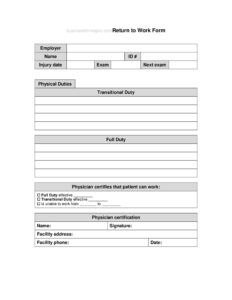
Return To Work Form
Download a free Return to Work form template in PDF and DOCX to document an employee's fitness, restrictions, and clearance before resuming duties.
PDF
DOCX
3 downloads
0
likes
Download Files
- DOCX
A Return to Work form is a document that confirms an employee is medically cleared and ready to resume their job duties after a leave of absence, illness, injury, or extended time away. The most common reason people use it is to record any work restrictions and obtain formal clearance before an employee steps back onto the floor. You can download this template free in both PDF and DOCX with no signup required.
What Is a Return to Work Form?
A Return to Work form is a workplace document used by employers, HR departments, supervisors, and healthcare providers to confirm that an employee is fit to come back to work after an absence. It documents the date the employee left, the reason for the absence, the anticipated return date, and whether the employee can perform full duties or needs temporary accommodations. The form often includes a section for a doctor or treating provider to note physical restrictions, light-duty recommendations, or follow-up requirements. By putting these details in writing, the form protects both the employee and the organization and creates a clear record of the clearance process.
When Do You Need a Return to Work Form?
This form is useful any time an employee has been away and the employer wants a documented, consistent process for bringing them back safely. Common situations include:
- An employee returning after a workplace injury or workers’ compensation claim that required medical treatment.
- A staff member coming back from an extended illness or surgery that may carry temporary restrictions.
- Returning from a contagious illness where the organization needs confirmation the employee is no longer infectious.
- Coming back after parental leave, FMLA leave, or another protected leave of absence.
- Resuming work following a mental health leave or stress-related absence.
- Returning from any leave longer than a company-defined threshold (for example, three or more consecutive days).
What a Return to Work Form Should Have
A complete Return to Work form captures enough detail to verify fitness for duty while respecting the employee’s privacy. Key elements include the employee’s name and job title, the department or supervisor, the start and end dates of the absence, and the reason for the leave at a general level. It should have a clearly marked clearance section indicating whether the employee is cleared for full duty, cleared with restrictions, or not yet cleared. A restrictions area lets a provider list specific limitations such as no heavy lifting, modified hours, or scheduled breaks. Finally, the form needs signature lines and dates for the employee, the supervisor or HR representative, and, where applicable, the healthcare provider.
How to Fill Out a Return to Work Form
Work through the form in order so nothing is missed:
- Employee details: Enter the employee’s full name, job title, department, and employee ID number if your organization uses one.
- Supervisor or manager: Note the name of the direct supervisor and the contact who will receive the completed form.
- Absence dates: Record the last day worked, the first date of absence, and the date the employee is expected to return.
- Reason for absence: Provide a general reason (illness, injury, surgery, personal leave) without recording protected medical detail unless required.
- Clearance status: Check whether the employee is cleared for full duty, cleared with restrictions, or not yet cleared to return.
- Restrictions and accommodations: List any work limitations, light-duty assignments, modified schedules, or required follow-up appointments.
- Provider section: Have the treating physician or healthcare provider sign and date if medical clearance is required.
- Signatures: The employee, supervisor, and HR representative each sign and date to confirm the agreed return plan.
Handling Restrictions and Accommodations
When a provider clears an employee with restrictions, the form becomes the basis for a temporary work plan. Supervisors should review the listed limitations and confirm the role can be adjusted to meet them — for example, reassigning heavy lifting, offering a sit-stand option, or shortening shifts during recovery. If the restrictions cannot be accommodated in the current position, HR may discuss alternative or transitional duty. It is good practice to set a review date so the restrictions can be reassessed as the employee recovers. Document any changes on a follow-up form so the file always reflects the employee’s current clearance status. Treat the medical details with confidentiality and store the completed form separately from the general personnel file where required.
Keeping the Process Consistent and Private
Using the same form for every returning employee makes the process fair and predictable. A consistent procedure reduces the risk that one employee is treated differently from another, which matters for both morale and compliance. At the same time, gather only the information you genuinely need. A Return to Work form should confirm fitness for duty and any restrictions — it generally does not need a detailed diagnosis. Limiting the form to functional information helps protect employee privacy and keeps the document focused on its purpose: getting people back to work safely.
Common Mistakes to Avoid
- Collecting detailed medical diagnoses when only fitness-for-duty and restrictions are needed.
- Letting an employee return without recording the provider’s clearance when restrictions exist.
- Leaving the restrictions section blank instead of writing “none” or “full duty,” which creates ambiguity later.
- Forgetting signature and date lines, which makes the form unenforceable as a record.
- Failing to set a follow-up or review date for temporary restrictions.
- Storing the completed form in an unsecured location instead of confidential HR records.
Frequently Asked Questions
What is a Return to Work form used for? It documents that an employee is cleared to resume their job after an absence and records any temporary restrictions. Employers use it to manage a safe, consistent return-to-duty process and to keep a written record of clearance. It protects both the worker and the organization.
How do I fill out a Return to Work form? Start with the employee’s name, title, and department, then record the absence dates and general reason. Indicate whether the person is cleared for full duty or has restrictions, list any limitations, and have the employee, supervisor, and provider sign where required.
Does a doctor have to sign the Return to Work form? It depends on the absence. For routine short leaves, a supervisor signature may be enough, but absences involving injury, surgery, or contagious illness often require a healthcare provider’s clearance. Follow your company policy and any applicable legal requirements.
Is a Return to Work form legally required? There is no universal mandate, but many employers use one as part of their workplace safety and leave policies, and certain situations (such as workers’ compensation) may make documentation important. Requirements vary by jurisdiction and industry, so check your local rules.
What information should not go on the form? Avoid recording detailed medical diagnoses or unnecessary private health information. The form should focus on functional fitness for duty and specific work restrictions rather than the underlying medical condition, which helps protect employee privacy.
Is this Return to Work form template free? Yes. You can download it free in PDF and DOCX with no signup required, then customize the fields to match your organization’s policies and the employee’s situation.
This Return to Work form template is a general example provided for informational purposes only and is not legal, medical, or HR advice. Employment and privacy requirements vary by jurisdiction and industry. Consult a qualified professional before relying on this document.
Official resource: for the rules that apply to your situation, see the U.S. Small Business Administration.
Related Forms
- Meeting Minutes Form
- Notice of Meeting
- Fancy Gold Appointment Reminder Card
- Postal Holidays
- Fancy Appointment Reminder Card
- Project Schedule
Browse more in Office.