
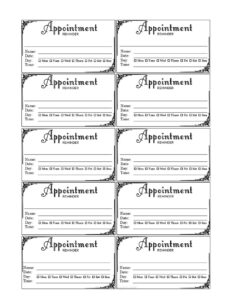
Fancy Appointment Reminder Card
Download a free Fancy Appointment Reminder Card template in PDF and DOCX to confirm client visits, reduce no-shows, and look professional.
PDF
DOC
4 downloads
0
likes
Download Files
- DOC
A Fancy Appointment Reminder Card is a small, attractively designed card that a business hands to a client to confirm the date and time of their next visit. People most often use it to cut down on missed appointments and to give clients a tangible, professional-looking keepsake they can stick on the fridge or slip into a wallet. You can download this Fancy Appointment Reminder Card free in both PDF and DOCX formats, with no signup required.
What Is a Fancy Appointment Reminder Card?
A Fancy Appointment Reminder Card is a printed reminder, usually the size of a business card or a slightly larger note card, that documents an upcoming appointment for a client or patient. It is typically issued at the front desk by salons, dental and medical offices, spas, barber shops, veterinary clinics, and other service providers. The card records the business name, the client’s name, and the scheduled date and time, often alongside contact details and cancellation instructions. Unlike a plain sticky note, the “fancy” version uses polished layout, borders, and styling so the reminder reflects well on the brand. Its purpose is simple: help clients remember when to return and give them an easy way to reschedule.
When Do You Need a Fancy Appointment Reminder Card?
This card is useful anytime a client books a future visit and you want them to actually show up. Common situations include:
- Dental and medical practices scheduling six-month checkups or follow-up visits where the gap is long enough that people forget.
- Hair salons, barbershops, and nail studios rebooking a regular client at the end of an appointment for their next trim or fill.
- Spas and wellness centers confirming a series of treatments such as massages or facials booked in advance.
- Veterinary clinics reminding pet owners about vaccinations, grooming, or post-surgery rechecks.
- Therapists, tutors, and personal trainers who run recurring sessions and want a physical record handed to the client.
- Optometrists and other specialists giving patients a card to carry until their next annual exam.
Any business that books appointments in person can use the card to reinforce a verbal confirmation and reduce costly no-shows.
What a Fancy Appointment Reminder Card Should Have
An effective reminder card balances clarity with brand polish. At minimum it should include the business name and logo, the client’s name, and the appointment date and time written clearly and unambiguously. Strong cards also include the office address, a phone number for questions or rescheduling, and a short cancellation policy line. Many businesses add the name of the provider the client is seeing, the type of service or appointment, and a friendly closing message. Because it is the “fancy” version, the design should feel consistent with your other materials: a tasteful border, your brand colors, and readable fonts. Leave generous blank space so the handwritten or typed details stand out and are easy to read at a glance.
How to Fill Out a Fancy Appointment Reminder Card
This is a simple template, so completing it takes only a moment. Follow these steps:
- Add your business details. Place your business name, logo, address, and phone number in the header so the client knows exactly who the reminder is from.
- Write the client’s name. Personalize the card with the client or patient’s full name so it doesn’t get mixed up with another household member’s.
- Enter the appointment date. Write the full date, including the day of the week, to avoid confusion (for example, “Tuesday, March 4”).
- Enter the time. Include AM or PM clearly, and note arrival instructions if the client should come early.
- Note the service or provider. Specify the type of appointment or the staff member’s name if relevant.
- Add reschedule instructions. Include a line such as “Please call 24 hours ahead to cancel or reschedule.”
- Hand it over. Give the completed card to the client and confirm the details aloud before they leave.
If you are using the DOCX version, you can pre-fill the recurring fields and print a batch in advance.
Print, Customize, and Brand the Card
One advantage of starting from a template is how easily you can make the card your own. Open the DOCX file in your word processor to change the colors to match your brand, drop in your logo, and adjust the font. You can print several cards per sheet on card stock and cut them apart, or order them professionally if you prefer a heavier finish. Consider printing the front with your design and leaving the back blank for handwritten notes, or pre-printing your cancellation policy on the reverse. If your team writes details by hand at the desk, choose a layout with clear lines and plenty of room so the writing stays legible.
Tips to Reduce No-Shows
A reminder card works best as part of a broader system. Pair the physical card with a text or email reminder a day or two before the visit, since people respond to different channels. Train front-desk staff to fill the card out while the client watches and to repeat the date and time out loud. Keep a small stack of pre-styled cards at every checkout point so handing one out becomes routine. A clear cancellation policy printed on the card sets expectations early and makes follow-up conversations easier.
Common Mistakes to Avoid
- Illegible handwriting — rushed notes at the desk lead to clients showing up on the wrong day.
- Leaving off AM/PM or the weekday, which causes confusion and missed slots.
- Forgetting a phone number, so clients have no easy way to reschedule.
- Skipping the client’s name, making the card easy to lose track of in a busy household.
- Overcrowding the design so the key details get lost in decoration.
- Not updating the card when an appointment is changed, leaving the client with stale information.
Frequently Asked Questions
What is a Fancy Appointment Reminder Card used for? It is a styled printed card that confirms a client’s upcoming appointment date and time. Businesses hand it to clients at checkout to reduce no-shows and reinforce a verbal booking with something tangible.
How do I fill out the card? Add your business name and contact details, write the client’s name, and clearly note the date, time, and service. Many businesses also include a reschedule line and hand the completed card to the client while repeating the details aloud.
Is this template free to download? Yes. You can download the Fancy Appointment Reminder Card free in both PDF and DOCX formats from Business Forms Pro, with no signup or payment required.
Can I customize the design and add my logo? Absolutely. The DOCX version is fully editable, so you can change colors, fonts, and layout, and drop in your own logo so the card matches the rest of your branding.
How many cards can I print on one page? That depends on the card size and your printer settings, but most layouts let you fit several per sheet of card stock so you can print a batch, cut them apart, and keep them at the front desk.
Does the card replace digital reminders? No, it works best alongside them. A physical card gives the client something to keep, while a follow-up text or email closer to the date catches people who prefer digital prompts.
This template is provided as a general example for informational purposes only and is not legal, medical, or business advice. Privacy and recordkeeping requirements for client information vary by jurisdiction and industry, so consult a qualified professional to ensure your use complies with applicable rules.
Official resource: for the rules that apply to your situation, see the U.S. Small Business Administration.
Related Forms
- Meeting Agenda Simple
- 2024 Postal Holidays
- Recurring Appointment Reminder Card
- Hoshin Kanri Matrix
- Insertion Order
- Employee Attendance Record
Browse more in Office.