
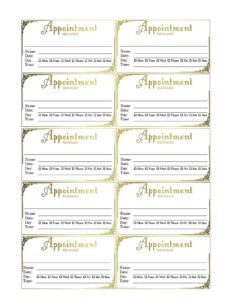
Fancy Gold Appointment Reminder Card
Download a free Fancy Gold Appointment Reminder Card template in PDF and DOCX to confirm client visits, cut no-shows, and add an elegant touch.
PDF
DOC
2 downloads
0
likes
Download Files
- DOC
A Fancy Gold Appointment Reminder Card is an elegant, easy-to-hand-out card that confirms a client’s upcoming visit with the date, time, and location of their appointment. Salons, spas, clinics, and personal-service businesses use it most often to reduce no-shows and leave a polished impression. You can download it free in PDF and DOCX with no signup required.
What Is a Fancy Gold Appointment Reminder Card?
A Fancy Gold Appointment Reminder Card is a small printed card — typically business-card or postcard sized — that a business gives a client at checkout or mails ahead of a future booking. Decorated with refined gold accents, it documents the essential details of the next visit: who it’s with, when, and where. Receptionists, stylists, hygienists, estheticians, and practitioners issue these cards so customers have a tangible, attractive reminder to keep in a wallet, on a fridge, or pinned to a corkboard. Unlike a digital ping that’s easily lost in a crowded inbox, a physical reminder card reinforces the appointment, communicates professionalism, and quietly markets your brand long after the client walks out the door.
When Do You Need a Fancy Gold Appointment Reminder Card?
This card fits any business that books clients in advance and wants those clients to show up. Common scenarios include:
- Hair and beauty salons confirming a client’s next color, cut, or styling session after they pay for today’s service.
- Spas and wellness centers reminding guests of an upcoming massage, facial, or treatment package date.
- Dental and orthodontic offices handing out the next cleaning or adjustment appointment at the front desk.
- Medical and chiropractic clinics giving patients a printed reminder for a follow-up visit weeks out.
- Nail technicians, lash artists, and barbers who rebook standing appointments and want clients to remember the day and time.
- Tutors, trainers, and consultants confirming the next session in a recurring schedule.
Any time a missed appointment costs you revenue and a wasted time slot, a reminder card is a low-cost way to protect your calendar.
What a Reminder Card Should Have
A reminder card works only if it answers the client’s three core questions clearly: when, where, and with whom. A complete Fancy Gold Appointment Reminder Card should include your business name and logo, the client’s name, the appointment date and start time, the service or provider, your address, and a phone number for changes. Many cards also add a short cancellation policy line and a friendly closing message. The gold styling should never compete with legibility — the date and time must remain the most prominent details on the card.
How to Fill Out a Fancy Gold Appointment Reminder Card
Because this is a flexible template, you’ll customize a few key placeholders before printing. Follow these steps:
- Add your business name and logo at the top so the card is instantly recognizable as yours.
- Write the client’s name on the line provided to personalize the card and avoid mix-ups at a busy front desk.
- Fill in the appointment date clearly — spell out the month or use an unambiguous format so there’s no confusion.
- Enter the appointment time, including AM or PM, and note arrival instructions if you ask clients to come early.
- List the service or provider so the client knows exactly what’s booked and with whom.
- Include your address and any parking or suite-entry notes.
- Add a contact phone number or text line for rescheduling.
- Insert a short policy or note, such as a 24-hour cancellation request or a warm “We look forward to seeing you!”
Once the fields are complete, save your copy, print on quality cardstock, and hand it to the client at checkout.
Tips for Designing and Printing Reminder Cards
To get the most polish from the gold theme, print on a heavier cardstock — 14pt or higher — so the card feels substantial in hand. A matte or soft-touch finish keeps the gold accents looking refined rather than gaudy, while a glossy stock makes colors pop. If you fill in details by hand, use a fine-tip pen in a dark ink that contrasts cleanly against the design. For high-volume offices, edit the DOCX version to set up a fillable layout, or leave the date and time lines blank and complete them at the desk. Keep a small stack pre-printed with your business name so staff can write in client specifics in seconds during a busy rush.
Reminder Card vs. Digital Reminder
A printed card and an automated text or email aren’t competitors — they’re a team. The physical Fancy Gold Appointment Reminder Card gives the client something tangible to file away the moment they book, reinforcing the commitment with a memorable, branded keepsake. A digital reminder, sent a day or two before, catches anyone who forgets to check the card. Using both layers tends to lower no-show rates more than either alone. The card also doubles as a marketing piece: every time the client sees it, they’re reminded of your business and may share it with a friend.
Common Mistakes to Avoid
- Leaving the time ambiguous — always specify AM or PM to prevent a client arriving twelve hours off.
- Forgetting to write the client’s name, which makes the card easy to misplace or hand to the wrong person.
- Letting decoration overpower the details so the date and time become hard to read.
- Omitting a contact number, leaving clients with no easy way to reschedule.
- Skipping a cancellation policy when one matters to your business.
- Printing on flimsy paper that crumples in a wallet and undercuts the elegant look.
Frequently Asked Questions
What is a Fancy Gold Appointment Reminder Card used for? It’s a printed card a business gives a client to confirm the date, time, and location of an upcoming appointment. Its main purpose is to reduce no-shows and present your business professionally. Salons, spas, clinics, and other service providers use it most.
How do I fill out the reminder card? Add your business name and logo, then write the client’s name, appointment date, time (with AM/PM), the service or provider, your address, and a contact number. You can also include a short note or cancellation policy. Save the file and print it on cardstock before handing it to your client.
Can I edit the template? Yes. The DOCX version is fully editable, so you can change the text, add your logo, adjust colors, and tailor the layout to your business. The PDF version is ready to print and fill in by hand.
What size should I print it at? Most businesses print these as business-card or postcard size so clients can tuck them into a wallet or purse. Choose the size that fits your workflow, and use 14pt or heavier cardstock for a quality feel.
Does a reminder card replace a confirmation text or email? It works best alongside digital reminders rather than replacing them. The physical card serves as an immediate, tangible reminder, while an automated message a day before catches anyone who forgets. Using both typically lowers no-show rates.
How much does this template cost? It’s completely free to download from Business Forms Pro in both PDF and DOCX, with no signup or account required. You can print as many copies as your business needs.
This template is a general example provided for informational purposes only and is not legal, financial, or professional advice. Business practices and any policy or privacy requirements vary by jurisdiction and industry — consult a qualified professional to ensure your forms meet your specific needs.
Official resource: for the rules that apply to your situation, see the U.S. Small Business Administration.
Related Forms
- Annual Salary Increase
- Notice of Meeting
- Meeting Agenda Landscape
- Manufacturing Production Schedule
- Wedding Reservation Form
- Insertion Order
Browse more in Office.