
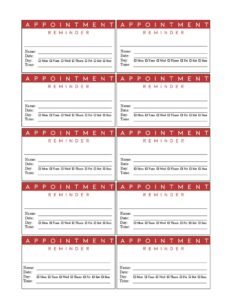
Red Appointment Reminder Card
Download a free Red Appointment Reminder Card template in PDF and DOCX to confirm patient and client appointments and cut no-shows fast.
PDF
DOC
0
likes
Download Files
- DOC
A Red Appointment Reminder Card is a small, brightly colored card you hand or mail to a patient or client to confirm the date and time of their next visit. It is most commonly used to reduce no-shows in medical, dental, salon, and service businesses, and it’s free to download here in both PDF and DOCX formats with no signup required.
What Is a Red Appointment Reminder Card?
A Red Appointment Reminder Card is a compact printed card that records the details of an upcoming scheduled appointment so the recipient has a tangible reminder to keep. The bold red design is chosen deliberately to stand out on a fridge, in a wallet, or on a desk, making it harder to overlook than a plain note. Front-desk staff, receptionists, dental hygienists, doctors, stylists, and trades professionals typically issue these cards at the end of a visit. The card documents who the appointment is with, the day and time, and any short instructions the recipient needs before arriving. It serves as both a courtesy and a practical scheduling tool.
When Do You Need a Red Appointment Reminder Card?
This card is useful any time a customer or patient books a future visit and you want a physical confirmation in their hands. Common situations include:
- Medical and dental offices scheduling a follow-up exam, cleaning, or recall visit several weeks or months out.
- Salons, barbershops, and spas booking a client’s next color, cut, or treatment before they leave the chair.
- Physical therapy and chiropractic clinics setting a series of recurring sessions where consistency matters.
- Veterinary practices reminding pet owners of vaccinations, dental cleanings, or post-surgery checkups.
- Home service and trades businesses confirming an installation, inspection, or maintenance call.
- Optometrists, audiologists, and specialists who rely on annual or semi-annual recall appointments.
Because the red color draws the eye, the card is especially valuable when the appointment is far in the future and easy to forget. It also gives the recipient something to reference when they add the date to a calendar or phone.
What a Red Appointment Reminder Card Should Have
An effective reminder card keeps the information minimal but complete. At its core it should show the name of the practice or business, the recipient’s name, the date and time of the appointment, and the provider or staff member they’ll be seeing. Many cards also include a phone number to call for rescheduling, a short cancellation policy note, and the address or suite number. The red border or accent should frame the key details so the date and time are the first thing the eye lands on. Leaving a blank line for special instructions—such as “arrive 15 minutes early” or “bring insurance card”—rounds out a card that is both attractive and genuinely useful.
How to Fill Out a Red Appointment Reminder Card
The card is intentionally simple, so completing it takes only a moment at the front desk:
- Write or print your business or practice name at the top so the recipient knows immediately who the card is from.
- Add the recipient’s name on the line provided to personalize the reminder and avoid mix-ups.
- Fill in the appointment date clearly, spelling out the month if there is any chance of confusion (for example, “March 4” rather than “3/4”).
- Enter the appointment time, including AM or PM, and note the day of the week if space allows.
- Record the provider, stylist, or staff member’s name the recipient is scheduled to see.
- Include the address or suite number if your location is easy to miss or if you have multiple offices.
- Add a phone number for confirmations, questions, or rescheduling.
- Use the notes line for any prep instructions, then hand the card directly to the recipient.
Double-check the date and time against your booking system before handing it over so the card matches what’s actually scheduled.
Printing and Distribution Tips
Most reminder cards are designed to print several to a sheet, so you can cut them into standard business-card or index-card sizes for easy storage. Print on heavier cardstock if you want the card to survive a wallet or purse, and keep a stack of pre-printed cards with only the variable fields blank to save time at the counter. If you mail cards instead of handing them out, send them about one to two weeks before the appointment so the timing stays top of mind. For practices that text or email reminders too, the physical red card works well as a backup that doesn’t depend on the recipient checking their phone.
Reducing No-Shows With Reminder Cards
A reminder card is one of the simplest tools for protecting your schedule, but it works best as part of a layered approach. Pair the card with a phone, text, or email reminder closer to the date for the strongest results. Make your cancellation or rescheduling policy easy to find on the card so clients know how to give notice if plans change. Consistency matters: when every patient or client leaves with a card every time, the habit becomes part of your front-desk routine and the no-show rate tends to fall.
Common Mistakes to Avoid
- Leaving the date or time blank—an incomplete card defeats the entire purpose and invites confusion.
- Writing illegibly, which can lead the recipient to show up on the wrong day or at the wrong hour.
- Using ambiguous date formats like 4/5 that read differently in different regions; spell out the month when possible.
- Forgetting a phone number, so clients have no easy way to reschedule and simply don’t show.
- Not verifying the appointment against your system before handing over the card, causing double-bookings.
- Omitting AM/PM, which is one of the most common causes of missed morning and evening appointments.
Frequently Asked Questions
What is a Red Appointment Reminder Card used for? It is a small printed card that confirms the date, time, and details of an upcoming appointment for a patient or client. The bold red design helps it stand out so the recipient is less likely to forget. It is commonly used in medical, dental, salon, and service businesses to reduce no-shows.
How do I fill out the card? Write your business name, the recipient’s name, the appointment date and time, and the provider they’ll see. Add your address and a phone number for rescheduling, then use the notes line for any prep instructions. Confirm the details against your booking system before handing it over.
Is this template free to download? Yes, the Red Appointment Reminder Card template is completely free to download here in both PDF and DOCX formats. There is no signup, account, or payment required. You can print as many copies as your practice needs.
Can I customize the card with my logo and colors? Absolutely. The DOCX version is editable, so you can add your business name, logo, contact details, and adjust the layout. You can keep the red accent or change it to match your brand while preserving the eye-catching design.
What size should I print the cards? Reminder cards are typically printed at business-card or index-card size, often several to a single sheet so you can cut them apart. Heavier cardstock holds up better in a wallet or purse. Choose a size that fits comfortably in your front-desk card holder.
Do reminder cards really cut down on missed appointments? A physical card gives clients a tangible cue they can post on a fridge or keep in a wallet, which helps. They work best alongside a text, email, or phone reminder closer to the date. Including a clear rescheduling number also makes it easier for clients to give notice instead of simply not showing.
This template is a general example provided for informational purposes only and is not legal, medical, or business advice. Appointment, privacy, and recordkeeping requirements vary by jurisdiction and by industry—consult a qualified professional to ensure your practices meet applicable rules.
Official resource: for the rules that apply to your situation, see the U.S. Small Business Administration.
Related Forms
- Employee Performance Evaluation
- Fancy Gold Appointment Reminder Card
- Job Application
- Insertion Order
- 2024 Postal Holidays
- Postal Holidays
Browse more in Office.