
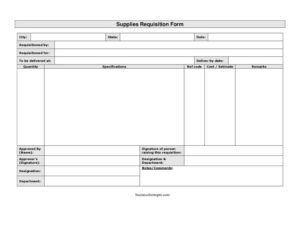
Supplies Requisition Form
Download a free Supplies Requisition Form template in PDF and DOCX to request, itemize, and approve workplace supplies quickly and accurately.
PDF
DOCX
0
likes
Download Files
- DOCX
A Supplies Requisition Form is an internal document an employee or department uses to formally request office, operational, or project supplies and route that request for approval before any purchase or stock release happens. Most people reach for it when they need a paper trail showing who asked for what, when, and who signed off. It’s free to download here in both PDF and DOCX, with no signup required.
What Is a Supplies Requisition Form?
A Supplies Requisition Form is a standardized request submitted by a staff member to a purchasing, stores, or procurement function asking for specific items in specific quantities. It is typically raised by the person who needs the supplies, then reviewed and authorized by a manager or budget holder before goods are ordered or issued from inventory. The form documents the requested items, quantities, specifications, estimated cost, delivery location, and the deadline by which they’re needed. By capturing both the requester’s signature and the approver’s signature, it creates accountability, supports budget control, and gives the warehouse or buyer a clear, written instruction to act on.
When Do You Need a Supplies Requisition Form?
This form is useful any time supplies move from a budget or stockroom into someone’s hands and an approval step is expected. Common situations include:
- An office administrator restocking printer paper, toner, pens, and folders for a department.
- A site supervisor requesting tools, safety gear, or raw materials for an upcoming job.
- A new hire’s manager ordering a laptop, monitor, headset, and desk accessories before a start date.
- A facilities team requesting cleaning chemicals, paper towels, and maintenance parts.
- An event coordinator pulling supplies for a conference, including signage, badges, and refreshments.
- A lab or clinic replenishing consumables that must be tracked against a specific cost center.
In each case, the form ensures the request is itemized, costed, and authorized rather than handled by a casual verbal ask that’s easy to forget or dispute later.
What a Supplies Requisition Form Should Have
A complete requisition leaves no ambiguity about what is being ordered and who is responsible. The essentials include the requester’s name and the department or person the supplies are for, the date the request is raised, and a clearly described list of items with quantities and specifications. It should state where the goods are to be delivered and the date by which they’re needed. A cost or estimate column helps the approver weigh the request against budget, while a reference code ties the request to a project, account, or purchase order. Finally, signatures from both the person raising the requisition and the authorizing manager — along with the approver’s designation and department — make the document complete and traceable.
How to Fill Out a Supplies Requisition Form
- Enter the city and state where the request originates, then the date you are raising it.
- Fill in requisitioned by with your own name, and requisitioned for with the department, team, project, or individual that will use the supplies.
- Record the delivery details: to be delivered at (the exact address, building, or stockroom) and the deliver by date so the buyer knows your deadline.
- List each item line by line, entering the quantity needed and detailed specifications such as size, model, color, brand, or grade.
- Add a ref code to link the item to a project number, cost center, or purchase order.
- Provide a cost/estimate for each line or the total, helping the approver assess budget impact.
- Use the remarks field for urgency notes, substitutions allowed, or special handling.
- Sign the signature of person raising this requisition line, then route to the approver, who completes approved by (name), the approver’s signature, and their designation & department.
- Use notes/comments for any final instructions before the form is submitted to procurement or stores.
Requisition Versus Purchase Order
People often confuse a requisition with a purchase order, but they serve different stages of the same process. A Supplies Requisition Form is an internal request — it tells your own organization what you need and seeks permission to obtain it. A purchase order, by contrast, is an external commitment issued to a supplier that authorizes them to deliver and bill. In practice, an approved requisition is the trigger that allows a buyer to raise a purchase order or release items from existing stock. Keeping the two separate protects spending control: the requisition captures the need and the approval, while the purchase order captures the actual contractual commitment to a vendor.
Tips for Faster Approval
To get supplies on time, be specific. Vague entries like “some folders” force the approver to chase you for details and delay the order. Always include exact quantities, full specifications, and a realistic deliver-by date that accounts for shipping or restock lead times. Provide an accurate cost estimate so the request doesn’t bounce back for budget questions, and reference the correct project or cost code so accounting can allocate the expense cleanly. If an item is urgent, flag it in the remarks rather than assuming the approver will know. Submitting one organized form beats sending a string of follow-up emails.
Common Mistakes to Avoid
- Leaving specifications blank — “chairs” or “cable” without model, size, or quantity invites the wrong item being ordered.
- Omitting the deliver-by date, which leaves the buyer guessing how urgent the request really is.
- Forgetting the reference code, making it impossible to charge the cost to the right project or department.
- Submitting without the approver’s signature, which leaves the request unauthorized and stalled.
- Guessing wildly at cost estimates, causing budget reviews to reject or hold the request.
- Combining unrelated requests onto one form when different cost centers or approvers are involved.
Frequently Asked Questions
What is a Supplies Requisition Form used for? It is used to formally request supplies from a stockroom, purchasing team, or procurement department and to get that request approved before items are ordered or issued. It documents what’s needed, in what quantity, by when, and who authorized it, creating a clear audit trail.
How do I fill out a Supplies Requisition Form? Start with the location and date, then your name and the department or person the supplies are for. List each item with quantity, specifications, a reference code, and a cost estimate, add the delivery address and deadline, then sign and route it to your approver for their signature and designation.
Does a Supplies Requisition Form need to be signed? Yes. The person raising the request signs to confirm the need, and an authorizing manager signs to approve it. Most organizations treat an unsigned requisition as incomplete and will not process it until the approver’s signature is in place.
What is the difference between a requisition and a purchase order? A requisition is an internal request for permission to obtain supplies, while a purchase order is an external document sent to a supplier authorizing them to deliver and invoice. An approved requisition typically comes first and leads to a purchase order being raised.
Is a reference code required? A reference code is not always mandatory, but it is strongly recommended because it links the request to a project, budget line, or cost center. Without it, your finance or procurement team may struggle to allocate the expense correctly.
Is this Supplies Requisition Form free to download? Yes. You can download this template free in both PDF and DOCX formats with no signup required. Edit the fields, headings, and item lines to match your organization’s approval workflow and inventory categories.
This template is a general example provided for informational purposes only and is not legal, financial, or procurement advice. Internal requisition and approval requirements vary by organization and jurisdiction, so review your company’s policies and consult a qualified professional before adopting it.
Related Forms
- Stained Items Release Form
- Payroll Deduction Authorization
- Company Request Rejection
- Reprint Permission Form
- Rejection Response Letter
- Request to be Removed From Mailing List
Browse more in Request and Authorization.