
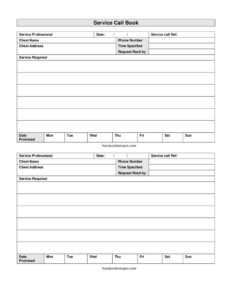
Service Call Book
Download a free Service Call Book template in PDF and DOCX to log client service requests, schedule visits, and track promised dates with ease.
PDF
DOCX
8 downloads
0
likes
Download Files
- DOCX
A Service Call Book is a simple log used by service businesses to record every customer service request, the work needed, and when it was promised and completed. People most often use it to keep incoming calls organized so no job slips through the cracks during a busy week. You can download this Service Call Book free in both PDF and DOCX formats, with no signup required.
What Is a Service Call Book?
A Service Call Book is a running record of service requests handled by a technician, contractor, or repair company. Each entry captures who called, what they need fixed or installed, where the job is located, and the date the work was promised. It is typically maintained by the service professional or a dispatcher who answers the phone, and it doubles as both a scheduling tool and a paper trail. Unlike a single work order, a Service Call Book holds many calls together in one place, giving you an at-a-glance view of the day’s or week’s workload. It helps small operations manage requests without expensive software while keeping every client detail consistent and easy to find.
When Do You Need a Service Call Book?
Any business that responds to customer requests can benefit from a structured call log. Common situations include:
- HVAC, plumbing, and electrical companies taking repair calls throughout the day and needing to track promised arrival times.
- Appliance repair technicians who travel between homes and want one organized record of addresses and phone numbers.
- Property maintenance teams logging tenant requests so each issue is assigned and resolved.
- Locksmiths, garage door, or pest control services handling urgent calls where the time specified and date promised matter.
- Office equipment or IT field service staff coordinating multiple client visits across a week.
- Solo tradespeople who answer their own phone and need a quick way to jot down details before they forget.
What a Service Call Book Should Have
A complete entry leaves no doubt about who needs what, by when, and who took the request. The essential elements are the name of the service professional or company handling the call, a unique service call reference number, the client’s full name and contact details, a clear description of the service required, and the date the work was promised. Including the time specified and a day-of-the-week breakdown lets you slot each job into a realistic schedule. Recording who received the request adds accountability, which is helpful when several people answer the phone. Together these fields turn a scattered set of phone messages into an actionable, trackable list of jobs.
How to Fill Out a Service Call Book
- Service professional: Enter the name of the technician, company, or person assigned to handle the call.
- Date: Record the date the call was received so entries stay in chronological order.
- Service call ref: Assign a unique reference number for tracking, invoicing, and follow-up.
- Client name: Write the customer’s full name as they want to be addressed.
- Phone number: Note the best contact number for confirming or rescheduling the visit.
- Client address: Enter the full service location, including unit or suite if applicable.
- Time specified: Log the time the client requested or expects service.
- Request recd by: Record who took the call so questions can be directed to the right person.
- Service required: Describe the work needed clearly — for example, “no hot water” or “replace ceiling fan.”
- Date promised: Enter the date you committed to completing the work.
- Mon–Sun columns: Mark the day or days the job is scheduled to spread the week’s workload evenly.
Tips for Managing Service Calls Effectively
A call book is only as useful as the habits around it. Fill in every field while the client is still on the phone rather than relying on memory afterward. Use the service call reference number consistently across your call book, work orders, and invoices so a single job can be traced from first contact to final payment. The day-of-week columns are a planning aid: glance across them before promising a date so you do not overbook a single day. Confirm the time specified back to the client before hanging up to avoid missed-appointment disputes. If you operate as a team, the “request received by” field makes it easy to follow up with whoever has the full background on the call.
How a Service Call Book Differs From a Work Order
People sometimes confuse the two, but they serve different stages. A Service Call Book is the intake and scheduling layer — a chronological list of requests as they come in, used to dispatch and plan. A work order is generated for an individual job and travels with the technician, capturing labor, parts, and customer sign-off. Many businesses use both: the call book to manage the queue and assign jobs, and a separate work order for the detailed on-site record. Linking them through the same service call reference number keeps your records tidy.
Common Mistakes to Avoid
- Skipping the reference number, which makes it impossible to match a call to its invoice or follow-up later.
- Writing vague service descriptions like “fix it” that leave the technician unprepared on arrival.
- Forgetting the date promised, leading to missed commitments and unhappy clients.
- Recording incomplete addresses without a unit number or access notes, causing wasted trips.
- Overloading one day by ignoring the Mon–Sun columns when scheduling.
- Leaving “request received by” blank, so no one can answer questions about the original call.
Frequently Asked Questions
What is a Service Call Book used for? It is used to log and track customer service requests in one organized place. Each entry records the client, the work required, contact details, and the promised completion date so jobs can be scheduled and followed up efficiently.
How do I fill out a Service Call Book? Complete one row per call with the date, a unique service call reference, the client’s name, phone, and address, then describe the service required and note the time specified and date promised. Mark the relevant day-of-week column to slot the job into your schedule.
Is a Service Call Book a legally binding document? No, it is primarily an internal record-keeping and scheduling tool rather than a contract. However, it can serve as useful supporting evidence of when a request was made and what was promised if a dispute arises.
Does a Service Call Book need to be signed or notarized? No signature or notarization is required, since it is an operational log rather than a legal agreement. Some businesses add a notes or status column to confirm completion, but that is optional.
How much does this Service Call Book template cost? It is completely free to download from Business Forms Pro in both PDF and DOCX formats. There is no signup, subscription, or hidden fee.
Can I customize the Service Call Book template? Yes. Download the DOCX version to add your company logo, extra columns such as job status or parts used, or to adjust the layout to match your workflow.
This Service Call Book template is provided as a general example for informational purposes only and does not constitute legal, financial, or business advice. Record-keeping and contractual requirements vary by jurisdiction and industry — consult a qualified professional to ensure your forms meet your specific needs.
Related Forms
- Repair Under Warranty Request
- Personal Request Rejection
- Request To Terminate Unauthorized Service
- Day Off Request Form
- Drug and Alcohol Testing Individual
- Reservation Request Letter
Browse more in Request and Authorization.