
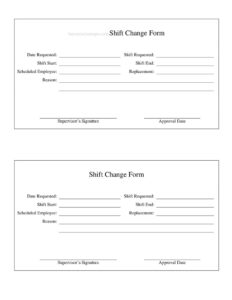
Shift Change Form
Download a free Shift Change Form template to document restaurant shift swaps and manager approvals quickly — free PDF and DOCX download, no signup needed.
PDF
DOCX
1 downloads
0
likes
Download Files
- DOCX
A Shift Change Form is a simple document restaurant staff use to request, approve, and record swaps or coverage of scheduled shifts. The most common reason people reach for one is to formally trade a shift with a coworker and get a manager’s sign-off so the schedule stays accurate. You can download this template free in both PDF and DOCX formats, with no signup required.
What Is a Shift Change Form?
A Shift Change Form is a written record used in restaurants, cafes, bars, and other hospitality settings to document a change to an employee’s scheduled work shift. It is typically initiated by an employee who can no longer work an assigned shift and is being covered by, or trading with, a coworker. The form captures who is giving up the shift, who is taking it, the date and time involved, and the reason for the change. A manager or shift supervisor then reviews and approves it. By putting the agreement in writing, the restaurant keeps payroll accurate, ensures every station is staffed, and avoids confusion about who is responsible for showing up.
When Do You Need a Shift Change Form?
Shift changes happen constantly in fast-paced restaurant environments. Use this form whenever a scheduled shift needs to move from one person to another. Common scenarios include:
- A personal conflict: A server has a doctor’s appointment, family event, or exam and needs a coworker to take their Friday dinner shift.
- A direct trade: Two line cooks swap shifts so each can attend something on the other’s day.
- Calling in sick: A bartender wakes up ill and arranges last-minute coverage that the manager needs to confirm.
- Picking up extra hours: A part-time host volunteers to cover an open or dropped shift to earn more income.
- Vacation or time off: An employee going out of town hands off several shifts and documents each one.
- Overtime control: A manager wants written proof of who agreed to a change to keep hours and labor costs in line.
What a Shift Change Form Should Have
A complete Shift Change Form leaves no room for confusion about who works when. At a minimum it should include the date the request is submitted, the name of the employee giving up the shift, and the name of the employee accepting it. It needs the specific shift details — the date, the start and end time, the position or station, and the location or department. There should be a field for the reason for the change, a space for both employees to sign and date their agreement, and a dedicated manager approval section with a signature and date. A clear approved-or-denied indicator helps everyone know the change is official.
How to Fill Out a Shift Change Form
- Date the request: Write the date you are submitting the form so there is a clear timeline before the shift in question.
- Enter the requesting employee: Print the full name of the person who currently has the shift and cannot work it.
- List the covering employee: Write the full name of the coworker who has agreed to take or trade the shift.
- Specify the shift details: Record the exact date, start time, and end time of the shift being changed.
- Note the position and location: Indicate the role (server, cook, host, bartender) and the section, station, or restaurant location.
- State the reason: Briefly explain why the change is needed — illness, personal conflict, or a mutual trade.
- Collect employee signatures: Both employees sign and date to confirm they agree to the change.
- Get manager approval: The manager or supervisor reviews, marks the request approved or denied, then signs and dates it.
Types of Shift Changes
Not every shift change is the same, and the form can capture each kind. A direct swap involves two employees trading shifts with each other, so both schedules shift at once. A one-way coverage happens when one employee simply gives up a shift and another picks it up without trading anything in return. A drop request is when an employee releases a shift back to the manager to reassign, often posted for anyone to claim. Finally, a partial change covers cases where only part of a shift is handed off — for example, the first half of a double. Noting the type on the form helps payroll and scheduling software stay accurate.
Tips for Managing Shift Changes Smoothly
Set a clear deadline for submitting changes — many restaurants require requests at least 24 to 48 hours in advance except in emergencies. Make sure both employees are qualified for the role; a host cannot always cover a bartender’s shift. Keep approved forms on file or in your scheduling system so you can verify hours when running payroll. Encourage staff to confirm coverage directly with each other before submitting, so the manager is approving a real, mutual agreement rather than chasing people down. Consistent documentation protects the restaurant and the employee if a no-show dispute ever comes up.
Common Mistakes to Avoid
- Skipping manager approval: An agreement between two employees is not official until a supervisor signs off — without it, the schedule of record may not reflect the change.
- Vague shift times: Writing only the day without start and end times causes confusion about exactly what is being covered.
- Missing the covering employee’s signature: If the person taking the shift never signs, they can claim they never agreed.
- Submitting too late: Last-minute changes leave no time to find coverage or update payroll systems.
- Forgetting the reason: Patterns of changes are easier to manage when reasons are documented.
- Not keeping a copy: Losing the form means losing proof of who was responsible for the shift.
Frequently Asked Questions
What is a Shift Change Form used for? It is used to formally document when one restaurant employee swaps, drops, or hands off a scheduled shift to another employee. The form records the details of the change and captures manager approval so the official schedule and payroll stay accurate. It serves as proof of who agreed to work the shift.
How do I fill out a Shift Change Form? Enter the date, the name of the employee giving up the shift, and the name of the employee taking it. Add the shift date, start and end times, position, and reason, then have both employees sign. Finally, a manager reviews, marks it approved or denied, and signs to make it official.
Does a Shift Change Form need a manager’s signature? In most restaurants, yes. A change agreed between two coworkers is not considered official until a manager or shift supervisor approves it in writing. The manager’s signature confirms the coverage is acceptable and that the schedule and payroll records can be updated.
Is a Shift Change Form legally binding? It is primarily an internal scheduling and payroll document rather than a formal legal contract. That said, a signed and approved form can serve as helpful evidence in workplace disputes about who was responsible for a shift. Always follow your employer’s own scheduling and labor policies.
How much does this Shift Change Form template cost? Nothing — it is completely free to download from Business Forms Pro. You can get it in both PDF and DOCX formats with no signup or payment required. Edit the DOCX version to add your restaurant’s name and logo.
How far in advance should I submit a shift change? That depends on your restaurant’s policy, but many require at least 24 to 48 hours’ notice for non-emergencies. Emergencies like sudden illness are usually handled case by case. Submitting early gives managers time to confirm coverage and update payroll systems.
This Shift Change Form template is a general example provided for informational purposes only and is not legal, financial, or HR advice. Workplace scheduling rules, labor laws, and overtime requirements vary by jurisdiction and employer — consult a qualified professional or your company’s HR department to ensure your forms and policies meet applicable requirements.
Related Forms
- Food Waste Log
- Happy Hour Table Cards
- No Free Refills Sign
- Shift Request Form
- Minimum Internal Temperature Chart
- Wine List
Browse more in Restaurant.