
Daily Sales Report
Download a free Daily Sales Report template for restaurants to track daily revenue, covers, and cash in PDF or DOCX with no signup required.
PDF
DOCX
2 downloads
0
likes
Download Files
- DOCX
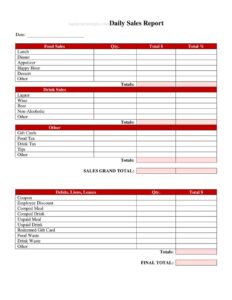
A Daily Sales Report is a one-page summary that captures a restaurant’s revenue, transactions, and key operating numbers for a single business day. Managers and owners use it to close out each shift, reconcile cash and card payments, and spot trends quickly. You can download this Daily Sales Report free in PDF or DOCX, with no signup required.
What Is a Daily Sales Report?
A Daily Sales Report is an internal document that records how much money a restaurant took in during one day and how that money breaks down. It is typically completed by a shift manager or supervisor at closing, then handed to the owner, bookkeeper, or general manager. The report documents gross sales, payment methods, the number of guests served, and any discounts, voids, or refunds. Its purpose is to create a reliable daily paper trail that supports cash reconciliation, accounting, payroll planning, and performance tracking. Over weeks and months, a stack of these reports becomes the backbone of revenue forecasting, food-cost analysis, and budgeting decisions for the business.
When Do You Need a Daily Sales Report?
Almost any food-service operation benefits from logging sales every day. Common situations include:
- Daily shift close-out: A manager tallies the register and completes the report before locking up for the night.
- Cash reconciliation: Matching the cash drawer and card batch totals against recorded sales to catch shortages or overages.
- Multi-location oversight: An owner compares reports from several stores side by side to see which is performing best.
- Bookkeeping and tax prep: Providing your accountant with clean daily totals for sales tax filing and monthly statements.
- Staffing and forecasting: Spotting busy days, slow periods, and seasonal patterns to schedule labor more efficiently.
- Detecting theft or errors: Tracking voids, comps, and refunds daily makes unusual activity easier to flag.
What a Daily Sales Report Should Have
A complete report leaves no question about how the day’s money was earned and accounted for. The essentials include the business name and location, the report date and day of week, and the manager or staff member on duty. It should capture total gross sales, then break revenue down by category such as food, beverages, and alcohol where applicable. Payment-method totals (cash, credit, debit, gift cards) let you reconcile against the drawer and processor. Round it out with the number of guests or covers, average check size, discounts and comps, voids and refunds, sales tax collected, and a notes field for weather, events, or anything unusual that explains the numbers.
How to Fill Out a Daily Sales Report
- Enter the header: Write your restaurant’s name, location, the report date, and the day of the week.
- Record who closed: Add the name of the manager or staff member completing the report and the shift covered.
- Log gross sales: Pull the total sales figure from your POS or register and write it in the gross sales line.
- Break down by category: Split sales into food, non-alcoholic beverages, and alcohol or other categories your menu uses.
- Enter payment methods: Record cash, credit, debit, and gift-card totals so they sum to gross sales.
- Add guest counts: Note the number of covers or transactions, then calculate the average check.
- Note adjustments: List discounts, comps, voids, and refunds for the day.
- Calculate tax and net: Record sales tax collected and confirm your net deposit amount.
- Reconcile the drawer: Compare the starting bank plus cash sales to the actual cash counted and note any variance.
- Sign and add notes: Initial the report and use the notes field to explain weather, promotions, or unusual results.
Tips for Reconciling Cash and Card Totals
Reconciliation is where the report earns its keep. Start with your opening cash bank, add recorded cash sales, subtract any paid-outs, and the result should match the cash actually counted in the drawer. Differences of a few dollars are normal, but a consistent shortage or a large gap deserves investigation. For card payments, compare the report’s credit and debit totals to your processor’s batch settlement. Keep gift-card sales and redemptions separate, since redeeming a card is not new revenue. Recording these numbers the same way every day makes patterns obvious and protects you when questions arise weeks later.
Using the Report to Improve Performance
Beyond closing out, a Daily Sales Report becomes a planning tool over time. Compare the same weekday across several weeks to see whether a promotion actually moved the needle. Watch the average check figure to gauge upselling and menu pricing. Track guest counts against labor hours to refine scheduling. When you file each report consistently, your accountant can roll daily numbers into weekly and monthly summaries with far less back-and-forth, and you build a clear historical record for loan applications, lease negotiations, or a future sale of the business.
Common Mistakes to Avoid
- Skipping slow days: Leaving out low-sales days breaks your trend data and makes forecasting unreliable.
- Mixing tips with sales: Recording credit-card tips as revenue inflates your numbers and distorts tax figures.
- Ignoring variances: Writing down a cash shortage without investigating lets small problems grow.
- Forgetting the date or day: A report without a clear date is nearly useless for comparison.
- Counting gift-card redemptions as new sales: This double-counts revenue that was already recorded when the card was sold.
- Leaving the notes blank: Without context, a strange spike or dip is impossible to explain later.
Frequently Asked Questions
What is a Daily Sales Report used for? It is used to summarize a restaurant’s revenue, payment breakdown, and guest counts for a single day. Managers complete it at close to reconcile the cash drawer and card batches, and owners use the accumulated reports for accounting, forecasting, and spotting trends.
Who fills out the Daily Sales Report? Usually the closing manager or shift supervisor completes it, since they have access to the POS totals and the cash drawer. In smaller operations the owner may do it personally. Whoever fills it out should sign or initial the report for accountability.
How is gross sales different from net sales? Gross sales is the total amount rung up before any deductions. Net sales is what remains after discounts, comps, voids, and refunds are subtracted, and it more accurately reflects earned revenue. Many reports show both so you can see the impact of adjustments.
Do I need a POS system to use this template? No. While a POS makes pulling totals faster, you can complete this report from a manual register tape or even handwritten tickets. The template simply gives you a consistent place to record and reconcile the day’s numbers.
Is the Daily Sales Report a legal or tax document? It is an internal operating record rather than an official filing, but it directly supports your sales-tax returns and bookkeeping. Keeping accurate daily reports makes tax preparation easier and provides documentation if your figures are ever questioned.
Is this Daily Sales Report template free to download? Yes. You can download it free in PDF or DOCX with no signup required. Use the DOCX version if you want to customize categories, add your logo, or adjust fields to match your restaurant’s menu and reporting needs.
This Daily Sales Report template is provided as a general example for informational purposes only and does not constitute accounting, tax, or legal advice. Reporting and recordkeeping requirements vary by jurisdiction and business type — consult a qualified accountant or professional for guidance specific to your situation.
Related Forms
- Employee Hygiene Checklist
- Smoking Section Sign
- Minimum Internal Temperature Chart
- Seat Yourself Sign
- Freezer Inventory Log
- See Host Table Sign
Browse more in Restaurant.