
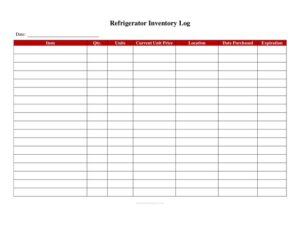
Refrigerator Inventory Log
Download a free Refrigerator Inventory Log template to track cold storage stock, dates, and quantities in your kitchen — free PDF and DOCX download.
PDF
DOC
8 downloads
0
likes
Download Files
- DOC
A Refrigerator Inventory Log is a simple tracking sheet used to record what food and ingredients are stored in a commercial refrigerator, how much of each item is on hand, and when it was received or should be used by. Restaurants, cafes, and catering kitchens rely on it most often to reduce waste and stay ahead of stock running low. You can download it free in PDF and DOCX, with no signup required.
What Is a Refrigerator Inventory Log?
A Refrigerator Inventory Log is a written or digital record that documents the contents of a kitchen’s cold storage unit at a given point in time. It is typically maintained by line cooks, prep staff, kitchen managers, or shift leads who open and close the kitchen. The log captures each item, its quantity, the date it entered the fridge, and its use-by or expiration date. Its purpose is twofold: to give managers an accurate picture of available stock for ordering and prep, and to support food safety by flagging items that are aging or expired. Unlike a full inventory count, this log focuses specifically on refrigerated goods that spoil quickly and need close monitoring.
When Do You Need a Refrigerator Inventory Log?
Cold storage moves fast in a busy kitchen, and a log keeps everyone working from the same information. Common situations where this form earns its keep include:
- Daily opening and closing checks — confirming what is on hand before service and what was used at the end of the night.
- Weekly ordering — totaling quantities so a manager knows exactly what to reorder and what to skip.
- Reducing food waste — spotting items nearing their use-by date so they can be prepped or featured before they spoil.
- Health inspection readiness — demonstrating that storage dates and temperatures are tracked and that expired items are removed.
- Shift handoffs — giving the incoming crew a clear snapshot so nothing is double-ordered or overlooked.
- Multi-unit operations — standardizing how each location reports cold-storage stock to a central office.
What a Refrigerator Inventory Log Should Have
An effective log balances detail with speed, since staff complete it during busy shifts. The most useful versions include a header for the date of the count, the storage unit or location being checked, and the name or initials of the person completing it. The body of the log lists each item by name, the current quantity or unit (cases, pounds, containers), the date received, and the use-by or expiration date. Many kitchens add a column for the storage temperature reading and a notes field for items that need to be used first or discarded. A clean, repeatable layout matters: when the columns stay the same every day, staff fill it out faster and managers can compare counts week over week without confusion.
How to Fill Out a Refrigerator Inventory Log
- Write the date of the count and the refrigerator or storage unit you are checking at the top of the sheet.
- Record the name or initials of the staff member completing the log, plus the shift or time if your kitchen tracks both.
- Note the current temperature reading of the unit if your log includes a field for it, and confirm it is within the safe range.
- List each item by its common kitchen name, working shelf by shelf so nothing is skipped.
- Enter the quantity on hand using a consistent unit — cases, pounds, gallons, or containers.
- Add the date received and the use-by or expiration date for each item so aging stock is easy to flag.
- Use the notes column to mark items to use first, low-stock alerts, or anything to discard.
- Review the completed log, sign or initial it, and store it where the next shift and the manager can find it.
Pairing the Log With Food Safety Practices
A Refrigerator Inventory Log works best alongside the safe-handling habits a kitchen already follows. Use the first-in, first-out (FIFO) method when stocking shelves so older inventory sits in front and gets used before newer deliveries. The use-by dates you record on the log make FIFO easy to enforce at a glance. Pair the log with a temperature monitoring routine: many kitchens record fridge temperatures on the same sheet or a companion log to confirm units stay within safe cold-holding ranges. Keeping completed logs on file also creates a paper trail that helps during health inspections and internal audits, showing that your team actively monitors what goes into and comes out of cold storage.
Tips for Keeping the Log Accurate
The value of any inventory log depends on how consistently it is used. Assign a specific person or role to complete it at set times rather than leaving it to chance. Keep a printed copy on a clipboard near the unit, or use the DOCX version on a tablet if your kitchen is paperless. Standardize the units of measure so a count of “3” always means the same thing to everyone reading it. Finally, train new staff on how to read and complete the log during onboarding so it becomes a routine habit instead of an afterthought.
Common Mistakes to Avoid
- Skipping the date or initials — without them, you cannot tell when a count was taken or who to ask about it.
- Using inconsistent units — mixing pounds, cases, and pieces makes totals unreliable for ordering.
- Ignoring use-by dates — a quantity count alone does not tell you what is about to spoil.
- Counting only the front of shelves — items pushed to the back get missed and quietly expire.
- Filling it out from memory — guessing instead of physically checking defeats the purpose of the log.
- Letting old logs pile up unreviewed — the data only helps if a manager actually uses it for ordering and waste tracking.
Frequently Asked Questions
What is a Refrigerator Inventory Log used for? It is used to track the items stored in a kitchen’s refrigerator, including quantities, received dates, and use-by dates. Restaurants rely on it to manage ordering, reduce food waste, and support food safety. It gives every shift a clear, current snapshot of cold storage.
Who should fill out the Refrigerator Inventory Log? Typically line cooks, prep staff, shift leads, or kitchen managers complete it during opening or closing routines. Assigning the task to a specific role keeps it consistent. Whoever fills it out should sign or initial the sheet so questions can be directed to the right person.
How often should the log be completed? Many kitchens complete it daily at opening and closing, while smaller operations may do a thorough count weekly before ordering. The right frequency depends on how fast your cold storage turns over. The key is to keep the schedule consistent so counts stay comparable.
Should I track refrigerator temperature on the same log? Some kitchens include a temperature column so cold-holding readings live alongside the inventory, while others keep a separate temperature log. Either approach works as long as readings are recorded regularly and stay within safe ranges. Tracking both together can simplify health inspection prep.
Is this template legally required for my restaurant? The template itself is not a legal document, but local health codes often require some form of food storage and temperature monitoring. Check your local health department rules to confirm what records your kitchen must keep. This log can help you meet those documentation expectations.
How much does this Refrigerator Inventory Log cost? It is completely free to download from Business Forms Pro in both PDF and DOCX formats, with no signup required. You can print it for a clipboard or edit the DOCX version to match your kitchen’s specific items and units. Use it as many times as you need.
This Refrigerator Inventory Log template is a general example provided for informational purposes only and is not legal, food-safety, or regulatory advice. Food storage and recordkeeping requirements vary by jurisdiction — consult your local health department or a qualified professional to ensure your practices comply with applicable rules.
Related Forms
- No Smoking Sign
- Refrigerator Temperature Log
- Breakfast Menu Casual
- Service Animals Only Sign
- Specials Menu
- Catering Menu Wedding
Browse more in Restaurant.