
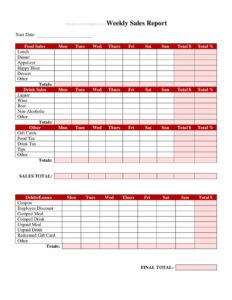
Weekly Sales Report
Track restaurant revenue with a free Weekly Sales Report template, available as a free download in PDF and DOCX to spot trends and boost performance.
PDF
DOCX
1 downloads
0
likes
Download Files
- DOCX
A Weekly Sales Report is a simple, structured document that captures a restaurant’s revenue, transactions, and performance over a single week. Managers and owners use it most often to track day-by-day sales trends, compare results against targets, and make smarter staffing and inventory decisions. It is free to download here in both PDF and DOCX formats, with no signup required.
What Is a Weekly Sales Report?
A Weekly Sales Report is an internal restaurant document that summarizes how much money the business took in across a seven-day period. It is typically completed by a shift manager, general manager, or bookkeeper at the close of the week, drawing figures from the point-of-sale (POS) system, daily cash-out sheets, and credit card batches. The report documents totals for food, beverages, and other categories, the number of guests or covers served, and how those numbers compare to the prior week or to forecasted goals. Its purpose is to give owners a clear, repeatable snapshot of financial health so they can spot slow days, peak shifts, and seasonal swings before they become problems.
When Do You Need a Weekly Sales Report?
Almost every restaurant that wants to manage by numbers rather than guesswork benefits from a consistent weekly summary. Common situations include:
- Weekly close-out: A manager compiles each day’s totals every Sunday or Monday to wrap up the prior business week.
- Multi-location oversight: An owner of two or more restaurants needs each unit to report on the same template so results can be compared side by side.
- Staffing decisions: Scheduling labor based on which days and dayparts actually drive sales requires reliable weekly data.
- Investor or franchise reporting: Franchisees and partners often submit weekly numbers to a corporate office or backer.
- Budgeting and forecasting: Comparing actual sales to projected targets helps refine next quarter’s budget.
- Marketing review: Measuring whether a promotion, happy hour, or new menu item moved the needle calls for before-and-after weekly figures.
What a Weekly Sales Report Should Have
A complete report turns raw register totals into something you can actually read and act on. At minimum it should identify the restaurant and the reporting period, break revenue down by category and by day, count guests or transactions, and present a clear total. The strongest versions also include comparison figures — last week, last year, or budget — plus a short notes area where the person filling it out can flag anything unusual, such as a holiday, a closure, or a large catering order. Including the preparer’s name and the date completed keeps the report accountable and makes it easy to follow up on questions.
How to Fill Out a Weekly Sales Report
- Enter the restaurant name and location so reports from different units never get mixed up.
- Record the week-ending date (or the start and end dates) to define the exact reporting period.
- List each day of the week down the left column — Monday through Sunday, or your defined business week.
- Fill in daily sales by category, entering food, beverage, alcohol, and any other revenue lines pulled straight from your POS.
- Add the guest count or number of covers for each day to track traffic alongside dollars.
- Calculate the daily total for each row, then sum the columns to get weekly totals.
- Note the average check (total sales divided by guests) where the template provides space.
- Compare to prior week or budget in the variance column, if included.
- Write any explanatory notes about weather, events, or staffing that affected results.
- Sign and date the report, then save or send it to ownership.
Reading the Numbers: Turning the Report Into Action
The report is only valuable if someone interprets it. Look first at the weekly total against your target, then drill into the day-by-day breakdown to see where the gap came from. A strong Friday but a weak Tuesday tells a different story than five flat days. Watch the average check closely — rising guest counts with a falling average check may signal discounting or a shift toward cheaper items, while a rising average check can reflect successful upselling or a price change. Track beverage and alcohol as a share of total sales, since those high-margin categories often determine whether a busy week was actually profitable. Over several weeks, the pattern matters more than any single figure.
Tips for Accurate, Consistent Reporting
Consistency makes a weekly report trustworthy. Always pull figures from the same source — usually the POS daily summary — and reconcile them against deposits so the numbers match the bank. Use the same category definitions every week; if “beverage” includes non-alcoholic drinks one week and not the next, your trends become meaningless. Complete the report at the same time each week, ideally first thing on the same morning, so it never gets forgotten. Finally, keep a folder of past reports so you can compare the current week to the same period last month or last year, which is where seasonal restaurants find their most useful insights.
Common Mistakes to Avoid
- Mixing gross and net sales: Decide whether figures include or exclude tax and discounts, and apply it consistently.
- Forgetting the guest count: Sales without traffic data hide whether you are growing covers or just raising prices.
- Skipping the notes field: A blank notes line leaves a holiday or rainstorm unexplained months later.
- Not reconciling to deposits: Reported sales that don’t match the bank can mask cash-handling errors or theft.
- Inconsistent week boundaries: Some weeks running Monday-Sunday and others Sunday-Saturday makes comparison impossible.
- Letting the report sit unread: Filling it out without reviewing it wastes the entire exercise.
Frequently Asked Questions
What is a Weekly Sales Report used for? It is used to summarize a restaurant’s revenue and guest traffic over one week so managers and owners can track trends, measure performance against targets, and make staffing, inventory, and marketing decisions based on real numbers rather than guesswork.
Who fills out a Weekly Sales Report? Usually a general manager, shift manager, or bookkeeper completes it at the end of the business week. They pull figures from the POS system, daily cash-out reports, and credit card batches, then hand the finished report to ownership or a corporate office.
What numbers should be included? At a minimum, daily sales broken down by category (food, beverage, alcohol, other), guest or transaction counts, daily and weekly totals, and average check. Many restaurants also add comparisons to the prior week, last year, or budgeted targets.
How often should I complete it? As the name suggests, once per week — most operators close out the same morning each week for consistency. Some pair the weekly report with daily logs feeding into it and a monthly roll-up summarizing the four or five weekly reports.
Is this report legally required? No. A Weekly Sales Report is an internal management tool, not a government filing. That said, accurate sales records support your tax filings and bookkeeping, so keeping consistent reports is good practice even though no law dictates the exact format.
Is this template really free? Yes. You can download the Weekly Sales Report template here in both PDF and DOCX formats at no cost and with no signup. Open the DOCX in your word processor to customize the categories, columns, and branding to match your restaurant.
This template is a general example provided for informational purposes only and does not constitute legal, financial, or tax advice. Recordkeeping and reporting requirements vary by jurisdiction and business type — consult a qualified accountant or professional for guidance specific to your restaurant.
Related Forms
- Refrigerator Temperature Log
- Bathrooms For Customers Sign
- Food Cooling Log
- Alcohol Inventory Log
- Pantry Inventory Log
- Employees Only Sign
Browse more in Restaurant.