
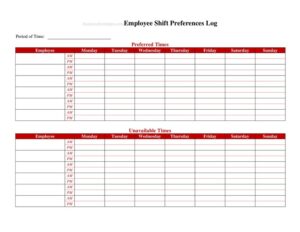
Shift Preferences Log
Use this free Shift Preferences Log template to collect staff availability and scheduling preferences, available as a free download in PDF and DOCX.
PDF
DOCX
0
likes
Download Files
- DOCX
A Shift Preferences Log is a simple form restaurant managers use to record each employee’s availability, preferred shifts, and scheduling constraints in one organized place. The most common reason people reach for it is to build fairer, conflict-free weekly schedules without endless back-and-forth texts. It’s free to download here in both PDF and DOCX, with no signup required.
What Is a Shift Preferences Log?
A Shift Preferences Log is a structured document that captures when each team member is willing or able to work. Managers, shift leads, or HR staff typically issue it to servers, cooks, bartenders, hosts, and dishwashers at the start of an employment period or each scheduling cycle. The log records preferred days and times, hours wanted, blackout dates, and any restrictions such as school hours or second jobs. By collecting this information in a consistent format, the form turns scattered verbal requests into a reliable reference. It documents what staff asked for, helps justify scheduling decisions, and reduces miscommunication when shifts are assigned, swapped, or declined.
When Do You Need a Shift Preferences Log?
In a busy restaurant where coverage changes weekly, a written record of preferences keeps scheduling fair and fast. Common situations include:
- Onboarding new servers, line cooks, or bartenders who need to declare their availability before their first schedule is built.
- Planning weekly or biweekly rotas and needing a single source of truth for who can work which shifts.
- Managing student employees with class schedules that shift each semester.
- Accommodating staff with second jobs, childcare needs, or transportation limits that affect early-morning or late-night availability.
- Coordinating coverage for holidays, special events, and peak weekend rushes when demand for popular shifts is high.
- Settling disputes about who requested time off or who asked for fewer hours, with a dated record to refer back to.
What a Shift Preferences Log Should Have
A complete log balances enough detail to schedule confidently without becoming a burden to fill out. Strong logs typically include the employee’s name and role, the date the preferences were submitted, and a clear breakdown of availability by day of the week. Look for fields covering preferred shift type (opening, mid, closing), minimum and maximum hours wanted, days or dates the person cannot work, and a notes section for special circumstances. A space for the employee’s signature or acknowledgment and the manager’s review confirms both parties agree on what was recorded. Including an effective date or review cycle keeps the information current as availability changes over time.
How to Fill Out a Shift Preferences Log
Because this template is intentionally flexible, fill it out in a logical order so nothing important is missed:
- Employee name and role: Write the full name and job title (server, cook, host, bartender) so the manager knows which positions the preferences apply to.
- Date submitted: Record the date the form is completed, which sets the starting point for the preferences.
- Availability by day: For each day of the week, note whether the employee is available and the time windows they can work.
- Preferred shifts: Indicate favored shift types such as morning openings, lunch, dinner, or closing.
- Desired hours: List the minimum and maximum weekly hours the employee wants.
- Unavailable dates: Add any blackout days, recurring commitments, or requested time off.
- Notes: Capture context like school schedules, transportation limits, or willingness to pick up extra shifts.
- Acknowledgment: Have the employee and manager sign or initial to confirm the recorded preferences.
Tips for Using the Log Effectively
Treat the Shift Preferences Log as a living document rather than a one-time form. Set a clear expectation about how often preferences can be updated — many restaurants review them monthly or each season. Make it easy to submit by keeping printed copies in the break room and a digital version staff can fill out on a phone. When you build the schedule, mark which preferences you were able to honor and which you couldn’t, so employees see their input was considered. Keeping past logs on file also helps you spot patterns, such as which shifts are chronically hard to cover, so you can adjust hiring or incentives accordingly.
How It Differs From a Time-Off Request
People sometimes confuse a Shift Preferences Log with a time-off request form, but they serve different purposes. A preferences log captures ongoing, general availability — the recurring framework within which a person prefers to work. A time-off request is a one-time, specific ask to be off on particular dates. Using both together gives managers the clearest picture: the log sets the baseline schedule, and time-off requests handle exceptions. Keeping them separate also prevents standing availability from being buried inside a pile of single-date requests.
Common Mistakes to Avoid
- Leaving the date blank, which makes it impossible to know whether the preferences are still current.
- Recording vague availability like “weekends” instead of specific time windows the employee can actually work.
- Forgetting to capture maximum hours, leading to accidental overtime or under-scheduling.
- Treating stated preferences as guaranteed assignments rather than requests the manager weighs against business needs.
- Failing to update the log when an employee’s school term, second job, or childcare situation changes.
- Storing logs inconsistently so they can’t be found when a scheduling dispute arises.
Frequently Asked Questions
What is a Shift Preferences Log used for? It is used to collect and document each employee’s availability and preferred shifts in one consistent place. Managers reference it when building weekly schedules to reduce conflicts and assign shifts more fairly. It also creates a dated record of what staff requested.
How do I fill out a Shift Preferences Log? Start with the employee’s name, role, and the submission date, then record availability for each day, preferred shift types, and desired hours. Add any unavailable dates and notes about special circumstances, and finish with an acknowledgment from both the employee and manager. Keeping entries specific makes the form far more useful.
Does a Shift Preferences Log guarantee an employee gets those shifts? No. The log records preferences and availability, but final schedules depend on staffing levels, business demand, and fairness across the whole team. It helps managers honor requests where possible, not promise them.
Is this form legally binding? It is generally an internal scheduling tool rather than a binding contract. However, it can serve as supporting documentation in disputes about availability or requested hours. Always follow your local labor laws regarding scheduling, breaks, and overtime.
How often should employees update their preferences? Most restaurants review preferences monthly or each season, and whenever a major life change affects availability. Setting a clear update cadence keeps the schedule accurate. Encourage staff to submit a new log promptly when their situation changes.
How much does this template cost? It is completely free to download here in both PDF and DOCX formats, with no signup required. You can print it for the break room or edit the DOCX version to match your restaurant’s roles and shift names.
This template is a general example provided for informational purposes only and is not legal, financial, or HR advice. Scheduling, overtime, and labor requirements vary by jurisdiction and may change over time. Consult a qualified professional to ensure your scheduling practices comply with applicable laws.
Related Forms
- Line Starts Here Sign
- Bus Your Table Sign
- Shift Request Form
- One Check Per Table Sign
- Pantry Inventory Log
- Drink Menu
Browse more in Restaurant.