
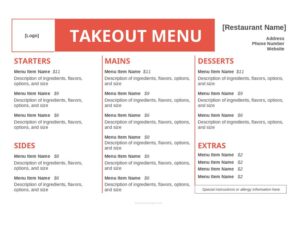
Takeout Menu
Create a clean, organized takeout menu with our free Takeout Menu template — list dishes, prices, and pickup details, free download in PDF and DOCX.
DOC
0
likes
Download Files
- DOC
A Takeout Menu is the printable or digital list a restaurant gives customers to order food for pickup or delivery, and the most common reason people use one is to present their dishes, prices, and ordering details in a clean, easy-to-read format that travels well outside the dining room. Whether you run a busy pizzeria, a taco truck, or a family café adding curbside service, this Takeout Menu template is free to download in both PDF and DOCX with no signup required.
What Is a Takeout Menu?
A Takeout Menu is a streamlined version of a restaurant’s offerings designed specifically for off-premise dining. It is issued by the restaurant owner or manager and used by customers, phone-order staff, and delivery platforms to communicate what is available, how much each item costs, and how to place an order. Unlike a sit-down dining menu, a takeout menu prioritizes items that travel well, often groups dishes by category for quick scanning, and includes practical information like hours, phone number, and pickup instructions. It documents your current pricing and selections in a portable format that customers can keep on the fridge, screenshot, or reference when they call.
When Do You Need a Takeout Menu?
A dedicated takeout menu becomes essential the moment your food starts leaving the building. Common situations include:
- Launching curbside pickup or online ordering and needing a clear list customers can browse from home.
- Printing handouts to slip into delivery bags so repeat customers can reorder easily.
- Posting a menu on your website, social media, or a third-party delivery app.
- Offering a limited “to-go” selection that differs from your full dine-in menu, especially for items that hold up during transport.
- Updating seasonal dishes, daily specials, or new pricing without reprinting your entire dining-room menu.
- Setting up a food truck, pop-up, or catering pickup window where space for a large menu board is limited.
What a Takeout Menu Should Have
A complete takeout menu balances appetizing descriptions with the logistics a customer needs to actually place an order. At minimum it should include the restaurant name and contact information, clearly organized food categories (such as appetizers, entrées, sides, drinks, and desserts), individual item names with short descriptions, and accurate prices. Many menus also note hours of operation, pickup or delivery windows, minimum order amounts, accepted payment methods, and any extra fees. Allergen notes, spice-level indicators, and portion sizes help customers choose confidently. Keep the layout uncluttered so items and prices line up neatly and are easy to scan on both paper and a phone screen.
How to Fill Out a Takeout Menu
Because this is a flexible template, fill it out from the top down so the finished menu reads clearly:
- Restaurant name and tagline: Enter your business name prominently at the top, followed by a short tagline or cuisine type if you have one.
- Contact and ordering details: Add your phone number, address, website or ordering link, and hours so customers know when and how to order.
- Pickup and delivery info: Note pickup wait times, delivery radius, any minimum order, and accepted payment methods.
- Category headers: Create sections such as Appetizers, Mains, Sides, Beverages, and Desserts to group related items.
- Item names and descriptions: Under each category, list the dish name and a brief, mouth-watering description highlighting key ingredients.
- Prices: Enter the price beside each item, aligning the figures so they are easy to compare.
- Add-ons and notes: Include optional extras, size choices, and symbols for vegetarian, spicy, or gluten-free items.
- Final details: Add a footer with tax notes, gratuity policy for delivery, and a thank-you line.
Designing a Menu That Sells
A takeout menu is also a marketing tool, so small design choices can lift average order size. Place your most profitable or signature dishes near the top of each category, where eyes land first. Use descriptive language that evokes flavor and freshness rather than bare item names — “slow-roasted pulled pork with house slaw” outperforms “pork sandwich.” Group combo deals and family packs together to encourage larger orders, and consider a clearly labeled “specials” box for limited-time items. Keep fonts large enough to read on a phone, and avoid overcrowding the page; white space makes prices and categories easier to scan. If you print in black and white for delivery bags, make sure the layout still looks sharp without color.
Keeping Your Menu Accurate and Up to Date
Prices, availability, and offerings change, and an out-of-date takeout menu frustrates customers and creates checkout confusion. Review your menu whenever ingredient costs shift, you add or retire dishes, or your hours change seasonally. Keep the editable DOCX version on file so you can update a single price or swap an item without rebuilding the whole document, then export a fresh PDF for printing and posting. Date your internal copy or use a version note in the footer so staff always work from the current edition. If you list the menu on third-party delivery platforms, update those listings at the same time to avoid mismatched prices.
Common Mistakes to Avoid
- Listing dishes that don’t travel well — items that go soggy or wilt in a box lead to disappointed customers and refunds.
- Forgetting contact and ordering details — a beautiful menu is useless if customers can’t find your phone number or hours.
- Outdated prices — mismatched figures at pickup cause disputes; update the menu the moment prices change.
- Overcrowding the layout — cramming too many items and tiny fonts onto one page makes the menu hard to read on a phone.
- Skipping allergen and dietary notes — customers with restrictions need clear labels to order safely.
- No mention of fees or minimums — surprise charges for delivery or small orders damage trust.
Frequently Asked Questions
What is a takeout menu? A takeout menu is a restaurant’s list of dishes, descriptions, and prices formatted for pickup or delivery orders. It typically includes ordering details like phone number, hours, and pickup instructions so customers can order food to eat off-premise.
How do I make a takeout menu for free? Download this free template in PDF or DOCX, then fill in your restaurant name, categories, item names, descriptions, and prices. The DOCX version is fully editable, so you can adjust the layout, fonts, and sections to match your brand before printing or posting it online.
Should a takeout menu be different from my dine-in menu? It often should be. Takeout menus usually highlight items that hold up well during transport and may omit dishes meant to be served immediately. Many restaurants also use the takeout version to feature combos, family packs, and pickup-friendly portions.
What information should I include besides food items? Beyond dishes and prices, include your phone number, address, hours, pickup or delivery details, accepted payment methods, any order minimums or fees, and dietary or allergen notes. These practical details reduce confusion and help customers complete their orders smoothly.
Can I edit the template after downloading it? Yes. The DOCX file lets you change every element — add or remove categories, update prices, insert your logo, and rearrange items. Save your master copy so future updates take only minutes, then export an updated PDF for printing and sharing.
How much does this takeout menu template cost? It is completely free to download from Business Forms Pro in both PDF and DOCX, with no signup or payment required. You can use it for a single location, multiple locations, or a pop-up and update it as often as your menu changes.
This Takeout Menu template is provided as a general example for informational purposes only and does not constitute legal, financial, tax, or food-safety advice. Labeling, allergen disclosure, and pricing requirements vary by jurisdiction — consult a qualified professional or your local health authority to ensure your menu meets applicable regulations.
Related Forms
- Refrigerator Inventory Log
- Prix Fixe Menu Options
- Line Starts Here Sign
- Lunch Menu
- Food Order Form
- Seat Yourself Sign
Browse more in Restaurant.