
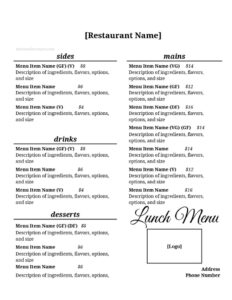
Lunch Menu
Create a clean, appetizing lunch menu for your restaurant or café with our free Lunch Menu template — organized, editable, and ready for free download.
DOCX
5 downloads
0
likes
Download Files
- DOCX
A Lunch Menu is a printable or digital list of midday food and drink offerings, organized so guests can quickly find dishes, descriptions, and prices. The most common reason businesses use one is to present a focused, attractive selection of lunch items that turns table tables faster and drives midday sales. This template is free to download in both PDF and DOCX formats, with no signup required.
What Is a Lunch Menu?
A Lunch Menu is the menu a restaurant, café, deli, food truck, or catering operation uses specifically during midday service. It is typically created and used by owners, managers, and chefs, and is handed to guests, posted at a counter, or displayed online. The document lists each dish along with its name, a short description, dietary notes, and price, usually grouped into logical sections such as starters, salads, sandwiches, mains, sides, and drinks. Unlike a full dinner menu, a lunch menu often features lighter, faster, and more affordable options suited to a quick break. Its purpose is to communicate offerings clearly, set expectations on price and portion, and encourage ordering.
When Do You Need a Lunch Menu?
A dedicated Lunch Menu is useful any time you serve a distinct midday crowd or want to streamline daytime ordering. Common situations include:
- Opening a new restaurant or café and needing a clean, printable menu for the front of house.
- Launching a weekday lunch special with set combos, soup-and-sandwich pairings, or a fixed-price plate.
- Running a deli, bakery, or coffee shop that wants a counter board or printed sheet for quick service.
- Catering corporate lunches and presenting clients with selectable packages and per-person pricing.
- Updating seasonal offerings when ingredients, prices, or featured dishes change and you need a fresh layout.
- Setting up a food truck or pop-up where a compact, easy-to-read menu helps a line move quickly.
Types of Lunch Menus
Not every lunch service looks the same, so the format you choose should match how you serve. A à la carte menu lists each item with its own price and gives guests full freedom to mix and match. A combo or set menu bundles items, such as a sandwich, side, and drink, at one price to speed up decisions and increase average ticket. A prix fixe lunch offers a fixed number of courses for a single price, popular for business lunches. A daily-special board highlights a rotating dish to use seasonal ingredients and reduce waste. Many operations blend these, using a core à la carte layout with a small featured-specials section.
What a Lunch Menu Should Have
A complete, appetizing lunch menu includes more than just dish names. Aim to cover:
- Business name and logo at the top for brand recognition.
- Service hours so guests know when lunch is available.
- Clear section headings like Starters, Salads, Sandwiches, Mains, Sides, and Drinks.
- Dish names that are short and recognizable.
- Concise descriptions listing key ingredients and preparation.
- Prices aligned cleanly to each item.
- Dietary and allergen icons such as vegetarian, vegan, gluten-free, or spicy.
- Specials or combo callouts to draw attention to high-margin items.
How to Fill Out a Lunch Menu
Follow these steps to turn the template into a finished, print-ready menu:
- Enter your restaurant or business name and add your logo in the header area.
- Add your lunch service hours and any contact details such as phone or website.
- Create your section headings, grouping items the way guests browse (starters first, drinks last).
- Under each section, type the dish name for every item you offer.
- Write a short description for each dish, naming the standout ingredients and any preparation worth highlighting.
- Fill in the price beside each item, keeping formatting consistent across the page.
- Mark dietary notes or allergen symbols where relevant so guests can order with confidence.
- Add a specials or combo section to feature daily deals or bundled lunch sets.
- Review spelling, prices, and spacing, then export to PDF for printing or keep the DOCX for ongoing edits.
Tips for an Appetizing, High-Performing Menu
Small design and wording choices have a real effect on what guests order. Use sensory, specific language—”crispy,” “house-made,” “slow-roasted”—rather than generic labels. Place your most profitable or signature dishes near the top of a section or in a boxed feature, where eyes naturally land. Keep descriptions to one or two lines so the page stays scannable during a busy lunch rush. Avoid lining up prices in a single straight column with leader dots, which can make guests compare on cost alone; instead, place each price right after its description. Limit the number of items per section to prevent decision fatigue, and refresh seasonal dishes regularly to keep regulars curious.
Printing and Updating Your Menu
Because the template is available in DOCX, you can update prices and dishes yourself whenever costs change, then re-export a fresh PDF for printing. For in-house use, print on sturdy stock and consider laminating menus that get heavy handling. If you display the menu online or on a screen, the PDF version keeps your layout consistent across devices. Keep a master file with the current date in the filename so staff always reference the latest version.
Common Mistakes to Avoid
- Forgetting to update prices after ingredient costs rise, which eats into margins.
- Overcrowding the page with too many items, making it hard to read and slow to order from.
- Vague descriptions that fail to make dishes sound appealing or list key ingredients.
- Omitting allergen or dietary notes, which can frustrate guests and create safety concerns.
- Inconsistent formatting in fonts, spacing, or price alignment that looks unprofessional.
- Skipping service hours, leaving guests unsure whether lunch items are still available.
Frequently Asked Questions
What is a Lunch Menu template? It is a ready-made layout you fill in with your own dishes, descriptions, and prices to create a polished midday menu. It saves you from designing the structure from scratch and keeps your sections, spacing, and pricing consistent. You simply replace the placeholder content with your offerings.
How do I fill out the Lunch Menu? Add your business name and logo, list your sections and dishes, write short descriptions, and enter prices beside each item. Mark any dietary notes, then review for typos and formatting before exporting. The DOCX version lets you edit anytime, while the PDF is ideal for printing.
Is this Lunch Menu template free? Yes. You can download it free in both PDF and DOCX formats with no signup or payment required. Use it for a single location or adapt it across multiple venues.
Can I edit the menu after downloading? Absolutely. The DOCX file is fully editable, so you can change dishes, adjust prices, add sections, or update your branding whenever your offerings change. Re-export to PDF whenever you need a fresh print copy.
Should I include allergen information on my lunch menu? Including allergen and dietary notes is strongly recommended and may be required in some regions. Clear icons for vegetarian, vegan, gluten-free, or spicy options help guests order confidently and reduce service questions. Always check the rules that apply to your location.
How many items should a lunch menu have? There is no fixed number, but a focused menu—often a handful of items per section—tends to speed up ordering and reduce kitchen complexity. Feature your strongest dishes prominently and rotate specials to keep the menu fresh without overwhelming guests.
This Lunch Menu template is provided as a general example for informational purposes only and does not constitute legal, financial, tax, or food-safety advice. Labeling, allergen disclosure, and pricing requirements vary by jurisdiction—consult a qualified professional or your local health authority to ensure compliance.
Related Forms
- Reservation Form
- Reservations List
- Dinner Menu
- Employee Hygiene Checklist
- Service Animals Only Sign
- Ingredient Usage Report
Browse more in Restaurant.