
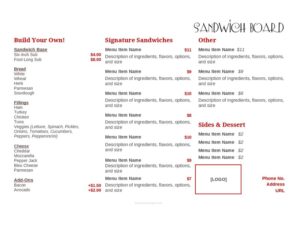
Sandwich Menu
Create a clear, appetizing sandwich menu with our free sandwich menu template — list items, prices, and add-ons, then download free in PDF or DOCX.
DOC
0
likes
Download Files
- DOC
A sandwich menu is a single-page menu that lists the sandwiches a deli, café, food truck, or sandwich shop sells, along with their ingredients and prices. The most common reason people use one is to present their sandwich lineup clearly so customers can order quickly and staff can ring up the right item. You can download this template free in both PDF and DOCX formats — no signup required.
What Is a Sandwich Menu?
A sandwich menu is a printed or digital list used by food businesses to display their sandwich offerings to customers. It is typically created by an owner, manager, or kitchen lead and used at the counter, on a table, on a wall board, or online. The menu documents each sandwich’s name, key ingredients, available sizes, and price, and often includes optional extras like cheese, bacon, or premium bread. Its purpose is twofold: to help customers choose confidently and to give staff a consistent reference for preparing and pricing orders. A well-built sandwich menu balances appetizing descriptions with the practical information needed to take and fulfill an order accurately.
When Do You Need a Sandwich Menu?
A sandwich menu is useful any time you sell sandwiches and want customers to understand their options at a glance. Common situations include:
- Opening a deli or sandwich shop and needing a clean counter menu that lists every build and price.
- Running a food truck or pop-up where a compact, easy-to-read board speeds up the ordering line.
- Launching a café lunch service and adding a dedicated sandwich section alongside coffee and pastries.
- Updating seasonal specials, such as a roasted vegetable panini in summer or a turkey-and-cranberry sub near the holidays.
- Offering catering or office lunch boxes, where a printed menu helps clients pre-select their orders.
- Refreshing prices or rebranding, when you want a polished, consistent layout instead of a handwritten list.
Types of Sandwich Menus
Sandwich menus come in a few practical styles. A counter menu sits at the register or on a wall and lists everything available all day. A build-your-own menu guides customers through bread, protein, cheese, and topping choices. A specials menu highlights limited-time or signature sandwiches. A catering menu focuses on platters, trays, and bulk pricing. This template can be adapted to any of these formats by adjusting the sections and headings.
What a Sandwich Menu Should Have
A complete sandwich menu makes ordering effortless and pricing accurate. The key elements include a clear business name or header, organized sections (for example, classic, hot, vegetarian), and a descriptive name for each sandwich. Each item should list its main ingredients so customers know what they are getting, along with size options and corresponding prices. Helpful extras include a list of paid add-ons, notes on bread choices, and dietary markers such as vegetarian or gluten-friendly. Including allergen reminders, served-with details (chips, pickle, side salad), and any combo or meal-deal pricing rounds out a menu that is both appetizing and functional for staff and customers alike.
How to Fill Out a Sandwich Menu
Follow these steps to turn the blank template into a finished, ready-to-print menu:
- Add your header. Enter your business name, logo space, and optionally a tagline or hours at the top of the page.
- Create your sections. Group sandwiches into categories such as Cold Classics, Hot Subs, Paninis, and Vegetarian so the menu reads logically.
- Name each sandwich. Give every item a clear, appealing name — for example, “Italian Stallion” or “Garden Veggie Wrap.”
- Describe the ingredients. List the protein, cheese, vegetables, sauces, and bread in a short, mouth-watering line.
- Set sizes and prices. Enter price columns for sizes you offer (half/whole, 6″/12″) and fill in the cost for each.
- List add-ons. Note extras like avocado, bacon, or extra cheese with their additional charges.
- Mark dietary options. Add symbols or notes for vegetarian, vegan, or gluten-friendly items.
- Add sides and combos. Include any meal deals, drinks, or side pairings and their pricing.
- Proofread and finalize. Check spelling, confirm every price, then save and export to PDF for printing.
Tips for Writing Descriptions That Sell
The wording on a sandwich menu directly affects what customers order. Use sensory, specific language — “slow-roasted turkey with melted Swiss and house pesto on toasted ciabatta” sells better than “turkey sandwich.” Lead with the star ingredient, name signature sauces, and mention how the bread is prepared. Keep descriptions to one tidy line so the menu stays scannable. Place your highest-margin or most popular sandwiches near the top or in a visually prominent box, since the items customers see first tend to sell more. Avoid jargon your customers may not recognize, and keep the tone consistent with your brand, whether casual deli or upscale café.
Keeping Prices and Layout Consistent
Because the template is provided in editable DOCX, updating prices for a new season or supplier cost change takes only minutes. Keep your price alignment consistent — right-aligned numbers or a leader-dot style make the menu easy to scan. Use the same font and sizing across sections so the document looks professional. When you change anything, re-export a fresh PDF and replace your printed copies and online version at the same time to avoid mismatched pricing between the counter and your website.
Common Mistakes to Avoid
- Vague names without ingredients — customers hesitate when they can’t tell what’s inside a sandwich.
- Forgetting to update prices across printed, posted, and online versions, leading to register disputes.
- Overcrowding the page with too many items or tiny fonts that are hard to read at the counter.
- Omitting add-on costs, which causes confusion and slows down the line at checkout.
- Ignoring allergen and dietary info, which matters to many customers and can affect safety.
- Inconsistent formatting between sections that makes the menu look unprofessional.
Frequently Asked Questions
What is a sandwich menu used for? A sandwich menu lists the sandwiches your business offers, with descriptions, sizes, and prices, so customers can choose quickly and staff can take accurate orders. It works as a counter display, table menu, wall board, or online ordering reference.
How do I fill out the sandwich menu template? Start by adding your business name and creating sections, then enter each sandwich’s name, ingredient description, sizes, and prices. Add a list of paid extras, mark dietary options, and proofread everything before exporting to PDF for printing.
Is this sandwich menu template free to download? Yes. You can download the sandwich menu template completely free in both PDF and DOCX formats, with no signup or account required. The DOCX version is fully editable so you can customize names, prices, and styling.
Can I edit the prices and items later? Absolutely. The editable DOCX file lets you change sandwich names, descriptions, prices, and sections whenever your offerings or costs change. Just re-export a new PDF and update your printed and online copies together.
Should I include allergen or dietary information? It is a good idea to mark vegetarian, vegan, or gluten-friendly items and to note common allergens like nuts, dairy, or gluten. Requirements for allergen labeling vary by location, so check your local food-service rules to stay compliant.
How many sandwiches should a menu list? There is no fixed number, but a focused menu of well-chosen items is usually easier to read and faster to prepare than an overcrowded one. Many shops feature a core lineup plus a small rotating specials section to keep things fresh.
This sandwich menu template is a general example provided for informational purposes only and is not legal, financial, or food-safety advice. Menu labeling, allergen, and pricing requirements vary by jurisdiction — consult the appropriate local authorities or a qualified professional to ensure your menu meets all applicable regulations.
Related Forms
- Takeout Menu
- Freezer Temperature Log
- Reservation Form
- Catering Menu
- Happy Hour Menu
- Pick Up Here Sign
Browse more in Restaurant.