
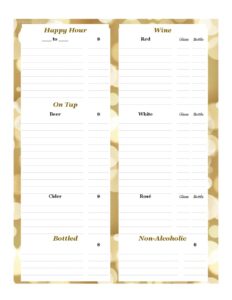
Drink Menu
Build a polished beverage list with our free Drink Menu template, organized for cocktails, beer, wine and soft drinks — free download in PDF and DOCX.
PDF
DOCX
7 downloads
0
likes
Download Files
- DOCX
A Drink Menu is a printed or digital list that presents the beverages your restaurant, bar, or café offers, usually grouped by category with prices. Most owners create one to show guests exactly what’s available and how much it costs, while also showcasing signature drinks that drive sales. You can download this Drink Menu template free in both PDF and DOCX formats — no signup required.
What Is a Drink Menu?
A Drink Menu is a presentation document used by hospitality businesses to list available beverages and their prices in an organized, easy-to-scan layout. It is typically issued by the venue’s owner or manager and handed to or displayed for guests at the table, bar, or counter. The menu documents what drinks are offered, how they’re grouped (for example, cocktails, beer, wine, and non-alcoholic options), and the price of each item. Beyond simply listing prices, a well-built drink menu communicates the personality of the establishment, highlights high-margin specialties, and helps servers answer questions quickly. It works as both a sales tool and a reference, ensuring guests and staff share the same understanding of what’s pourable and what it costs.
When Do You Need a Drink Menu?
A clear, current Drink Menu is useful in many everyday hospitality situations:
- Opening a new venue: A first-day beverage list that sets prices and showcases your signature offerings to early guests.
- Seasonal refreshes: Rolling out a summer cocktail lineup, fall spiced drinks, or a holiday hot-beverage section.
- Happy hour and specials: A dedicated card listing discounted drinks and the hours they apply.
- Private events and catering: Giving wedding, banquet, or corporate clients a curated selection with package pricing.
- Wine and craft beer programs: Presenting a by-the-glass and by-the-bottle list, or a rotating tap lineup with descriptions.
- Mobile bars and pop-ups: A compact, printable menu for festivals, food trucks, or temporary stands where guests order at a window.
Types of Drink Menus
Drink menus come in several formats, and many venues use more than one. A full beverage menu covers everything from spirits to soft drinks in one document. A cocktail menu focuses on house creations with descriptions of ingredients. A wine list may stand alone, organized by varietal, region, or by-the-glass versus by-the-bottle. A specials or happy hour card is a short, time-limited insert. Choosing the right format depends on your concept, your space, and how guests order.
What a Drink Menu Should Have
A complete and effective Drink Menu generally includes the following elements:
- The venue name and, optionally, a logo or tagline at the top.
- Clear category headings such as Cocktails, Wine, Beer, Spirits, and Non-Alcoholic.
- Each drink’s name, presented prominently so it’s easy to scan.
- A short description for signature or specialty drinks, noting key ingredients.
- The price for each item, aligned consistently for quick reading.
- Serving sizes where relevant (glass, bottle, pint, pitcher).
- Notes on specials, hours, or premium upgrades.
- Any required notices, such as age or responsible-service reminders where applicable.
How to Fill Out a Drink Menu
Because this is a flexible presentation template, fill it out section by section to match your offerings:
- Add your venue identity: Enter your business name at the top, and add a logo, location, or tagline if you’d like.
- Create your category headers: Label sections such as Cocktails, Wine, Beer, Spirits, and Soft Drinks based on what you serve.
- List each drink name: Type the name of every beverage under its category, ordering popular or high-margin items near the top.
- Write short descriptions: For signature cocktails or featured wines, add a one-line description of ingredients or tasting notes.
- Enter prices: Add the price beside each item, keeping decimals and formatting consistent throughout.
- Note serving sizes: Where it matters, indicate glass versus bottle, or pint versus pitcher, with separate prices.
- Add specials or notices: Include a happy-hour block, seasonal feature, or any service reminders.
- Review and export: Proofread spelling and prices, then save as PDF for printing or DOCX for future edits.
Design and Layout Tips
The way a Drink Menu looks affects how guests order. Keep categories visually distinct with bold headers and a little white space between sections so the eye can travel easily. Place your most profitable or signature drinks where attention naturally lands — near the top of a section or in a boxed feature. Use consistent price alignment, and avoid cluttering the page with too many fonts or colors. If you print on a single card, prioritize the drinks that sell; you don’t need to list every possible option. For digital menus shown on a screen or via a QR code, make sure text stays legible at smaller sizes.
Keeping Prices and Items Current
Beverage costs change, and an outdated menu frustrates guests and erodes margins. Review your Drink Menu whenever supplier prices shift, when you add or retire a drink, or at the start of each season. Because the DOCX version is fully editable, you can update a single price or swap an entire section without rebuilding the document. Print a fresh PDF after each change and replace old cards on the floor. Keeping a dated working copy helps you track what changed and when.
Common Mistakes to Avoid
- Inconsistent pricing format: Mixing styles like “$8” and “8.00” looks sloppy and confuses guests.
- Listing drinks you can’t make: Leaving sold-out or discontinued items on the menu leads to disappointed orders.
- Overcrowding the page: Too many items in tiny text makes the menu hard to read and slows ordering.
- Burying signature drinks: Hiding your best sellers at the bottom misses an easy upsell opportunity.
- Forgetting serving sizes: Omitting glass-versus-bottle or pint-versus-pitcher distinctions causes price confusion.
- Skipping a proofread: Typos in drink names or prices undermine the polish guests expect.
Frequently Asked Questions
What is a Drink Menu used for? A Drink Menu lists the beverages a venue offers along with their prices, organized into categories so guests can choose quickly. It also doubles as a marketing tool, helping you highlight signature cocktails and high-margin items. Servers use it as a shared reference when answering questions.
How do I make a Drink Menu? Start with this free template, add your venue name, create category headings, then list each drink with its price and an optional description. Arrange popular items near the top of each section and keep formatting consistent. When finished, export to PDF for printing or keep the DOCX for easy edits.
Is this Drink Menu template free? Yes. You can download it free from Business Forms Pro in both PDF and DOCX formats, with no signup or account required. Use it as many times as you like and customize it for different seasons or events.
Should I include descriptions for every drink? Not necessarily. Detailed descriptions work best for signature cocktails, featured wines, or items where ingredients aren’t obvious. Standard drinks like a domestic beer or a soda usually just need a name and price to keep the menu clean and scannable.
How often should I update my Drink Menu? Update it whenever prices change, when you add or remove a beverage, or at the start of a new season. Because the DOCX version is editable, small changes take only a moment, and you can print a fresh PDF immediately afterward.
Can I use this menu for a bar, café, or catered event? Absolutely. The template is flexible enough for a full-service bar, a coffee shop, a restaurant, or a private event package. Just adjust the categories and items to fit your concept and the occasion.
This Drink Menu template is a general example provided for informational purposes only and is not legal, financial, or tax advice. Rules regarding the sale and service of alcohol and beverages vary by jurisdiction — consult the relevant local authorities or a qualified professional to ensure your menu and operations comply with applicable requirements.
Related Forms
- Happy Hour Table Cards
- Recipe Food Costing Worksheet
- Knife Sharpening Log
- No Outside Food Or Drink Sign
- Dinner Menu Fancy
- One Check Per Table Sign
Browse more in Restaurant.