
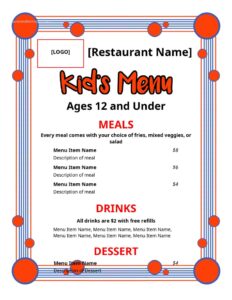
Kids Menu
Create a fun, easy-to-read kids menu for your restaurant with this free template — download in PDF or DOCX, no signup required.
DOCX
0
likes
Download Files
- DOCX
A kids menu is a simplified, child-focused food list that restaurants use to showcase smaller, family-friendly meals at appropriate prices. The most common reason businesses use one is to make families feel welcome and to give parents a quick, fuss-free way to order food their children will actually eat. This free kids menu template is ready to download in PDF and DOCX with no signup required.
What Is a Kids Menu?
A kids menu is a dedicated section or standalone sheet that presents a curated selection of meals designed for younger diners. It is typically issued by restaurants, cafés, diners, pubs, and catering venues, and it documents the dishes, portion sizes, drink options, and prices intended for children — usually those twelve and under. Unlike a full menu, it focuses on familiar, easy-to-eat favorites and often pairs food with a beverage or dessert in a single combo price. Many versions also include games, coloring activities, or playful artwork, turning the menu into both a practical ordering tool and a way to keep children entertained while parents relax.
When Do You Need a Kids Menu?
A well-designed kids menu pays off in a wide range of dining situations. Consider creating or updating one in these scenarios:
- You run a family restaurant or diner and want to attract parents who are choosing where to eat based on how child-friendly a venue is.
- You operate a café or pub that has added smaller plates and wants a clear, separate listing so families spot them quickly.
- You manage a hotel or resort dining room serving guests traveling with children of varied ages and appetites.
- You cater events, parties, or weddings and need a simpler set of options for younger attendees.
- You are rebranding or refreshing your existing menus and want a printable, themed page that matches your style.
- You are launching a new location and need professional menus before opening day without hiring a designer.
What a Kids Menu Should Have
A complete kids menu balances appetite appeal with clarity for the adult who is actually ordering. The essentials include a clearly labeled heading that identifies the menu as being for children, an age guideline if you set one, and a tidy list of meal items with short, appetizing descriptions. Each item should show its price, and combos or meal deals should spell out exactly what is included — for example, a main, a side, and a drink. Useful extras are a beverage section, a dessert section, and notes on allergens or dietary options such as vegetarian or gluten-free choices. Branding elements like your restaurant name, logo, and a fun color scheme tie everything together and reinforce a friendly, welcoming impression.
How to Fill Out a Kids Menu
Because this is a flexible design template, you customize the placeholders to match your own offerings. Follow these steps:
- Add your restaurant name and logo at the top so the menu is instantly recognizable.
- Set a title such as “Kids Menu” or “Just for Kids,” and include an age range if you limit who can order from it.
- List your main dishes — enter each item name, a short description, and the price. Keep names simple and fun.
- Fill in any combo or meal-deal blocks, noting the included side and drink and a single bundled price.
- Add a sides section for items like fruit, fries, or vegetables.
- Complete the drinks section with juice, milk, water, or soft-drink options and prices.
- Enter desserts such as ice cream or cookies, with prices.
- Insert any allergen or dietary notes, and add optional artwork, games, or a coloring activity.
- Review the final layout, then export to PDF for printing or DOCX for further edits.
Designing a Kids Menu That Works
The best kids menus are easy for a child to scan and even easier for a busy parent to read aloud. Use large, friendly fonts and keep descriptions to a few words — children respond to recognizable names more than elaborate culinary language. Bright colors, simple icons, and a cartoon or theme can make the page inviting, but avoid clutter that buries the prices. Group items logically so the flow moves from mains to sides to drinks to dessert. If you include an activity such as a maze or coloring picture, place it where it won’t interfere with the ordering information. Finally, consider laminating printed copies or using a wipe-clean material, since kids menus take a lot of handling and the occasional spill.
Pricing and Portion Tips
Children eat smaller portions, so price the menu accordingly to signal value to families. A common approach is to offer combo pricing that bundles a main, a side, and a drink, which simplifies the decision and increases perceived value. Keep portions sensible to reduce waste and to suit smaller appetites, and clearly state whether items can be modified — for instance, swapping fries for fruit. If you adjust prices seasonally or run promotions, the DOCX version makes it quick to update and reprint, so your printed menus never show outdated figures.
Common Mistakes to Avoid
- Overcomplicating descriptions — long, fancy wording loses both children and the parents reading quickly.
- Forgetting prices — every item, including combos and drinks, should display a clear cost.
- Ignoring allergens — failing to flag common allergens or offer alternatives frustrates families and creates risk.
- Cramming the layout — too many items or graphics make the page hard to read and slow ordering.
- Not updating prices — leaving outdated figures on reprinted menus causes confusion at the table.
- Skipping drink and dessert options — these are popular add-ons and a missed chance to round out a meal.
Frequently Asked Questions
What is a kids menu? A kids menu is a simplified food list designed for younger diners, featuring smaller portions, familiar dishes, and child-friendly prices. Restaurants use it to make families feel welcome and to speed up ordering for parents. It often includes drinks, desserts, and sometimes games or coloring activities.
How do I fill out this kids menu template? Start by adding your restaurant name and logo, then enter your menu title and an optional age range. List each dish with a short description and price, fill in sides, drinks, and desserts, and add any allergen notes or artwork. When you are done, export to PDF for printing or DOCX to keep editing.
What age range is a kids menu usually for? Many restaurants set their kids menu for children twelve and under, though the exact range is entirely up to you. Some venues offer separate tiers for toddlers and older children, while others keep it broad. State your chosen guideline clearly on the menu to avoid confusion.
Should I include allergen information on a kids menu? Yes, it is strongly recommended to note common allergens and to offer alternatives where possible, since parents need this information to order safely. Labeling vegetarian, gluten-free, or dairy-free options also broadens your appeal. Requirements for allergen disclosure vary by location, so check your local regulations.
Can I customize the colors, fonts, and layout? Absolutely. The DOCX version is fully editable, so you can change colors, swap fonts, adjust the layout, and add your own branding or artwork. This makes it easy to match the menu to your restaurant’s overall style and to update it whenever your offerings change.
How much does this kids menu template cost? It is completely free to download from Business Forms Pro in both PDF and DOCX formats, with no signup or payment required. You can use it for a single location or across multiple venues. Edit it as often as you need at no charge.
This kids menu template is a general example provided for informational purposes only and does not constitute legal, financial, or food-safety advice. Allergen labeling, nutritional disclosure, and menu regulations vary by jurisdiction — consult a qualified professional or your local authority to ensure your menu meets applicable requirements.
Related Forms
- Reservations List
- Freezer Temperature Log
- Refrigerator Inventory Log
- Coffee Menu
- Bathrooms For Customers Sign
- Section Reserved
Browse more in Restaurant.