
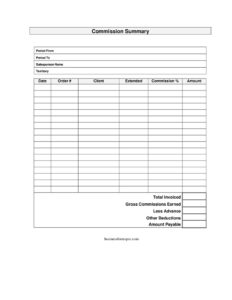
Commission Summary
Download a free Commission Summary template to track salesperson earnings by order, client, and rate — free PDF and DOCX download, no signup.
PDF
DOCX
8 downloads
0
likes
Download Files
- DOCX
A Commission Summary is a sales document that itemizes the commissions a salesperson earned over a specific pay period, showing each qualifying order, the sale amount, the commission rate, and the dollar amount due. People most often use it to reconcile a rep’s earnings before payroll runs. It’s free to download here in both PDF and DOCX, with no signup required.
What Is a Commission Summary?
A Commission Summary is a one-page statement prepared by a sales manager, accounting team, or commission administrator that breaks down how a salesperson’s commission for a given period was calculated. Instead of handing a rep a single lump-sum figure, it lists every order line by line, the client tied to each sale, the extended sale value, the applicable commission percentage, and the resulting amount. The document creates a transparent paper trail that both the company and the salesperson can verify. It’s commonly attached to a paycheck stub, emailed at the close of a pay cycle, or filed alongside sales records so disputes can be resolved quickly and earnings can be audited later.
When Do You Need a Commission Summary?
This form is useful any time variable, performance-based pay needs to be documented and explained. Common situations include:
- Monthly or bi-weekly payroll: calculating what each rep is owed before commissions are added to a paycheck.
- Onboarding new reps: showing exactly how commissions are computed so a new salesperson understands the plan.
- Resolving a pay dispute: giving a rep a line-by-line breakdown when they question a commission total.
- Quarter-end or year-end reviews: summarizing earnings by territory to evaluate performance and territory profitability.
- Splitting credit: documenting which orders count toward which salesperson when accounts or regions overlap.
- Bookkeeping and audits: keeping a clean record of commission expense tied to specific invoices and clients.
What a Commission Summary Should Have
A complete summary makes the math impossible to argue with. It should clearly state the pay period start and end dates, identify the salesperson and their territory, and list every qualifying order with its order number and client name. For each order it should show the extended (net) sale amount, the commission percentage applied, and the calculated commission amount. A total at the bottom that sums all the individual amounts is essential, along with a preparation date so the document is anchored in time. When all of these elements are present, anyone reading the form can trace a single dollar figure back to the exact sale that produced it.
How to Fill Out a Commission Summary
- Period from / Period to: Enter the first and last day of the pay cycle the summary covers, such as the start and end of the month.
- Salesperson name: Write the full name of the rep whose commissions are being reported.
- Territory: Note the region, account list, or sales zone assigned to this salesperson.
- Date: Record the date you prepared the summary.
- Order #: For each qualifying sale, enter the order or invoice number so it can be matched to your records.
- Client: Add the customer or account name tied to that order.
- Extended: Enter the net sale amount the commission is based on (often the order total after returns or discounts).
- Commission %: List the rate applied to that order, which may vary by product or tier.
- Amount: Multiply the extended amount by the commission percentage and record the result.
- Total: Add all the amount entries to show the rep’s total earnings for the period.
Understanding the Extended Amount and Rate
The two fields that drive every calculation are extended and commission %. “Extended” usually means the net value of the sale that actually qualifies for commission — not necessarily the gross order total. Many plans exclude shipping, taxes, returns, or unpaid invoices, so confirm which figure your commission plan uses before filling this column. The commission percentage may be flat across all sales, or it may step up as a rep hits volume tiers, or differ by product line. If a rep earns 5% on one product and 8% on another, list each order on its own line with its own rate rather than blending them. Keeping these two columns precise is what makes the summary trustworthy and easy to audit.
Tips for Accurate Commission Tracking
Treat the Commission Summary as a reconciliation tool, not just a payout notice. Cross-check every order number against your CRM or accounting system before finalizing, and only include orders that meet your plan’s payment or fulfillment rules. If your plan pays on collected revenue rather than booked revenue, exclude unpaid invoices and add them to a future period. Save a copy of each completed summary so you can compare period-over-period and spot errors fast. Because the DOCX version is editable, you can add columns for product line, draw against commission, or split percentages if your plan requires them.
Common Mistakes to Avoid
- Mismatched periods: including orders that fall outside the stated period from/period to dates.
- Using gross instead of extended amounts: commissioning on totals that include tax, freight, or items that don’t qualify.
- Wrong commission rate: applying a single rate when the plan has tiers or product-specific percentages.
- Math errors: the amount column not equaling extended times commission %, or a total that doesn’t sum the lines.
- Missing order numbers: leaving the order # blank, making it impossible to trace a payment to a sale.
- Counting unpaid or returned orders: paying commission on revenue that was later refunded or never collected.
Frequently Asked Questions
What is a Commission Summary used for? It is used to show a salesperson exactly how their commission for a pay period was calculated, listing each order, client, sale amount, rate, and resulting commission. Companies use it to support payroll, resolve disputes, and keep auditable records of commission expense.
How do I calculate the amount for each line? Multiply the extended (net qualifying) sale amount by the commission percentage for that order. For example, a $4,000 extended sale at a 6% rate produces a $240 commission. Then add every line’s amount together for the period total.
Does a Commission Summary need to be signed or notarized? No notarization is required. It is an internal accounting and pay document, though some companies have the salesperson and manager sign or initial it to acknowledge the figures and confirm agreement before payout.
Is a Commission Summary legally binding? The summary itself is a calculation record, not a contract; the binding terms come from the underlying commission agreement or offer letter. That said, a signed summary can serve as useful evidence of what was reported and paid in a dispute.
How much does this template cost? It is completely free to download from Business Forms Pro in both PDF and DOCX formats, with no signup or account required. The DOCX version is fully editable so you can adapt the columns to your commission plan.
Can I customize the form for tiered or split commissions? Yes. Open the DOCX file and add columns for product line, split percentages, draws, or tier rates, then list each order on its own line so the math stays transparent and verifiable.
This Commission Summary template is provided as a general example for informational purposes only and does not constitute legal, financial, tax, or accounting advice. Commission plans, payroll rules, and reporting requirements vary by company and jurisdiction — consult a qualified accounting or legal professional before relying on this document.
Need to work out sales tax? Use our free Sales Tax Calculator to add or remove sales tax from any amount in seconds.
Official resource: for the rules that apply to your situation, see the U.S. Small Business Administration.
Related Forms
- Order Authorization Form
- Layaway Plan Record
- Shipment Procedure
- Customer Referral Form
- Livestock Bill Of Sale
- Ebay Auction Worksheet
Browse more in Sales.