
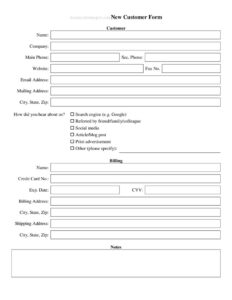
New Customer Form
Onboard clients faster with our free New Customer Form template—capture contact, billing, and account details in seconds. Free download in PDF and DOCX.
PDF
DOCX
2 downloads
0
likes
Download Files
- DOCX
A New Customer Form is a simple onboarding document businesses use to collect the essential contact, billing, and account details of a first-time client before opening an account or processing an initial order. It’s the fastest way to capture accurate customer information up front, and you can download it free in both PDF and DOCX formats with no signup required.
What Is a New Customer Form?
A New Customer Form is a standardized intake sheet completed by a customer—or by a sales rep on their behalf—when a new business relationship begins. It documents who the customer is, how to reach them, where to send invoices, and how they intend to pay. Sales teams, accounts departments, wholesalers, service providers, and retailers all use it to create a clean record in their CRM or accounting system. Rather than chasing details across emails and phone calls, the form gathers everything in one place, reduces data-entry errors, and gives the business a written reference for credit terms, shipping preferences, and contact people from day one.
When Do You Need a New Customer Form?
Any time a new account is being established, this form keeps onboarding organized and consistent. Common situations include:
- Opening a trade or wholesale account where billing addresses and payment terms must be agreed before the first shipment.
- Signing up a new service client—an agency, contractor, or consultancy capturing scope, contacts, and invoicing details.
- Setting up recurring B2B billing where accounts payable contacts and purchase-order requirements need to be recorded.
- Adding a walk-in or referral customer to your CRM so the sales pipeline and follow-up stay accurate.
- Establishing credit terms, where you may also request trade references or a tax ID for resale exemptions.
- Transitioning a prospect to an active account after a quote is accepted, ensuring nothing is missed before the first invoice.
What a New Customer Form Should Have
A complete New Customer Form captures everything needed to invoice, ship, and communicate without follow-up. At minimum it should include the customer or company name, a primary contact person and their role, phone and email, a billing address, and a shipping address if it differs. For business accounts, add a tax ID or business registration number, preferred payment method, requested credit terms, and an accounts payable contact. Sections for how the customer heard about you, the sales rep assigned, the date, and a signature round it out. The clearer the layout, the more reliable the data you collect—group related fields together and label each one plainly so customers know exactly what to enter.
How to Fill Out a New Customer Form
Work through the form top to bottom, completing each field accurately:
- Date: Enter the date the form is being completed so the record is timestamped.
- Company / customer name: Write the full legal or trading name as it should appear on invoices.
- Primary contact: Add the main point of contact’s full name and job title.
- Phone and email: Provide direct contact details for order confirmations and questions.
- Billing address: Enter the address where invoices and statements should be sent.
- Shipping address: Complete only if goods ship to a different location than billing.
- Tax ID / business number: Supply if you have a business or resale account.
- Payment method and terms: Indicate preferred payment type and any requested credit terms.
- Accounts payable contact: Name the person who handles invoices, if different from the primary contact.
- How did you hear about us / sales rep: Note the referral source and assigned rep.
- Signature: Sign and date to confirm the details are accurate.
Tips for a Smooth Customer Onboarding
Treat the New Customer Form as the first step in a repeatable onboarding workflow rather than a one-off document. Send the DOCX version so customers can type their answers, or share the PDF for a clean print-and-sign experience. Once it’s returned, transfer the data into your CRM or accounting software the same day so nothing slips through the cracks. Confirm the email address by sending a brief welcome message, and verify any tax ID before applying resale exemptions. If you offer credit terms, keep the completed form on file as evidence of what was agreed. A consistent intake process means every new account starts with the same complete, verified information.
New Customer Form vs. Credit Application
These two documents overlap but serve different goals. A New Customer Form is primarily about onboarding and contact details—it gets a customer set up so you can communicate, ship, and invoice. A credit application goes deeper into financial vetting, requesting bank references, trade references, and authorization to run a credit check before extending payment terms. Many businesses use the New Customer Form first and only request a separate credit application when a client asks for significant net terms. Keeping them distinct lets you onboard cash or card customers quickly while reserving the more detailed financial review for accounts that genuinely need it.
Common Mistakes to Avoid
- Leaving the billing address blank or assuming it’s the same as shipping—this causes invoices to bounce.
- Skipping the contact’s job title or direct line, which slows down order issues later.
- Not recording payment terms, leading to disputes when the first invoice is due.
- Forgetting the tax ID for resale accounts, which can create tax-exemption headaches.
- Using illegible handwriting on printed forms—type the DOCX version when possible.
- Failing to transfer the data promptly, so the form sits in a folder while the account stays incomplete.
Frequently Asked Questions
What is a New Customer Form used for? It’s used to collect a first-time customer’s contact, billing, shipping, and payment details so a business can open an account, process the first order, and communicate accurately. It standardizes onboarding and reduces back-and-forth.
How do I fill out a New Customer Form? Enter the date, the company or customer name, a primary contact with phone and email, the billing and (if different) shipping addresses, any tax ID, the preferred payment method and terms, and a signature. Complete every relevant field so no follow-up is needed.
Does a New Customer Form need to be signed? A signature isn’t always legally required, but it’s good practice. Signing confirms the customer agrees the details are accurate and acknowledges any stated payment terms, which is helpful if a dispute arises later.
Is a New Customer Form legally binding? On its own it’s mostly an informational intake document, not a contract. However, if it states agreed credit or payment terms and the customer signs, those terms can support your position, so keep the completed form on file.
What’s the difference between this and a credit application? A New Customer Form focuses on onboarding and contact details, while a credit application requests financial references and authorization to assess creditworthiness. Use the New Customer Form for general setup and add a credit application only when extending significant terms.
Is this New Customer Form free to download? Yes. You can download it free in both PDF and DOCX formats with no signup required, then customize the fields and branding to fit your business before sharing it with customers.
This New Customer Form template is a general example provided for informational purposes only and does not constitute legal, financial, or tax advice. Requirements and best practices vary by jurisdiction and industry—consult a qualified professional before relying on it for credit, tax, or contractual matters.
Need to work out sales tax? Use our free Sales Tax Calculator to add or remove sales tax from any amount in seconds.
Official resource: for the rules that apply to your situation, see the U.S. Small Business Administration.
Related Forms
- Proposal Form
- New Benefits Announcement
- Rejected Goods Notification
- Sales Report By Location
- Request For Appointment
- Livestock Bill Of Sale
Browse more in Sales.