
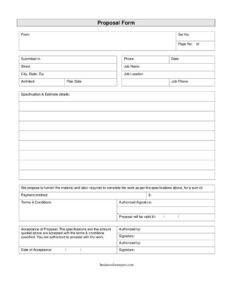
Proposal Form
Download a free Proposal Form template in PDF and DOCX to outline job specifications, pricing, and payment terms and win client approval fast.
PDF 2
DOCX 2
4 downloads
0
likes
Download Files
- DOCX
- DOCX
A Proposal Form is a sales document a contractor, vendor, or service provider uses to formally offer to furnish materials and labor for a specific job at a stated price. The most common reason people use one is to put a clear, written quote in front of a client so it can be reviewed, priced, and signed off. This template is free to download in PDF and DOCX with no signup required.
What Is a Proposal Form?
A Proposal Form is a written offer issued by a supplier or service provider to a prospective client, laying out exactly what work will be performed, the materials and labor involved, the total cost, and the terms of payment. It is typically prepared by the business doing the selling and addressed to the customer who requested a quote. The form documents the scope of a job, gives it a reference and proposal number for tracking, and includes a validity date so pricing does not stay open indefinitely. Crucially, it also contains an acceptance section the client signs to convert the offer into an agreed engagement, making it both a sales tool and the starting point of a contract.
When Do You Need a Proposal Form?
This form fits any situation where you need to present a priced offer for review before work begins. Common scenarios include:
- A contractor bidding on a renovation, repair, or construction job and submitting specifications with a lump-sum price.
- A landscaping, painting, or cleaning company responding to a homeowner’s request for a quote.
- A vendor proposing to supply equipment, materials, and installation labor for a commercial project.
- A service firm answering a formal request for proposals (RFP) and needing a structured, professional submission.
- An installer or trade business that wants a signed acceptance before ordering materials or scheduling crews.
- Any small business that wants to replace verbal estimates with documented, trackable offers.
What a Proposal Form Should Have
A complete Proposal Form leaves no ambiguity about who is offering what, at what price, and for how long. The essential elements are the client’s name and address, a job name that identifies the project, internal tracking numbers (a proposal number and a reference number), and the date through which the quote remains valid. The heart of the document is the specifications section describing the work, followed by the proposed total amount and a clear statement of the payment terms. Finally, it needs an authorized signatory block for the provider and an acceptance block where the client signs to agree. Including the number of pages helps confirm the full proposal was received and reviewed.
How to Fill Out a Proposal Form
- Proposal submitted to: Enter the name of the client or company receiving the offer.
- Address: Add the client’s full address so the proposal is clearly directed.
- Job name: Give the project a short, recognizable title (for example, “Kitchen Remodel” or “Warehouse Floor Coating”).
- Ref # and Proposal #: Assign your internal reference and proposal numbers for filing and follow-up tracking.
- Proposal valid till date: Enter the expiry date after which your pricing is no longer guaranteed.
- Number of pages: Note the total page count so the client knows the full document is present.
- Specifications and details: Describe the scope of work, materials, and any standards or exclusions in plain terms.
- Sum / amount: State the total price for furnishing the materials and labor described above.
- Terms of payment: Spell out the schedule — deposit, milestones, and final balance.
- Authorized signatory: Print the provider’s name and sign to authorize the offer.
- Acceptance of proposal: Leave this for the client to sign once they agree to the details, specifications, amounts, and payment terms.
Proposal vs. Estimate vs. Quote
These terms are often used interchangeably, but they differ in commitment. An estimate is a rough, non-binding guess at cost and can change as the job evolves. A quote is a firmer figure, usually fixed for a set period. A Proposal Form goes further by combining the price with a detailed scope of work, payment terms, validity period, and a built-in acceptance signature — turning a number into the framework of an agreement. Because this template includes an acceptance clause, a signed copy can serve as evidence that both parties agreed to the same terms, which is why proposals are favored for jobs involving custom work, materials orders, or staged payments.
Making Your Proposal Stand Out
The quality of the specifications section often decides whether a client says yes. Be specific about what is included and, just as importantly, what is excluded, so there are no disputes once work starts. Break the payment terms into clear stages tied to progress rather than vague language. Set a realistic validity date that protects you against rising material costs, and keep your proposal numbers sequential so you can reference past offers easily. A clean, well-organized form signals professionalism and builds the trust that wins the job.
Common Mistakes to Avoid
- Leaving the specifications vague, which invites scope disputes and change-order arguments later.
- Omitting the validity date, so the client tries to accept an old price after your costs have changed.
- Stating a total amount without breaking out the payment terms, leaving cash-flow expectations unclear.
- Forgetting to sign as the authorized signatory before sending, which weakens the offer’s credibility.
- Reusing the same proposal number across different jobs, making records impossible to track.
- Sending the proposal without confirming the page count, so the client reviews an incomplete document.
Frequently Asked Questions
What is a Proposal Form used for? It is used to present a formal, priced offer to a client describing the work, materials, labor, total cost, and payment terms. It also includes an acceptance section the client signs to approve the offer, making it both a sales document and the basis for an agreement.
How do I fill out a Proposal Form? Start with the client’s name and address, add the job name and your reference and proposal numbers, then set the validity date. Describe the specifications, state the total amount and payment terms, and sign as the authorized signatory before sending it for the client’s acceptance.
Is a signed Proposal Form legally binding? Once both parties sign — you as the provider and the client in the acceptance section — a proposal can function as a binding agreement on the stated scope, price, and terms. Because enforceability depends on local contract law, consult a qualified professional for high-value or complex jobs.
Does a Proposal Form need to be notarized? Notarization is generally not required for a standard sales or service proposal. A signature from both the authorized signatory and the accepting client is usually sufficient, though specific industries or contract values may call for additional formalities.
What is the difference between a proposal and an invoice? A proposal is offered before work begins to win approval and set terms, while an invoice is issued after work is delivered to request payment. The proposal defines what will be done and at what price; the invoice bills for what has actually been completed.
How much does this Proposal Form template cost? Nothing — it is completely free to download from Business Forms Pro in both PDF and DOCX formats with no signup required. You can edit the DOCX version to add your logo, adjust the specifications layout, and reuse it for every job.
This Proposal Form template is a general example provided for informational purposes only and is not legal, financial, or tax advice. Requirements for binding offers and contracts vary by jurisdiction, so consult a qualified professional before relying on this document for a specific transaction.
Need to work out sales tax? Use our free Sales Tax Calculator to add or remove sales tax from any amount in seconds.
Official resource: for the rules that apply to your situation, see the U.S. Small Business Administration.
Related Forms
- Customer Referral Form
- Transmittal Letter
- Daily Sales Log
- Order Authorization Form
- Sales Report By Location
- Rebate Tracker
Browse more in Sales.