
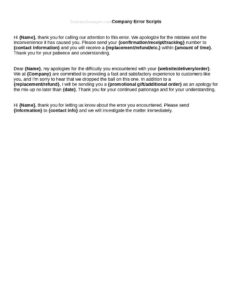
Company Error Scripts
Download free Company Error Scripts to help your team apologize, explain, and resolve customer-facing mistakes consistently—free template in PDF and DOCX.
DOCX
1 downloads
0
likes
Download Files
- DOCX
Company Error Scripts are ready-made talking points your team uses when your business makes a mistake that affects a customer—such as a billing error, shipping delay, or service outage. The single most common reason people use them is to deliver a consistent, professional apology and recovery message instead of improvising under pressure. You can download these Company Error Scripts free in PDF and DOCX, with no signup required.
What Are Company Error Scripts?
Company Error Scripts are pre-written communication templates that guide employees through acknowledging a company mistake, apologizing, explaining what happened, and outlining the resolution. They are typically created by customer service, support, or operations leaders and used by frontline staff across phone, email, live chat, and in-person interactions. Rather than dictating word-for-word robotic responses, well-built error scripts provide a reliable framework—opening acknowledgment, empathy statement, explanation, corrective action, and follow-up—that keeps tone consistent with your brand. They document how your organization wants to handle service recovery so that every customer receives a fair, calm, and accountable response no matter which team member they reach.
When Do You Need Company Error Scripts?
Mistakes are inevitable, but the way you respond determines whether a customer stays loyal or leaves. Company Error Scripts are useful in many recurring situations:
- Billing and invoicing errors—overcharges, duplicate charges, or incorrect totals that need a fast, apologetic correction.
- Shipping and fulfillment problems—wrong items, late deliveries, lost packages, or canceled orders.
- Service outages or downtime—when a website, app, or service is unavailable and customers need reassurance.
- Appointment or scheduling mix-ups—double bookings, missed appointments, or staffing shortfalls.
- Quality issues—a defective product, incomplete work, or a service that fell short of expectations.
- Data or privacy concerns—a minor disclosure or account issue that requires a careful, transparent explanation.
Types of Error Scripts to Include
A strong script library covers more than one scenario. Consider building separate scripts for phone calls, where tone of voice matters most; email replies, where written clarity and a clear resolution are key; and live chat, where speed and brevity count. You may also want a tiered approach: a quick-fix script for low-impact errors, a more detailed script for significant disruptions, and an escalation script for situations that require a manager or refund authorization. Grouping scripts by severity helps employees choose the right response quickly.
What Company Error Scripts Should Have
Effective error scripts share a common structure that keeps responses complete and on-brand. Each script should include:
- A clear, sincere acknowledgment of the mistake without defensiveness or blame.
- An empathy statement that recognizes the customer’s frustration or inconvenience.
- A brief, honest explanation of what happened—enough to be transparent, not so much that it sounds like an excuse.
- A specific corrective action and timeline, so the customer knows what you’ll do and when.
- An optional goodwill gesture (refund, credit, discount) where appropriate, with guidance on who can authorize it.
- A closing that confirms next steps, invites further questions, and thanks the customer for their patience.
How to Fill Out Company Error Scripts
Because this template is a flexible framework, adapt each section to your business before distributing it to your team:
- Name the scenario. Label each script clearly (for example, “Billing Overcharge—Phone”) so staff can find the right one fast.
- Write the opening acknowledgment. Insert your company name and a sincere line that takes ownership of the error.
- Add the empathy statement. Customize phrasing to match your brand voice—warm, formal, or friendly.
- Fill in the explanation. Provide a short, truthful summary placeholder employees can tailor to the specific incident.
- Define the resolution. Spell out the corrective steps, timelines, and any compensation limits.
- Set escalation rules. Note when to transfer to a supervisor and which authorizations require approval.
- Add a closing and follow-up line. Confirm next steps and how the customer can reach you again.
- Review and approve. Have a manager sign off before the scripts go live.
Tips for Using Error Scripts Well
Scripts are guides, not cages. Train staff to read the customer’s tone and personalize the language so the apology feels genuine rather than canned. Encourage employees to use the script’s structure—acknowledge, empathize, explain, resolve—while choosing their own natural words. Keep the documents accessible in a shared folder or help-desk tool, and review them regularly as products, policies, and common error types change. Pair the scripts with clear authority limits so frontline staff know exactly what they can offer without waiting on approval, which speeds up resolution and reduces customer frustration.
Service Recovery and Follow-Up
The conversation is only half the job. After delivering an error script, log the incident, complete the promised corrective action, and follow up to confirm the customer is satisfied. A short follow-up message—”We’ve issued your refund and wanted to confirm everything is resolved”—often does more for loyalty than the original apology. Track recurring error types so leadership can fix root causes rather than repeatedly apologizing for the same problem. Good error scripts feed a feedback loop that steadily improves both communication and operations.
Common Mistakes to Avoid
- Sounding robotic. Reading word-for-word with no warmth makes apologies feel insincere.
- Over-explaining. Long technical justifications can read as excuses; keep explanations brief and honest.
- Promising what you can’t deliver. Never offer a refund or timeline the company can’t honor.
- Skipping ownership. Avoid blaming the customer, a vendor, or “the system” instead of taking responsibility.
- Forgetting follow-up. An apology with no completed resolution erodes trust further.
- Letting scripts go stale. Outdated policies or product names make staff sound out of touch.
Frequently Asked Questions
What are Company Error Scripts used for? They give your team a consistent framework for responding when the company makes a mistake that affects a customer. The goal is to acknowledge the error, apologize sincerely, explain briefly, and resolve the issue. Used well, they turn a negative experience into an opportunity to rebuild trust.
How do I fill out and customize these scripts? Start by labeling each scenario, then insert your company name and brand voice into the acknowledgment, empathy, explanation, resolution, and closing sections. Add escalation rules and compensation limits so staff know what they can offer. Have a manager review the final versions before rolling them out to your team.
Should staff read the scripts word-for-word? No—treat them as a guide, not a rigid script. Employees should follow the structure while personalizing the language to sound natural and genuine. The framework ensures nothing important is missed while still allowing real human conversation.
Are these error scripts legally binding? No. They are internal communication tools, not contracts. However, any commitments your staff make using them—such as refunds or credits—may create real obligations, so set clear authority limits and review wording with your team.
How much do these Company Error Scripts cost? They are completely free to download here in both PDF and DOCX formats, with no signup or payment required. You can edit the DOCX version to match your brand voice, policies, and common error types.
How often should we update our error scripts? Review them whenever products, pricing, policies, or common problem types change—at minimum once or twice a year. Regular updates keep the language accurate and prevent staff from sounding out of date. Use real incident data to refine which scripts you need most.
This template is a general example provided for informational purposes only and does not constitute legal, financial, or professional advice. Communication and disclosure requirements vary by industry and jurisdiction—consult a qualified professional before relying on any scripted statement that involves customer obligations, refunds, or sensitive information.
Related Forms
- Business Outgoing Message Scripts
- Appointment Reminder Scripts
- Cold Call Scripts
- Company Confirmation Scripts
Browse more in Script.