
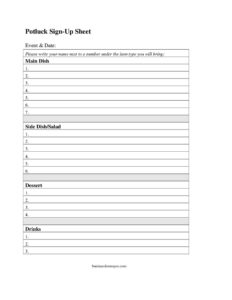
Potluck Sign Up Sheet
Organize your event with a free Potluck Sign Up Sheet template, sorting dishes by category so everyone knows what to bring — free download in PDF and DOCX.
PDF
DOCX
2 downloads
0
likes
Download Files
- DOCX
A Potluck Sign Up Sheet is a simple organizing form that lets guests claim what they will bring to a shared meal, so you end up with a balanced spread instead of ten desserts and no main dishes. People use it most often to coordinate office parties, church gatherings, classroom celebrations, and family holidays. It is free to download here in both PDF and DOCX formats — no signup required.
What Is a Potluck Sign Up Sheet?
A Potluck Sign Up Sheet is a single-page coordination tool used by whoever is hosting or organizing a shared meal. It documents the event and date at the top, then divides the contributions into clear categories — main dish, side dish or salad, dessert, and drinks — so participants can write their name next to a number under the type of food they plan to bring. The host typically posts it in a break room, passes it around a meeting, or shares a printed copy. Its purpose is to prevent duplication, guarantee variety, and give the organizer a clear headcount of who is contributing what before the day arrives.
When Do You Need a Potluck Sign Up Sheet?
Any time several people are pooling food for a single event, a sign up sheet keeps the meal balanced and the planning stress-free. Common situations include:
- Office and workplace parties — holiday lunches, retirement celebrations, or Friday team meals where coworkers each contribute a dish.
- Church and community gatherings — fellowship dinners, fundraisers, and congregation events that rely on volunteer cooking.
- Classroom and school functions — teacher appreciation lunches, room-parent celebrations, or end-of-year parties.
- Family reunions and holidays — Thanksgiving or Christmas where relatives divide up the cooking duties.
- Club, team, and neighborhood events — sports banquets, book club meetings, or block parties.
- Housewarmings and welcome gatherings — informal get-togethers where guests want to pitch in rather than have one person cook everything.
What a Potluck Sign Up Sheet Should Have
A complete and useful sheet keeps things organized at a glance. At minimum it should include the event name and date so there is no confusion about which gathering the sheet covers. It should clearly label each food category — main dish, side dish or salad, dessert, and drinks — with numbered lines under each so the host can see how many contributions exist in every category. Each line needs space for a guest to write their name and, ideally, the specific item they are bringing. A short instruction line at the top (“please write your name next to a number under the item type you will bring”) removes any guesswork for first-time signers.
How to Fill Out a Potluck Sign Up Sheet
- Fill in the event and date. The organizer writes the event name and the date at the top so everyone knows exactly which gathering they are signing up for.
- Read the instruction line. Note the prompt to write your name next to a number under the item type you intend to bring.
- Choose a category. Decide whether you will bring a main dish, a side dish or salad, a dessert, or drinks based on which columns still have open slots.
- Write your name on an open number. Find an unclaimed numbered line under your chosen category and print your name clearly.
- Add the specific item. Where space allows, note exactly what you will bring (for example, “baked ziti” or “garden salad”) so no two people duplicate.
- Scan the full sheet. Before finalizing, glance across all categories to keep the meal balanced — if drinks are empty and desserts are full, consider switching.
Tips for a Balanced Potluck
The biggest advantage of a sign up sheet is variety, so use it deliberately. Set a rough target number of slots per category based on your guest count — a gathering of twenty people generally needs several main dishes, plenty of sides, a handful of desserts, and a few people on drinks. As the organizer, you can pre-fill one or two slots yourself to model what good entries look like. If you are sharing the sheet digitally, take a photo of the latest version and resend it so guests always see current claims. Encouraging people to list the actual dish, not just the category, dramatically cuts down on three people all bringing the same potato salad.
Printed vs. Digital Sign Up Sheets
A printed Potluck Sign Up Sheet works beautifully for in-person settings — a break room counter, a classroom door, or a clipboard passed around a meeting. It requires no technology and everyone can see at a glance what is still needed. The DOCX version is handy when you want to type in the event details, adjust the number of slots per category, or email the sheet for people to fill in and return. For larger or remote groups, you might transfer the same categories into a shared online document, but the structure stays identical: event and date at the top, named numbered slots under each food type.
Common Mistakes to Avoid
- Leaving off the event and date — without them, a posted sheet creates confusion when multiple events overlap.
- Only writing names, not items — this leads to duplicate dishes and missing essentials.
- Forgetting dietary needs — note allergies or vegetarian options so there is something for everyone.
- Not setting category targets — without guidance, everyone gravitates to easy desserts and drinks.
- Posting it too late — share the sheet early so guests have time to plan and shop.
- Overlooking serving supplies — add a line for plates, cups, or utensils if the venue does not provide them.
Frequently Asked Questions
What is a Potluck Sign Up Sheet used for? It is used to coordinate who brings what to a shared meal, organizing contributions into categories like main dishes, sides, desserts, and drinks. This prevents duplicate dishes and ensures the spread is balanced. The host posts or shares it so guests can claim a slot in advance.
How do I fill out a Potluck Sign Up Sheet? Read the event and date at the top, pick a food category that still has open slots, and write your name on an available numbered line. Where space allows, add the specific dish you plan to bring. Then double-check the whole sheet so the meal stays varied.
How many slots should each category have? It depends on your guest count, but a good rule is to plan more side dishes and mains than desserts, with a few people covering drinks. For a group of twenty, you might set out several main-dish lines, a generous number of side lines, and a handful for desserts and drinks. Adjust the slots to match how many people you expect.
Can I customize the categories on this template? Yes. The DOCX version lets you rename or add categories — for example, adding “appetizers,” “bread/rolls,” or “serving supplies” — and change how many numbered slots appear under each. The PDF is ready to print as-is for a quick, no-edit option.
Is this Potluck Sign Up Sheet free to download? Yes, it is completely free to download in both PDF and DOCX formats with no signup or account required. You can print as many copies as you need or edit the editable version for your specific event. Use it for any number of gatherings at no cost.
Should I include dietary information on the sheet? It is a smart practice, especially for larger or mixed groups. Consider adding a note encouraging guests to label items as vegetarian, gluten-free, or nut-free, or include a short notes line. This helps everyone find something safe and enjoyable to eat.
This template is provided as a general example for informational and organizational purposes only and is not professional advice. Food safety, allergy, and event requirements vary by setting and location, so use your own judgment and consult appropriate guidelines when handling shared food at any gathering.
Related Forms
- Daily Conference Room Reservation
- Gifts Received List
- Conference Agenda
- Class Registration Form
- Sign Up Sheet Name and Date
- IT Request Form
Browse more in Sign In / Sign Up Sheets.