
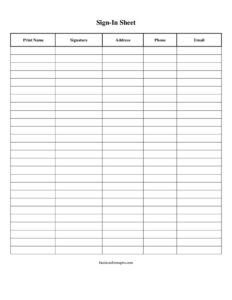
Sign In Sheet
Free printable sign-in sheet in PDF & DOCX with space for names and contact info. Great for events, meetings, and visitors — download and print.
PDF
DOCX
4 downloads
0
likes
Download Files
- DOCX
A sign-in sheet is a simple form that records who attended an event, meeting, or visit, along with their contact details. This basic version has room for names, signatures, and contact information. Download it free in PDF or DOCX and print. No signup or email required.
What Is a Sign-In Sheet?
A sign-in sheet is a single-page log where each attendee writes their name and details as they arrive. It creates a quick, dated record of who was present — useful for attendance counts, follow-up, safety head-counts, and proof that someone showed up. Because it’s filled in by hand on arrival, it doubles as a lightweight contact list you can reference afterward. There’s no software to set up and nothing to charge: you print it, put it on a clipboard or table, and you’re ready.
Common Uses for a Sign-In Sheet
The same basic form adapts to many situations:
- Attendance at meetings, classes, training sessions, and workshops
- Visitor logs at a front desk or office reception
- Events and open houses, where you also collect contact details
- Volunteers, vendors, and contractors checking in on site
- Safety and compliance head-counts, where knowing exactly who is present matters
When Do You Need a Sign-In Sheet?
- Tracking attendance at a meeting, class, training, or workshop
- Logging visitors at a front desk or office
- Collecting contact details at an open house or event
- Recording volunteers, vendors, or contractors on site
- Keeping a head-count for safety or compliance
How to Fill Out a Sign-In Sheet
- Add a title, the event or meeting name, and the date at the top.
- As each person arrives, have them print their name in the first column.
- Have them add a signature to confirm attendance.
- Collect contact details — address, phone, and email — in the remaining columns.
- Keep the columns wide enough to write in clearly, and start a new sheet if you run out of rows.
- File the completed sheet for your records or follow-up.
How to Make Your Own Sign-In Sheet
The fastest route is to use a ready-made template like the one above, but you can also build your own. In Word or Google Docs, insert a table and label the columns (Name, Signature, Phone, Email), then add as many rows as you expect attendees. In Excel or Google Sheets, put the headings in the top row and widen the columns so handwriting fits. Add your event name and date to the header, print, and you’re done. A template just saves you the setup and keeps the spacing consistent every time.
A Note on Privacy
A sign-in sheet often collects personal information, so handle it responsibly. Only ask for the details you’ll actually use — a name and one contact method is enough for most purposes. Don’t leave a completed sheet on display where others can copy contact details, and store it securely afterward. If you’re collecting information for marketing, be transparent about it.
Common Mistakes to Avoid
- Columns too narrow to read handwriting later
- No date or event name, so the sheet is hard to identify afterward
- Collecting more personal information than you actually need
- Leaving the sheet unattended where details can be copied
- Not starting a second page when the first fills up
Paper vs. Digital Sign-In Sheets
A printed sheet on a clipboard is instant, works without power or Wi-Fi, and needs no instructions — which is why it’s still the default for classes, events, and front desks. Digital sign-ins, like a tablet or a QR code linking to a form, capture typed, legible details and drop them straight into a spreadsheet, but they depend on a device and a connection. Many organizers keep a printed sheet as a reliable backup even when they offer a digital option, so no one is turned away by a dead battery or a weak signal.
What to Include for Different Events
Tailor the columns to the situation. A class or meeting may only need name and signature. A visitor log often adds “company,” “who you’re visiting,” and “time in/out.” An event collecting leads might include email and how the guest heard about you. A safety or evacuation list needs a name and a way to confirm everyone is accounted for. Start from the basic template and add or remove columns so you collect exactly what you’ll use — no more, no less.
After the Event
Once the sheet is full, store it securely and use it promptly — enter contacts into your list, confirm attendance, or file it for compliance. Completed sheets that sit around lose their value and create a privacy risk, so handle them while the information is still fresh and then keep them somewhere only the right people can reach.
Frequently Asked Questions
What is a sign-in sheet? It’s a form attendees fill in on arrival to record who was present, usually with their name, signature, and contact details.
How do I make a sign-in sheet? The fastest way is to download a ready-made template, add your event name and date, and print. You can also build one in Word, Google Docs, or Excel using a table with columns for name and contact info.
Where can I find a free sign-in sheet template? Right here — this printable sign-in sheet is free in PDF and DOCX, with no signup required.
Can I edit the sign-in sheet? Yes. The DOCX version lets you rename columns, add a logo, or adjust the number of rows.
What should a sign-in sheet include? At minimum a title, date, and columns for name and one contact method; add signature, address, phone, or email as your situation requires.
Do attendees have to sign in person? For attendance or safety records, yes — a personal signature is what makes the sheet a reliable record of who was actually present. For a simple contact list, a printed name and one contact detail are usually enough.
Related Forms
Sign-Up Sheet · Meeting Sign In Sheet · Visitor Log · Open House Sign In Sheet · Volunteer Sign Up Sheet
This template is provided for general use. If you collect personal contact information, handle and store it in line with applicable privacy rules.
Related Forms
- Gifts Sent List
- Childcare Check-In Sheet
- Daily Conference Room Reservation
- Child Care Sign In Sheet
- Potluck Sign-Up
- Group Meeting Attendance Log
Browse more in Sign In / Sign Up Sheets.