
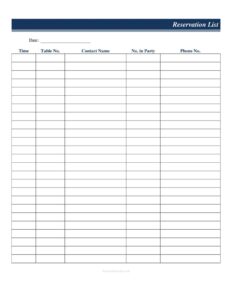
Restaurant Reservation List
Download a free Restaurant Reservation List template to track bookings, table assignments, and party sizes — free PDF and DOCX download, no signup.
PDF
DOC
4 downloads
0
likes
Download Files
- DOC
A Restaurant Reservation List is a simple tracking sheet that records every booking for a service period, capturing the date, time, table number, guest name, party size, and phone number in one organized place. Most restaurants use it to coordinate seating and avoid double-booked tables during busy shifts. It’s free to download here in both PDF and DOCX formats, with no signup required.
What Is a Restaurant Reservation List?
A Restaurant Reservation List is a front-of-house document used by hosts, managers, and reservation staff to log incoming bookings and plan the floor for an upcoming service. It consolidates the essential details of each reservation — when guests are arriving, where they’ll sit, how many people are in the party, and how to reach them — onto a single, scannable page. Rather than relying on scattered notes or memory, the host stand keeps this list at hand to seat guests smoothly, manage table turns, and confirm bookings by phone. It works for fine dining rooms, casual cafes, banquet halls, and small bistros alike, and it functions equally well printed on paper or filled in digitally before a shift.
When Do You Need a Restaurant Reservation List?
This sheet earns its keep any time bookings need to be tracked and seated in an orderly way. Common situations include:
- Busy weekend dinner services when multiple parties arrive within the same window and tables must be assigned in advance.
- Holiday and special-event nights such as Valentine’s Day, Mother’s Day, or New Year’s Eve, where reservations sell out and accuracy matters.
- Large party bookings that require pushing tables together or reserving a section for a group.
- Confirmation call rounds, where staff phone guests the day of service to verify they’re still coming and reduce no-shows.
- Shift handovers, when one host leaves and another takes over and needs an instant snapshot of who is booked and where.
- Small restaurants without booking software that need a low-cost, reliable way to manage reservations on paper.
What a Restaurant Reservation List Should Have
A complete reservation list keeps the host stand running without confusion. The most useful versions include a clear date and time for each booking so the floor can be sequenced; a table number so the assignment is locked in; the contact name the booking was made under; the number in party so the correct table size is chosen; and a phone number for confirmations or last-minute changes. Together these fields turn a stack of phone calls into a manageable seating plan. Leaving space at the top for the service date or shift label, and keeping rows in chronological order by time, makes the list even easier to read at a glance during a rush.
How to Fill Out a Restaurant Reservation List
Work through the sheet one booking per row, filling each field as the reservation comes in:
- Date: Enter the calendar day the reservation is for. If the list covers a single shift, write the date once at the top and use the column for confirmation.
- Time: Record the requested arrival time, such as 7:00 PM. Listing reservations in time order helps the host pace seatings.
- Table No.: Assign the specific table for the party. For large groups, note the combined tables (for example, “12 + 14”).
- Contact Name: Write the name the booking is held under, ideally a last name plus first initial to avoid mix-ups.
- No. in Party: Enter the headcount so staff set the right number of covers and choose a suitable table.
- Phone No.: Capture a reachable number for confirmation calls, waitlist updates, or notifying guests of a delay.
Keep the completed list at the host stand and update it live as walk-ins fill tables or cancellations free them up.
Tips for Managing Reservations Smoothly
A reservation list works best when paired with a few habits. Read the full list at the start of each shift so you know your busiest windows before the doors open. Build in realistic table-turn times — if a 6:30 PM party books a four-top, you may not be able to seat the same table again until 8:00 PM. Highlight large parties and special requests (birthdays, allergies, accessibility needs) so the kitchen and servers are prepared. Finally, make confirmation calls a routine: a quick check using the phone numbers on the list can dramatically cut no-shows on high-demand nights and free tables for the waitlist if a booking falls through.
Reservation List vs. Waitlist
It’s worth distinguishing a reservation list from a walk-in waitlist. A reservation list records bookings made in advance with a committed table and time, while a waitlist tracks guests who arrive without a booking and are seated as tables open up. Many host stands keep both side by side: the reservation list reserves capacity, and the waitlist fills the gaps. Knowing which guests hold a confirmed table and which are waiting helps you set expectations on quoted wait times and avoid seating a walk-in at a table promised to a 7:30 PM reservation.
Common Mistakes to Avoid
- Skipping the phone number, which leaves no way to confirm bookings or reach guests about delays and changes.
- Recording party size incorrectly, leading to a table that’s too small or wasted seats during peak demand.
- Assigning the same table to overlapping times without accounting for how long the first party will stay.
- Illegible handwriting on names or times, which causes confusion at the host stand during a rush.
- Failing to update the list live as cancellations, no-shows, and walk-ins change the floor throughout service.
- Not noting special requests like high chairs, anniversaries, or accessibility needs alongside the booking.
Frequently Asked Questions
What is a Restaurant Reservation List used for? It is used to log advance bookings and plan table seating for a service period. By capturing the date, time, table, name, party size, and phone number, it helps hosts seat guests in order and avoid double-booking the same table.
How do I fill out a Restaurant Reservation List? Enter one booking per row, filling in the date, requested time, assigned table number, the contact name, the number of guests, and a reachable phone number. Keep rows in time order and update the sheet as bookings change throughout the shift.
Is this template free to download? Yes. The Restaurant Reservation List is completely free to download here in both PDF and DOCX formats, with no signup or payment required. You can print it as-is or edit the DOCX version to match your restaurant.
Can I customize the columns for my restaurant? Absolutely. The DOCX version lets you add columns for special requests, deposit status, server section, or a confirmation checkbox. Tailor the layout to fit how your host stand actually operates.
Do I need reservation software to use this? No. This list is designed for restaurants that prefer a simple paper or printable system, and it also works as a backup if your booking software goes down. Many small venues rely on it exclusively.
How does this differ from a sign-in sheet? A sign-in sheet records guests as they arrive, while a reservation list plans bookings in advance with assigned tables and times. The reservation list is forward-looking and helps you prepare the floor before guests walk through the door.
This template is provided as a general example for informational purposes only and does not constitute legal, financial, or business advice. Operational and record-keeping requirements vary by location and establishment — consult a qualified professional for guidance specific to your restaurant.
Related Forms
- Mailing List Sign Up Sheet
- Vendor Registration Form
- Sign In Sheet
- Conference Agenda
- Patient Sign In Sheet
- Group Meeting Attendance Log
Browse more in Sign In / Sign Up Sheets.