
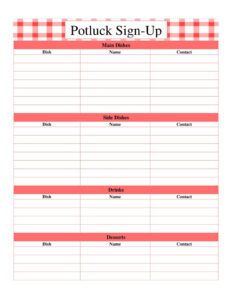
Potluck Sign-Up
Organize your next gathering with a free Potluck Sign-Up sheet template that tracks dishes, names, and contacts — free download in PDF and DOCX.
PDF
DOCX
0
likes
Download Files
- DOCX
A Potluck Sign-Up sheet is a simple organizing tool that lets guests claim what they will bring to a shared meal, grouped by category so you avoid ending up with twelve desserts and no main dishes. Whether it’s an office party, a church gathering, a family reunion, or a classroom celebration, this form keeps everyone coordinated. It’s completely free to download in PDF and DOCX, with no signup required.
What Is a Potluck Sign-Up?
A Potluck Sign-Up is a planning sheet used by an event host or organizer to coordinate a communal meal where each attendee contributes a dish. Instead of one person cooking everything, guests divide responsibility across categories like main dishes, side dishes, drinks, and desserts. The sheet records what each person is bringing along with their name and contact information, giving the host a clear, balanced menu at a glance. It is not a contract or formal document — just a friendly, practical way to make sure the food spread is varied, the workload is shared, and nothing important gets forgotten. Hosts often print it for in-person gatherings or share a digital copy ahead of time.
When Do You Need a Potluck Sign-Up?
Any time several people are pooling food for one event, a sign-up sheet saves you from awkward duplicates and gaps. Common situations include:
- Office and workplace gatherings — holiday parties, team lunches, or a farewell celebration where coworkers each bring a dish.
- Church and community events — fellowship meals, fundraisers, or after-service luncheons that rely on many contributors.
- Family reunions and holidays — Thanksgiving, Christmas, or birthday gatherings where relatives coordinate who handles the turkey, the sides, and the pies.
- School and classroom parties — teachers asking parents to sign up for snacks, drinks, and treats for a class event.
- Neighborhood and club functions — block parties, book club meetings, or sports team get-togethers.
- Housewarmings and casual dinner parties — when friends want to share the cooking rather than burden a single host.
What a Potluck Sign-Up Should Have
An effective potluck sheet is organized so the menu stays balanced and contact follow-up is easy. The essentials include clearly labeled food categories — typically main dishes, side dishes, drinks, and desserts — so guests can see at a glance which areas still need coverage. Under each category there should be space for the specific dish being brought, the contributor’s name, and a way to reach them. A good sheet also leaves room for several entries per category and is easy to read whether printed or viewed on a screen. The version offered here covers all four core categories with dish, name, and contact fields for each.
How to Fill Out a Potluck Sign-Up
Filling out this sheet is quick. Follow these steps to claim your contribution:
- Review the categories first. Scan the four sections — Main Dishes, Side Dishes, Drinks, and Desserts — to see what’s already taken and where help is still needed.
- Pick a category that needs coverage. If everyone has signed up for desserts but no one has a main dish, choose accordingly to keep the meal balanced.
- Enter the dish. In the Dish field for your chosen category, write specifically what you’ll bring — for example, “vegetable lasagna” rather than just “casserole.”
- Add your name. Fill in the Name field so the host knows who is responsible for that item.
- Provide your contact. In the Contact field, list a phone number or email so the organizer can reach you with questions, timing, or last-minute changes.
- Repeat if you’re bringing more than one item. Sign up under each relevant category — for instance, a drink and a dessert.
- Confirm with the host. Once the sheet is complete, the organizer can post or circulate it so everyone sees the final lineup.
Tips for a Well-Balanced Potluck
The whole point of a sign-up sheet is variety, so a little guidance goes a long way. As host, decide ahead of time roughly how many of each category you want — for a group of twenty you might aim for four mains, six sides, three drink contributions, and four desserts. Encourage guests to be specific in the dish field; “chicken curry” tells you more than “chicken.” Consider noting dietary needs such as vegetarian, gluten-free, or nut-free options near the relevant entries so guests with restrictions are accounted for. If your event has a theme or cuisine, mention it when you share the sheet. Finally, ask people to bring serving utensils for their own dishes, since hosts frequently run short.
Sharing and Managing the Sign-Up
For an in-person event, print the sheet and post it somewhere central — a break room, bulletin board, or sign-in table — so people can add their names as they arrive or in the days leading up. For remote coordination, the DOCX version is easy to edit and email around, letting contributors type their entries before sending it back. Either way, keep one master copy so you always have the latest list. The contact fields are especially useful in the final day or two before the event, when you may need to confirm head counts, adjust quantities, or remind someone about a missing item.
Common Mistakes to Avoid
- Leaving the dish field vague. “Salad” or “dessert” makes it hard to plan; specifics prevent surprises and duplicates.
- Skipping the contact field. Without a phone or email, the host can’t follow up on timing or changes.
- Overloading one category. If everyone signs up for desserts, balance the meal by steering people toward mains and sides.
- Not circulating the sheet early enough. Last-minute sign-ups lead to gaps and forgotten basics like plates and ice.
- Ignoring dietary needs. Failing to flag allergens or vegetarian options can leave guests with nothing to eat.
- Forgetting serving gear. Dishes show up without spoons, tongs, or napkins because no one assigned them.
Frequently Asked Questions
What is a Potluck Sign-Up sheet used for? It is used to coordinate a shared meal by letting each guest record what dish they’ll bring, grouped into categories like mains, sides, drinks, and desserts. This prevents duplicates and gaps so the host ends up with a balanced spread. It also captures contact details for easy follow-up.
How do I fill out the Potluck Sign-Up? Choose a food category that still needs coverage, write the specific dish you plan to bring, add your name, and provide a phone number or email in the contact field. If you’re bringing more than one item, simply sign up under each relevant category. Being specific about your dish helps the host plan.
Is this Potluck Sign-Up template free? Yes. You can download it free from Business Forms Pro in both PDF and DOCX formats with no signup required. Use it as many times as you like for any event.
Can I edit the categories on the sheet? Absolutely. The DOCX version is fully editable, so you can rename categories, add new ones like “appetizers” or “breads,” or adjust the number of rows to match your group size. The PDF works well if you prefer to print and fill it in by hand.
How should I share the sign-up with guests? For in-person events, print it and post it somewhere central so people can add their names. For remote planning, email the DOCX file and have everyone type their entries, then keep one master copy as the official list.
Do I need to collect contact information? It’s optional but highly recommended. Having a phone number or email lets you confirm quantities, share timing details, or remind someone about a forgotten dish in the day or two before the event.
This Potluck Sign-Up template is provided as a general example for informational and organizational purposes only and does not constitute legal, dietary, or food-safety advice. Always follow safe food handling practices and accommodate guests’ allergies and dietary restrictions as needed.
Related Forms
- Workshop Registration Form
- Daily Conference Room Reservation
- Meeting Sign In Sheet
- Weekly Conference Room Reservation
- Gifts Received List
- Gifts Sent List
Browse more in Sign In / Sign Up Sheets.