
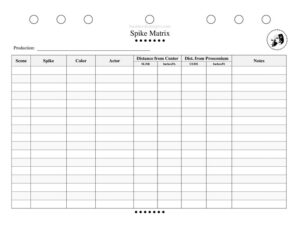
Spike Matrix
Track every set piece, prop, and actor spike position with the Spike Matrix template - keep blocking consistent night after night with a free download.
PDF
DOCX
5 downloads
0
likes
Download Files
- DOCX
A Spike Matrix is a stage-management tool that records the exact placement of every set piece, prop, and actor position on stage using spike (tape) marks. Crews use it most often to reset the stage identically for every rehearsal and performance, so blocking, lighting, and scene changes stay consistent. It’s free to download here in PDF and DOCX, with no signup required.
What Is a Spike Matrix?
A Spike Matrix is a structured chart, usually maintained by the stage manager or assistant stage manager, that documents where each spike mark sits on the stage floor. Instead of relying on memory or a marked-up ground plan alone, it translates positions into measurable coordinates – distance from center line and distance from the proscenium – along with a color code for the spike tape. It documents what each mark represents (a sofa, a chair, an actor’s entrance position) and which scene it belongs to. The matrix becomes a single reference that any crew member can use to reset the deck quickly and accurately, performance after performance.
When Do You Need a Spike Matrix?
Whenever a production has scenery, furniture, or blocking that must land in the same spot repeatedly, a written record beats guesswork. Common scenarios include:
- Tech rehearsals: establishing and confirming the position of every set piece and prop as cues are set.
- Multi-scene shows: tracking different spike colors for different scenes so the crew knows which marks apply at any moment.
- Quick scene changes: giving the run crew exact coordinates so heavy or awkward pieces land correctly in the dark.
- Touring or remounting a production: recreating the same layout on a new stage by measuring from center and proscenium.
- Actor safety and choreography: recording where performers must stand for lighting specials, fights, or dance numbers.
- Understudy and swing rehearsals: teaching new cast members precise positions without rebuilding the staging from scratch.
What a Spike Matrix Should Have
A useful matrix balances detail with speed of reading. Each entry should clearly identify the production and scene, name the item being spiked, and record a color so the mark on the floor matches the chart. The heart of the document is the measurement system: a horizontal coordinate (how far left or right of the center line) and a depth coordinate (how far upstage or downstage of the proscenium). A notes column captures anything that doesn’t fit a cell – shared marks, glow tape, or special handling. When all of these are present, the matrix lets anyone reset the deck without supervision.
How to Fill Out a Spike Matrix
- Production: Enter the show’s title at the top so the matrix is filed with the correct prompt book.
- Scene: Note the scene or act the spike applies to, especially for shows with changing layouts.
- Spike: Name the item being marked – for example “sofa SR leg,” “writing desk,” or “Act 2 table.”
- Color: Record the tape color assigned to that piece or scene so the floor mark and chart agree.
- Actor: If the mark is a standing position, list the character or performer it serves.
- Distance from Center: Measure how far the mark sits from the center line.
- SL/SR: Indicate whether that distance runs stage left or stage right.
- Inches/Ft.: State the unit so the measurement reads cleanly.
- Dist. from Proscenium: Measure the depth from the proscenium (or plaster) line.
- US/DS: Mark whether that depth is upstage or downstage of the reference line.
- Inches/Ft: Record the depth unit to match.
- Notes: Add reminders – shared spike, partner piece, glow tape, or “strike after Scene 3.”
Measuring and Color-Coding Tips
Consistency is what makes a Spike Matrix trustworthy. Always measure from the same reference points – the center line for left-right and the proscenium or plaster line for upstage-downstage – and pick one unit convention you stick with across the whole document. Many stage managers spike a piece at two points (each visible corner or both legs) so it can’t rotate, and the matrix should reflect both marks. A clear color system helps the crew read the floor at a glance: assign one color per scene, or one color per major set piece, and write that key into the notes or a legend. Glow tape entries deserve a note so the crew knows which marks must read in a blackout.
Keeping the Matrix Current
A matrix is only as good as its last update. Positions shift during tech as the director refines blocking and the lighting designer focuses specials, so revise entries the moment a change is locked rather than relying on memory after rehearsal. Date your versions and keep the matrix with the prompt book and ground plan so the whole package travels together. When the show moves to a new venue, the recorded measurements let you re-spike the deck efficiently, then verify each position against sightlines and lighting once you’re in the new space.
Common Mistakes to Avoid
- Mixing measurement references: measuring some marks from center and others from a wall makes coordinates unreliable.
- Skipping the unit: leaving Inches/Ft. blank invites confusion between feet and inches.
- Forgetting SL/SR or US/DS: a distance without a direction places the piece on the wrong side of the stage.
- Reusing colors carelessly: if two scenes share a color, the crew may set the wrong layout.
- Not updating after blocking changes: an out-of-date matrix is worse than none because the crew trusts it.
- Vague item names: “chair” is useless when three chairs are on stage – specify which.
Frequently Asked Questions
What is a Spike Matrix used for? It records the exact floor position of every set piece, prop, and actor mark so the stage can be reset identically for each rehearsal and performance. Stage managers use it to keep blocking, lighting, and scene changes consistent and to recreate the layout when a show transfers to a new venue.
Who fills out the Spike Matrix? Usually the stage manager or assistant stage manager completes and maintains it, often during tech rehearsals as positions are finalized. The run crew then uses it to reset the deck during scene changes and before each performance.
What do center line and proscenium mean on the form? The center line is the imaginary vertical line down the middle of the stage, used to measure how far left (SL) or right (SR) a mark sits. The proscenium or plaster line is the reference at the front of the stage, used to measure how far upstage (US) or downstage (DS) a mark sits.
Why does each spike need a color? Color coding lets the crew read the floor instantly – typically one color per scene or per set piece – so they set only the marks that apply at a given moment. Recording the color in the matrix keeps the chart and the taped floor in agreement.
Is a Spike Matrix the same as a ground plan? No. A ground plan is a scaled drawing of the set from above, while a Spike Matrix is a measured list that translates positions into exact coordinates. They work together: the ground plan shows the picture, and the matrix gives the precise numbers for re-spiking.
How much does this template cost? It’s completely free to download here in both PDF and DOCX formats, with no signup required. You can print it for backstage use or open the DOCX to customize columns, add a color legend, or tailor it to your production.
This Spike Matrix template is a general example provided for informational purposes only and is not professional production, safety, or technical advice. Stage practices, measurement conventions, and venue requirements vary – confirm procedures with your production team and venue, and consult qualified theater professionals for your specific show.
Related Forms
- Preliminary Props List
- Costume Information Sheet
- Audition Checklist
- Script Breakdown
- Comp Ticket Tracker
- Understudy Tracker
Browse more in Theater.