
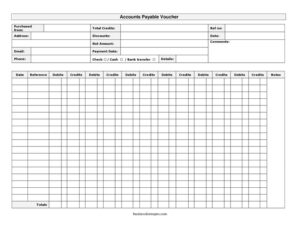
Accounts Payable Invoice
Track and process vendor bills with the Accounts Payable Invoice template, with fields for debits, credits, and payment terms — free download in PDF and DOCX.
PDF
DOC
2 downloads
0
likes
Download Files
- DOC
An Accounts Payable Invoice is the document your business uses to record, verify, and process a bill received from a supplier before payment is made. People most often reach for it to organize incoming vendor charges and keep an accurate running balance of what is owed. It’s free to download here in both PDF and DOCX formats — no signup required.
What Is an Accounts Payable Invoice?
An Accounts Payable Invoice is a record created or logged by the buyer’s finance or bookkeeping team to capture the details of a purchase made on credit. While a vendor issues a sales invoice, the accounts payable version is the internal-facing document used to match that bill against a purchase order, apply any discounts or credits, and schedule payment. It documents who the goods or services were purchased from, the amount due, applicable debits and credits, and a reference number for tracking. In short, it’s the working sheet that turns an incoming bill into an organized, payable, and auditable transaction within your accounting system.
When Do You Need an Accounts Payable Invoice?
This form is useful any time your company buys on terms rather than paying immediately. Common situations include:
- Logging a supplier bill after receiving inventory, materials, or office supplies on net-30 or net-60 terms.
- Recording a service provider’s invoice — such as a contractor, consultant, or maintenance vendor — before cutting a check.
- Applying a vendor credit memo or early-payment discount against an outstanding balance.
- Reconciling a statement that lists multiple charges so you can match each line to a debit or credit.
- Preparing documentation for a month-end close or an audit, where every payable must be traceable.
- Tracking a disputed or partially shipped order while you confirm the correct amount owed with the vendor.
What an Accounts Payable Invoice Should Have
A complete Accounts Payable Invoice ties the bill to its source and shows a clear, defensible balance. The essentials are vendor identification (the purchased from party with full address, phone, and email), a unique reference number for cross-referencing, and the date the invoice is logged. It should clearly separate the gross amount from any discounts, list debits and credits (including total credits), and show the resulting payment due. A comments field rounds it out, giving room to note approvals, terms, or disputes. Together these elements make the document complete, easy to approve, and ready for posting to your ledger.
How to Fill Out an Accounts Payable Invoice
- In the purchased from field, enter the legal name of the vendor or supplier exactly as it appears on their bill.
- Record the vendor’s address, phone, and email so anyone reviewing the form can reach them about questions or disputes.
- Assign or copy a reference number — typically the vendor’s invoice number or your internal PO number — for tracking.
- Enter the date the invoice is received or logged; this anchors your payment terms and aging reports.
- List the gross amount of the purchase before adjustments.
- Apply any discounts, such as an early-payment or volume discount, and reduce the amount accordingly.
- Record the debits and credits tied to this transaction, then sum the credit lines into total credits.
- Calculate the final payment due after discounts and credits are applied.
- Use the comments field to note approval status, payment terms, or any partial-shipment details.
Understanding Debits, Credits, and Discounts
The strength of this form lies in how it separates the numbers. The amount is the starting figure — the gross value of goods or services. Discounts are reductions you’ve earned, such as a 2% early-payment incentive. The debits and credits columns let you reflect bookkeeping entries: a debit typically increases an expense or asset account, while a credit (including returns, allowances, or prior overpayments rolled forward) reduces what you owe. The total credits figure aggregates every credit applied so the final payment is transparent. Keeping these on one sheet means anyone — an approver, an auditor, or your accountant — can see exactly how the bottom-line payment was derived without re-running the math.
Approval, Filing, and Next Steps
Once the invoice is filled in, route it for internal approval before payment. Many businesses follow a three-way match: comparing the Accounts Payable Invoice against the original purchase order and the receiving report to confirm quantity, price, and delivery. After approval, schedule the payment according to the terms noted in the comments and file the completed form with supporting documents. Retaining these records — typically for several years, though retention rules vary by jurisdiction — supports audits, tax preparation, and vendor reconciliation. A consistent reference number system makes retrieval painless when a vendor calls about a missing or duplicate payment.
Common Mistakes to Avoid
- Skipping the reference number, which makes it nearly impossible to match the invoice to its purchase order or vendor statement later.
- Forgetting to apply earned discounts before payment, leaving savings on the table.
- Mixing up debits and credits so the payment figure overstates or understates what’s truly owed.
- Paying before the three-way match is complete, risking payment for goods never received.
- Leaving the comments field blank when terms, partial shipments, or disputes need documenting.
- Using an outdated vendor address or email, causing remittances and questions to go astray.
Frequently Asked Questions
What is an Accounts Payable Invoice used for? It is used by a buyer’s finance team to record and verify a bill from a supplier before payment. The form captures vendor details, the amount owed, any discounts and credits, and the final payment, creating a traceable record for your ledger and audits.
How is this different from a regular sales invoice? A sales invoice is issued by the vendor to request payment, while an Accounts Payable Invoice is the buyer’s internal working document for logging, approving, and reconciling that bill. The same transaction appears as a receivable to the seller and a payable to you.
How do I fill out the debits and credits fields? Enter debits for charges that increase what you owe and credits for returns, allowances, or prior overpayments that reduce it. Total your credits in the total credits field, then subtract them and any discounts from the amount to arrive at the payment due.
Does an Accounts Payable Invoice need to be signed or notarized? It does not require notarization. Most businesses do route it for an internal approval signature or sign-off before payment is released, but that is a company policy rather than a legal requirement.
Is this Accounts Payable Invoice template legally binding? The template itself is an internal accounting record, not a contract. The underlying obligation to pay comes from the purchase agreement or the vendor’s invoice; this form simply documents and processes that obligation.
How much does this template cost? It is completely free to download here in both PDF and DOCX formats, with no signup or subscription required. You can edit the DOCX version to add your logo, account codes, or extra line items.
This Accounts Payable Invoice template is provided as a general example for informational purposes only and does not constitute legal, financial, or tax advice. Accounting practices, record-retention rules, and tax requirements vary by jurisdiction — consult a qualified accountant or financial professional before relying on this form.
Need to work out sales tax? Use our free Sales Tax Calculator to add or remove sales tax from any amount in seconds.
Official resource: for the rules that apply to your situation, see the U.S. Small Business Administration.
Related Forms
- Features Comparison Chart
- Tailor Alterations Form
- Tax Invoice Statement Book
- Replacement Parts Order Form
- Numbered Purchase Order
- Proforma Invoice
Browse more in Invoices and Order Forms.