
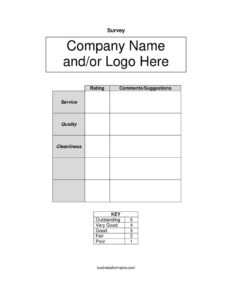
Blank Survey Template
Download a free blank survey template in PDF and DOCX to collect customer feedback on service, quality, and cleanliness with a clear rating scale.
PDF
DOCX
1 downloads
0
likes
Download Files
- DOCX
A blank survey template is a ready-to-use feedback form that lets any business collect customer opinions on service, quality, cleanliness, and overall experience using a simple rating scale. People most often reach for it when they want quick, structured feedback at the point of contact — a checkout counter, hotel room, or restaurant table — without building a survey from scratch. You can download it free in PDF and DOCX, with no signup required.
What Is a Blank Survey Template?
A blank survey template is a printable or editable document that gathers structured opinions from customers, guests, or employees. It is typically issued by a business, restaurant, hotel, clinic, or service provider and handed out, left on a table, or attached to a receipt. The template documents how respondents rate specific aspects of an experience — such as service, quality, and cleanliness — using a consistent scale, and it captures open-ended comments and suggestions. Because it includes space for your company name or logo, the form can be branded in seconds and reused across locations. Its purpose is to turn casual impressions into measurable data you can track over time and act on.
When Do You Need a Blank Survey Template?
This form fits almost any situation where you want honest, organized feedback. Common uses include:
- Restaurants and cafes placing a short card on each table to rate food quality, service, and dining-room cleanliness.
- Hotels and lodging leaving a guest-satisfaction slip in the room to measure housekeeping and front-desk service.
- Retail stores asking shoppers about staff helpfulness and store presentation at checkout.
- Salons, spas, and clinics gauging how clients felt about their appointment and the facility.
- Events and workshops handing out a quick rating sheet so organizers know what to improve next time.
- Internal use, where managers survey employees on workplace conditions and cleanliness standards.
Types of Surveys You Can Build From This Template
Although the template ships with a focus on service, quality, and cleanliness, the same layout adapts to many feedback goals. You can convert it into a customer satisfaction survey, a post-visit evaluation, a product feedback form, or an event review sheet by renaming the rated categories. The rating key — outstanding, very good, good, fair, and poor — stays constant so respondents always understand the scale, while the categories flex to match what you actually want to measure.
What a Blank Survey Should Have
A complete and useful survey includes a few essentials. First, branding: a place for your company name and/or logo so respondents know who is asking. Second, clearly labeled categories to rate — here, service, quality, and cleanliness. Third, a consistent rating scale with a defined key (outstanding, very good, good, fair, poor) so answers are comparable. Fourth, an open comments/suggestions field where people can explain their scores or raise issues the checkboxes miss. Optional but helpful additions are a date line, location or staff name, and a way to follow up if the respondent wants a reply.
How to Fill Out a Blank Survey Template
Whether you are setting up the form or a customer is completing it, follow these steps mapped to the actual fields:
- Add your branding. In the header area marked company name and/or logo here, insert your business name and logo so the survey looks official and trustworthy.
- Review the categories. The template lists service, quality, and cleanliness as the items to evaluate. Keep, rename, or add rows to match what you want feedback on.
- Understand the rating key. The key defines five levels: outstanding, very good, good, fair, and poor. This scale appears beside each category.
- Mark a rating. For each category, the respondent selects one rating that best reflects their experience — for example, marking outstanding for service and good for cleanliness.
- Write comments. In the comments/suggestions field, add specifics: what went well, what fell short, and any ideas for improvement.
- Submit the form. Drop the card in a box, hand it to staff, or save the digital version. The business then totals the ratings to spot trends.
Tips for Getting Better Feedback
The quality of your data depends on how the survey is presented. Keep the form short so people actually finish it; three to five categories is usually enough. Place it where the experience is fresh — on the table, with the receipt, or in the room. Make submission effortless by offering a drop box or a QR code that links to the DOCX-based digital version. Whenever possible, avoid asking respondents to write their name unless they want a reply, since anonymity tends to produce more candid ratings. Finally, review the comments regularly and close the loop by fixing recurring complaints, then watch whether your ratings improve over the following weeks.
Turning Ratings Into Action
A survey only helps if you use it. Assign a number to each level — for instance, 5 for outstanding down to 1 for poor — and average the scores per category each week or month. Track those averages over time to see whether changes are working. Pay special attention to the written comments/suggestions, because they often reveal the why behind a low score. Share results with your team so everyone understands where to focus.
Common Mistakes to Avoid
- Skipping the branding. Leaving the company name or logo blank makes the form look generic and lowers response rates.
- Changing the rating scale per category. Always use the same five-level key so scores stay comparable.
- Asking too many questions. Long surveys get abandoned; stick to the categories that matter most.
- Ignoring the comments box. The open field often holds the most actionable insight, so read every entry.
- Collecting data but never acting. Feedback you never review damages trust when customers see nothing change.
- Forcing respondents to identify themselves. Mandatory names can suppress honest, critical feedback.
Frequently Asked Questions
What is a blank survey template used for? It is used to collect structured feedback from customers, guests, or staff on aspects like service, quality, and cleanliness. Businesses hand it out at the point of experience and use the ratings to identify strengths and areas to improve. It works for restaurants, hotels, retail, clinics, events, and internal reviews.
How do I fill out the survey? Add your company name or logo at the top, then mark one rating — outstanding, very good, good, fair, or poor — for each category such as service, quality, and cleanliness. Use the comments and suggestions field to explain your scores or raise issues. The completed form is then returned to the business for review.
Can I change the categories and rating scale? Yes. The DOCX version is fully editable, so you can rename service, quality, or cleanliness, add new rows, and keep or adjust the five-point key. Just keep the scale consistent across all categories so the results remain easy to compare.
Should respondents include their name? Names are optional and not part of the core template. Anonymous surveys usually produce more honest feedback, so only ask for contact details if you intend to follow up with the respondent or resolve a specific complaint.
How much does this template cost? Nothing — it is completely free to download in both PDF and DOCX formats, with no signup or payment required. You can print it as-is or customize the editable version for your business.
Is the survey data confidential? Confidentiality depends on how you collect and store the responses. If you gather sensitive feedback, keep completed forms secure and limit who can view them, and tell respondents how their answers will be used so they feel comfortable sharing honest opinions.
This blank survey template is a general example provided for informational purposes only and is not legal, financial, or professional advice. Data-collection and privacy requirements vary by jurisdiction and industry, so consult a qualified professional to ensure your surveys comply with applicable rules.
Related Forms
- Dressing Room Numbers
- Individual RSVP Form Fancy
- Gantt Chart Six Weeks
- Todays Focus Sign
- Goal Planner
- Membership Cancellation Form
Browse more in Miscellaneous.