
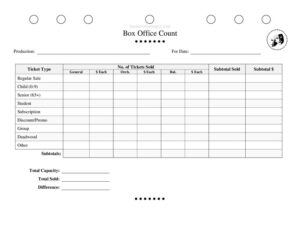
Box Office Count
Reconcile theater ticket sales by performance with this free Box Office Count form template, tracking seats sold, pricing, and totals — free download in PDF and DOCX.
PDF
DOCX
0
likes
Download Files
- DOCX
A Box Office Count is a reconciliation worksheet that records every ticket sold for a single performance, broken down by ticket type, seating section, and price, so the box office can balance revenue against attendance. Theaters use it most often to confirm that the money collected matches the seats released for a given show date. You can download it free in PDF and DOCX, with no signup required.
What Is a Box Office Count?
A Box Office Count is the end-of-performance tally a box office manager or treasurer prepares to settle a show. It documents how many tickets were sold across each price category — regular, child, senior, student, subscription, comps, and more — and multiplies those counts by their per-ticket price to arrive at a revenue total. The form also compares Total Sold against Total Capacity to surface any difference. In professional and community theater alike, this count is the official record handed to the production company, presenter, or accounting office. It supports settlement statements, royalty calculations, and nightly cash drops, making it a cornerstone of honest, auditable house management.
When Do You Need a Box Office Count?
This worksheet comes out for nearly every performance with a paid or reserved house. Common situations include:
- Nightly settlement — closing out a single performance and reconciling cash, card, and complimentary tickets before the deposit.
- Run or tour reporting — submitting per-show numbers to a touring company or presenter who is owed a percentage of the gate.
- Royalty and licensing reports — providing accurate attendance and gross figures to a licensor who charges based on seats sold or revenue.
- Subscription and group tracking — separating season-subscriber and group-sale seats from single-ticket buyers for marketing and renewal analysis.
- Comp and deadwood accounting — documenting unsold (deadwood) seats and complimentary tickets so the house count is defensible.
- Capacity audits — verifying that seats sold plus held seats never exceed the venue’s licensed capacity.
What a Box Office Count Should Have
A complete count clearly identifies the show and the exact performance, then lays out every revenue stream. It should include the production name and date, a row for each ticket type, the number of tickets in each category, the price each, and a calculated subtotal per line. It needs seating-section breakdowns where pricing differs by location — for example general admission, orchestra, and balcony — along with grand totals for tickets and dollars. Finally, it should reconcile Total Capacity, Total Sold, and the Difference between them, so anyone reviewing the sheet can confirm the math balances at a glance.
How to Fill Out a Box Office Count
- Enter the Production title and the For Date of the specific performance you are settling.
- For each Ticket Type row — Regular Sale, Child (0-9), Senior (65+), Student, Subscription, Discount/Promo, Group, Deadwood, and Other — record the No. of Tickets Sold.
- Where seating sections are priced separately, split counts across General, Orch. (orchestra), and Bal. (balcony) columns.
- Enter the $ Each price for every ticket type and section combination.
- Multiply count by price to fill each Subtotal Sold and Subtotal $ figure.
- Add the line subtotals to complete the Subtotals row for both tickets and dollars.
- Record the venue’s Total Capacity and the resulting Total Sold.
- Calculate the Difference (capacity minus sold) to show unsold seats, then verify totals before signing off.
Understanding the Ticket-Type and Deadwood Categories
The strength of this form is its granularity. Regular Sale captures full-price single tickets, while Child, Senior, and Student rows track concession pricing tied to eligibility. Subscription seats belong to season-package holders and are often counted at a blended or pre-paid rate, so keep them distinct from walk-up buyers. Discount/Promo covers coupon, rush, and partner-rate sales, and Group records bulk bookings sold at a negotiated price. Deadwood is the term for seats that went unsold — the leftover inventory — and is essential for a true capacity reconciliation. The Other line absorbs comps, press tickets, and anything that doesn’t fit a standard category. Tagging revenue this way lets management analyze yield per audience segment and plan future pricing.
Reconciling Capacity and Cash
The bottom of the form is where everything ties out. Your Total Sold should equal the sum of all paid and held tickets across every type and section, and when added to Deadwood it should match Total Capacity. The Difference field gives you a quick at-a-glance figure for empty seats. On the dollar side, the Subtotal $ column rolled into Subtotals should equal the cash, card, and prepaid receipts you actually collected. Any gap means a counting error, an unrecorded comp, or a pricing mistake that needs investigating before the deposit goes in. Keeping the signed count with the matching deposit slip creates a clean audit trail.
Common Mistakes to Avoid
- Forgetting comps and press seats — leaving them off the count makes the capacity reconciliation impossible to balance.
- Mixing sections — pooling orchestra and balcony seats when they carry different $ Each prices distorts the revenue total.
- Skipping the deadwood line — without unsold seats recorded, Total Capacity won’t match Total Sold plus held inventory.
- Wrong performance date — labeling the count with the wrong For Date ruins per-show settlement and royalty reports.
- Math left unverified — failing to recheck subtotals against actual cash and card receipts before depositing.
- Counting subscriptions at full price — overstating revenue by ignoring pre-paid subscription rates.
Frequently Asked Questions
What is a Box Office Count used for? It is used to reconcile ticket sales for a single performance, breaking revenue down by ticket type and seating section. The completed sheet supports nightly settlements, royalty reporting, and audits by confirming that money collected matches seats sold.
How do I fill out a Box Office Count? Start with the production title and performance date, then record the number of tickets sold and the price each for every ticket type and section. Calculate the subtotals, then reconcile Total Capacity, Total Sold, and the Difference to confirm everything balances.
What does “deadwood” mean on this form? Deadwood refers to seats that were not sold for the performance — your leftover inventory. Recording deadwood is essential so that sold tickets plus unsold seats add up to the venue’s Total Capacity.
Why separate subscription and group tickets? Subscription and group seats are usually sold at negotiated or pre-paid rates that differ from single-ticket prices. Keeping them on their own lines gives an accurate revenue figure and helps the box office analyze sales by audience segment.
Is a Box Office Count a legal document? It is an internal accounting and reconciliation record rather than a contract, but it is often relied upon for settlement statements and royalty payments. Because of that, it should be filled out accurately and retained with the matching deposit records.
How much does this template cost? Nothing — the Box Office Count template is completely free to download in both PDF and DOCX formats with no signup required. You can edit the DOCX version to add house-specific ticket types, sections, or pricing tiers.
This Box Office Count template is a general example provided for informational purposes only and does not constitute legal, financial, or tax advice. Settlement, royalty, and reporting requirements vary by venue, presenter, and jurisdiction — consult a qualified professional or your licensing agreement to confirm what applies to your production.
Related Forms
- Props Scene List
- Pre-Show Checklist
- Conflict Calendar
- Scene Breakdown Action
- Weekly Rehearsal Schedule
- Line Notes Breakdown
Browse more in Theater.