
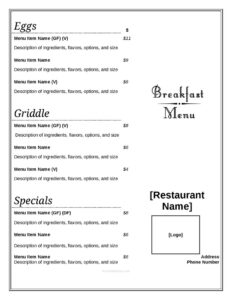
Breakfast Menu
Download a free breakfast menu template in PDF and DOCX to organize dishes, prices, and categories for your cafe or restaurant—easy to customize, free download.
DOC
0
likes
Download Files
- DOC
A breakfast menu is a printed or digital list of morning food and drink items a restaurant, cafe, diner, or hotel offers to guests, organized by category with clear descriptions and prices. People most often use one to present their breakfast offerings in an appealing, easy-to-read layout that helps customers order quickly. This template is free to download in PDF and DOCX, with no signup required.
What Is a Breakfast Menu?
A breakfast menu is a customer-facing document used by food-service businesses to display their morning meal options. It is typically issued by a restaurant owner, cafe manager, or kitchen team and shows what is available before lunch service begins—think eggs, pancakes, pastries, coffee, and fresh juice. The menu documents each dish name, a short description, and its price, often grouped into logical sections such as hot plates, baked goods, sides, and beverages. Beyond listing food, a well-built breakfast menu reinforces a brand’s personality through layout, tone, and styling. It serves as both a sales tool and an operational reference, helping servers and kitchen staff stay aligned on exactly what is being offered each morning.
When Do You Need a Breakfast Menu?
A clear breakfast menu is useful in many morning-service situations. Common scenarios include:
- Opening a new cafe or diner and needing a professional menu before your first service.
- Launching a weekend brunch program that requires its own dedicated list of dishes and prices.
- Refreshing seasonal offerings, such as adding pumpkin pancakes in autumn or fresh berry bowls in summer.
- Running a hotel or bed-and-breakfast that serves guests a morning meal and wants an in-room or lobby menu.
- Hosting catered breakfast events, corporate mornings, or buffets that need a printed item list.
- Updating prices after ingredient costs change and you need a fast, editable document to reprint.
Types of Breakfast Menus
Not every breakfast menu looks the same, and the format you choose depends on your service style. An à la carte menu lists each item individually with its own price, giving guests full freedom to mix and match. A combo or platter menu bundles items—eggs, toast, and a side—into fixed-price plates that simplify ordering and kitchen prep. A buffet menu describes stations or a single flat-rate offering rather than per-item pricing. Many businesses also keep a weekend brunch menu that is larger and more indulgent than the weekday list. Choosing the right type helps you control food costs and set guest expectations.
What a Breakfast Menu Should Have
A complete, effective breakfast menu generally includes the following elements:
- Business name and logo at the top for instant brand recognition.
- Clear category headings such as Hot Breakfast, Bakery, Sides, and Drinks.
- Dish names that are short, appetizing, and easy to read.
- Brief descriptions listing key ingredients and preparation style.
- Prices aligned consistently beside each item.
- Dietary notes or icons for vegetarian, vegan, or gluten-free choices.
- Service hours so guests know when breakfast is available.
How to Fill Out a Breakfast Menu
Because this is a flexible layout template, you can adapt each section to your own offerings. Follow these steps:
- Add your header. Place your restaurant or cafe name and logo at the top, and include breakfast service hours if they differ from regular hours.
- Create your categories. Replace the placeholder section titles with groupings that fit your menu, such as Egg Dishes, Griddle, Pastries, and Beverages.
- Enter each dish name. Type the item title clearly under the correct category.
- Write a short description. Add one line noting the main ingredients or style, for example “two eggs any style, hash browns, toast.”
- Add the price. Enter the cost beside each item, keeping decimal alignment consistent.
- Mark dietary options. Note vegetarian, vegan, or gluten-free items with a symbol or label.
- Add footer details. Include allergen disclaimers, gratuity notes, or a thank-you line.
- Review and proofread every name, description, and price before printing.
Tips for Designing an Appetizing Menu
Presentation directly affects what guests order, so a few small choices make a big difference. Lead each section with your highest-margin or signature dishes, since the first items in a list often get the most attention. Use warm, descriptive language—”fluffy buttermilk pancakes” reads better than just “pancakes”—but keep descriptions to one tight line so the menu stays scannable. Limit the overall number of items to avoid overwhelming customers and to keep your kitchen efficient. Keep fonts large enough to read in dim morning light, and leave generous white space so the layout feels relaxed rather than cluttered. Finally, avoid printing dollar signs next to every price; studies of menu psychology suggest a clean number can feel less transactional.
Pricing and Updating Your Menu
Set prices that reflect your true food and labor costs while staying competitive with nearby breakfast spots. Because ingredient prices shift, the DOCX version of this template is handy for quick edits—update a number, save, and reprint without redesigning the whole page. Many businesses keep a master file and version it by date so they always know which menu is current. If you raise prices, do it gradually and consider refreshing descriptions at the same time so customers focus on value rather than the increase. Laminating printed copies or using a protective sleeve extends their life through the messy reality of a busy breakfast service.
Common Mistakes to Avoid
- Overcrowding the page with too many items, which slows ordering and increases kitchen errors.
- Forgetting to update prices, leaving old figures that no longer cover your costs.
- Using vague descriptions that leave guests unsure what a dish actually includes.
- Ignoring dietary labels, which frustrates vegetarian, vegan, and allergy-conscious customers.
- Inconsistent formatting, such as mismatched fonts or misaligned prices, that looks unprofessional.
- Listing items you can’t reliably make, leading to frequent “we’re out of that” moments.
Frequently Asked Questions
What is a breakfast menu used for? A breakfast menu presents a restaurant or cafe’s morning food and drink options in an organized, appealing format. It helps customers choose quickly and gives staff a shared reference for what is being served. It also acts as a marketing tool that reflects your brand and highlights your best dishes.
How do I fill out this breakfast menu template? Start by adding your business name and logo, then replace the placeholder categories with your own sections like eggs, griddle, and beverages. Enter each dish name, a short description, and its price, and add any dietary symbols. Finish by proofreading every entry and printing once everything is accurate.
Is this breakfast menu template free? Yes. You can download it free in both PDF and DOCX formats from Business Forms Pro with no signup required. The DOCX version is fully editable so you can tailor it to your own offerings.
Should I include prices on my breakfast menu? In most cases, yes—clear pricing helps customers decide and reduces questions for your staff. Some buffet or fixed-rate concepts list a single flat price instead of per-item costs. Keep your price formatting consistent and update it whenever your costs change.
How many items should a breakfast menu have? There is no fixed rule, but many successful breakfast menus keep the list focused so the kitchen stays efficient and guests aren’t overwhelmed. A tight, well-curated selection often outperforms an oversized one. Aim for variety across egg dishes, sweet items, sides, and drinks without padding.
Can I customize the categories and design? Absolutely. The template is meant to be a starting point—change the section headings, fonts, colors, and layout to match your brand. The editable DOCX file makes it easy to adjust everything from dish names to overall styling.
This breakfast menu template is provided as a general example for informational purposes only and does not constitute legal, financial, tax, or food-safety advice. Labeling, allergen disclosure, and pricing requirements vary by jurisdiction—consult a qualified professional or your local authority to ensure your menu complies with applicable rules.
Related Forms
- Freezer Temperature Log
- Wine List
- Happy Hour Menu
- One Check Per Table Sign
- Alcohol Inventory Log
- Ingredient Usage Report
Browse more in Restaurant.