
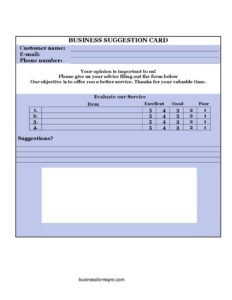
Business Suggestion Card
Free business suggestion card template in PDF & DOCX to collect ideas and feedback from customers or employees. Gather suggestions easily — download and print.
PDF
DOCX
7 downloads
0
likes
Download Files
- DOCX
A business suggestion card is a short, simple card that invites customers or employees to share an idea, a concern, or feedback. It’s one of the cheapest, most effective ways to hear what the people closest to your business are thinking. Download this free template in PDF or DOCX and start collecting suggestions. No signup required.
What Is a Business Suggestion Card?
A business suggestion card is a small form, usually placed in a box or at a counter, that gives customers or staff an easy way to offer ideas and feedback. Some of the best improvements a business ever makes come not from consultants but from the people who use its products or work in its operations every day. A suggestion card lowers the barrier to sharing those insights: instead of having to find the right person or write a formal complaint, someone can jot a quick note and drop it in a box. Whether aimed at customers in a shop or restaurant, or at employees on the floor, the card signals that the business is listening — which itself builds goodwill.
When Do You Need a Suggestion Card?
- Collecting customer ideas and feedback in a store, restaurant, office, or service business.
- Giving employees a low-pressure way to suggest improvements to operations.
- Surfacing problems early, before they turn into lost customers or staff frustration.
- Gathering ideas for new products, services, or process improvements.
- Showing customers and staff that their opinions are genuinely welcome.
- Running a suggestion box program with a simple, consistent card.
What a Good Suggestion Card Includes
An effective suggestion card is short enough that filling it in feels effortless. It gives space for the suggestion itself, asks (optionally) for the person’s name and contact details if they’d like a reply, and may include a checkbox for the type of feedback or the area it relates to. Keeping it brief and making contact information optional encourages more honest, frequent input — the easier the card is to complete, the more suggestions you’ll receive.
How to Use the Suggestion Card
- Provide space for the suggestion or feedback itself — the heart of the card.
- Include optional fields for the person’s name and contact details if they’d like a response.
- Add an optional line for the area or category the suggestion relates to.
- Place printed cards and a pen near a clearly labeled suggestion box or counter.
- Collect and review the cards regularly so ideas don’t pile up unread.
- Act on good suggestions and, where possible, let people know their input made a difference.
Making a Suggestion Program Work
Putting out a card is easy; getting value from it takes a little follow-through. The single most important thing is to actually read and act on what comes in — nothing kills a suggestion program faster than a box that’s clearly never emptied. Review cards on a regular schedule, group recurring themes, and pick a few ideas to implement, then close the loop by letting customers or staff know that suggestions led to a real change. That visible response is what turns a one-time trickle of cards into an ongoing stream of useful feedback. Keep the card and the box accessible and clearly labeled, reassure people that input is welcome (and that anonymous feedback is fine), and consider recognizing especially helpful suggestions. Over time, the cards become an early-warning system for problems and a steady source of practical, ground-level ideas you wouldn’t otherwise hear — at almost no cost.
Common Mistakes to Avoid
- Collecting cards but never reading or acting on them.
- Making the card long or requiring contact details, which discourages honest input.
- Hiding the box where no one notices it.
- Never closing the loop, so people stop believing suggestions matter.
- Ignoring recurring themes that point to a real problem.
- Failing to thank or recognize people for genuinely useful ideas.
Anonymous and Digital Suggestion Boxes
The classic physical card in a box still works beautifully, but it pairs well with a digital option for the people who’d rather type than write. A short online form, reachable by a posted link or a QR code near the counter, captures the same information and drops it straight into an inbox you can review anywhere — handy for remote staff, larger premises, or customers who think of something after they’ve left. Whichever format you use, the question of anonymity deserves a deliberate decision. Anonymous suggestions tend to be more candid, especially from employees who might hesitate to put their name to a criticism of how things are run, so allowing anonymity usually surfaces problems you’d otherwise never hear about. The trade-off is that you can’t follow up directly, so the best setups make a name and contact details optional rather than required, letting each person choose. Reassure people, in a short line on the card or form, that honest feedback is welcome and won’t be held against them — that reassurance is often what turns a hesitant thought into a submitted suggestion. Whatever mix of paper and digital, named and anonymous, you settle on, keep it simple and consistent, review what comes in on a regular schedule, and make sure both channels actually reach a person who can act. A suggestion box only works when the people using it believe their input is read and, sometimes, acted upon.
Frequently Asked Questions
What is a business suggestion card? It’s a short card that lets customers or employees share an idea, concern, or piece of feedback, usually dropped into a suggestion box. It’s a simple, low-cost way to hear from the people closest to your business.
Should suggestion cards be anonymous? Making contact details optional is best. Allowing anonymous feedback encourages more honest input, while giving people the choice to leave their name lets you follow up when they’d like a reply.
How do I get more suggestions? Keep the card short and the box visible, reassure people that input is welcome, and — most importantly — act on suggestions and let people know their ideas led to change. Visible follow-through drives participation.
Can I use this for employees as well as customers? Yes. The same card works for staff suggestions about operations and for customer feedback about products or service — just place it where the right group will see it.
How often should I review the cards? On a regular schedule that fits your volume — weekly or monthly — so ideas are acted on promptly and the box never appears neglected.
How much does this template cost? Nothing — it’s free to download in PDF and DOCX, with no signup required.
Related Forms
- Restaurant Your Opinion Card
- Hotel Feedback Card
- Business Customer Survey Card
- Customer Feedback Card
- Event Feedback Survey
- Product Feedback Form
Browse more in Feedback.