
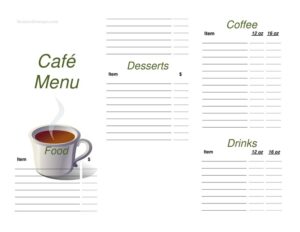
Cafe Menu
Create a clear, appealing cafe menu with this free template — list drinks, food, and prices in minutes with a free download in PDF and DOCX.
PDF
DOCX
3 downloads
0
likes
Download Files
- DOCX
A cafe menu is the printed or digital list that shows customers what food and drinks your cafe offers and what each item costs. The most common reason people use one is to present coffee, tea, pastries, and light meals in a clean, organized layout that makes ordering easy and reinforces your brand. This cafe menu template is free to download in both PDF and DOCX, with no signup required.
What Is a Cafe Menu?
A cafe menu is a customer-facing document used by coffee shops, bakeries, bistros, and casual eateries to display their offerings. It is typically created and maintained by the owner or manager and handed to or displayed for guests at the counter, on tables, or on a wall board. The menu documents item names, short descriptions, sizes, and prices, often grouped into categories such as hot drinks, cold drinks, breakfast, sandwiches, and desserts. Beyond listing products, a well-designed cafe menu communicates the cafe’s personality, guides customers toward popular or high-margin items, and sets clear expectations about cost and selection before an order is placed.
When Do You Need a Cafe Menu?
A cafe menu is essential at almost every stage of running a coffee shop. Common situations include:
- Opening a new cafe and needing a professional list of drinks and food for launch day.
- Updating seasonal offerings, such as adding iced beverages in summer or spiced lattes in autumn.
- Adjusting prices after a change in supplier or ingredient costs and reprinting an accurate menu.
- Introducing a new category like vegan pastries, breakfast bowls, or specialty cold brew.
- Setting up takeaway or delivery, where a clear printed or PDF menu helps customers order remotely.
- Catering and events, where you provide a tailored menu sheet to clients booking your cafe.
Many cafes keep several versions on hand — a full sit-down menu, a compact counter card, and a simple chalkboard list of daily specials.
What a Cafe Menu Should Have
A complete cafe menu balances clarity with appeal. The key elements include a header with your cafe’s name and optional logo, clearly labeled category sections, individual item names with brief descriptions, sizes where relevant (small, medium, large), and a price beside each item. Many menus also include allergen notes or dietary symbols (vegetarian, vegan, gluten-free), an indication of seasonal or signature items, and footer details such as opening hours, a tagline, or contact information. Consistent fonts, generous spacing, and logical grouping make the menu easy to scan, which speeds up ordering and improves the guest experience.
How to Fill Out a Cafe Menu
Because this is a flexible layout template, you customize it to match your offerings. Follow these steps:
- Add your cafe name and logo at the top so the menu is instantly branded.
- Write a short tagline or welcome line if you want to set the tone, such as “Locally roasted, freshly baked.”
- Create your category headings, for example Hot Drinks, Cold Drinks, Breakfast, Bakery, and Sandwiches.
- List each item name under the correct category, keeping names short and recognizable.
- Add a brief description for items that benefit from one, like ingredients or flavor notes.
- Enter sizes and prices beside each item, aligning prices neatly for easy reading.
- Mark dietary or allergen symbols where they apply so customers can choose confidently.
- Fill in the footer with opening hours, address, phone, or social handles.
- Review and proofread, then export to PDF for printing or keep the DOCX for future edits.
Designing a Menu That Sells
The way items are arranged influences what customers order. Place your most profitable or signature drinks near the top of each section or in a highlighted box, since guests tend to notice the first and last items in a list most. Avoid cluttering prices with currency symbols repeated dozens of times if a clean look suits your brand, and keep descriptions concise so the page does not feel crowded. Use category breaks and white space to help the eye move smoothly down the page. If you offer add-ons such as extra shots, syrups, or plant-based milk, group them in a small “Extras” section rather than repeating them under every drink.
Keeping Your Menu Accurate and Current
A menu is only useful if it reflects what you actually serve at the price you actually charge. Review it whenever ingredient costs shift, when you discontinue an item, or when a seasonal product ends. Because this template is editable in DOCX, you can update a single price or swap an item in minutes and reprint without redesigning the whole page. Keeping a dated version saved helps you track when prices last changed and revert if needed. For cafes that post a menu online, update the digital PDF at the same time so in-store and online listings always match.
Common Mistakes to Avoid
- Listing prices that don’t match the register, which frustrates customers and slows the line.
- Overcrowding the page with too many items or tiny fonts that are hard to read.
- Forgetting allergen or dietary information that customers increasingly expect.
- Using inconsistent formatting, such as mixed fonts or misaligned prices.
- Leaving discontinued or out-of-stock items on the menu after they’re gone.
- Skipping a proofread, so typos in item names or prices reach the printed version.
Frequently Asked Questions
What is a cafe menu used for? A cafe menu lists the food and drinks your coffee shop offers along with their prices, helping customers decide what to order and reinforcing your brand. It can be used as a printed counter card, a table menu, a wall display, or a downloadable PDF for takeaway and delivery.
How do I fill out this cafe menu template? Start by adding your cafe name and logo, then create category headings like Hot Drinks and Bakery. List each item with a short description, sizes, and prices, add any dietary symbols, and finish with your hours and contact details before exporting to PDF.
Is this cafe menu template free? Yes. You can download it free in both PDF and DOCX formats from Business Forms Pro with no signup required. The DOCX version is fully editable so you can update items and prices whenever you like.
Should I include allergen information on my menu? Including allergen and dietary notes is strongly recommended and, in many regions, legally required for food businesses. Clear symbols or notes for items containing common allergens help customers order safely and reduce questions at the counter.
Can I edit the categories and add my own items? Absolutely. The template is designed to be customized — you can rename sections, add or remove categories, and list as many or as few items as your cafe serves. Keep the layout consistent so the finished menu looks polished.
How often should I update my cafe menu? Update it whenever prices change, you add seasonal items, or you discontinue something. Many cafes review their menu at least seasonally and reprint as needed, keeping the editable DOCX file on hand for quick changes.
This cafe menu template is a general example provided for informational purposes only and is not legal, financial, or food-safety advice. Allergen labeling and food-business requirements vary by jurisdiction — consult the relevant local authorities or a qualified professional to ensure your menu complies with applicable rules.
Related Forms
- Order Here Sign
- Line Starts Here Sign
- Order At Counter Sign
- Coffee Menu
- Daily Food Sales Log
- Knife Sharpening Log
Browse more in Restaurant.