
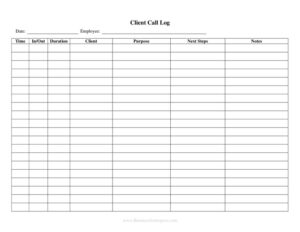
Client Call Log
Track every client phone conversation with a free Client Call Log template—record dates, callers, topics, and follow-ups. Free download in PDF and DOCX.
PDF
DOCX
7 downloads
0
likes
Download Files
- DOCX
A Client Call Log is a simple record-keeping document used to track every phone conversation you have with a client, capturing who called, when, what was discussed, and what needs to happen next. People most often use it to keep a clear paper trail of client communication so nothing slips through the cracks. It’s free to download here in both PDF and DOCX formats, with no signup required.
What Is a Client Call Log?
A Client Call Log is a structured sheet—often kept as a single page, a spreadsheet, or a running notebook—where a business documents each telephone interaction with a client or prospect. It typically records the date and time of the call, who initiated it, the client’s name, the subject of the discussion, key outcomes, and any follow-up actions. Sales reps, account managers, customer support teams, freelancers, attorneys, and small business owners all rely on call logs to maintain accurate communication histories. The goal is accountability and continuity: anyone reviewing the log later can quickly understand what was said, when, and by whom, even if the original person who took the call is unavailable.
When Do You Need a Client Call Log?
A Client Call Log proves its value any time client conversations need to be tracked, remembered, or referenced. Common scenarios include:
- Sales follow-up: A sales team tracking inbound and outbound calls so leads are followed up on the agreed date and no opportunity is forgotten.
- Customer support: A support desk logging complaint calls, troubleshooting steps, and promised resolutions to ensure consistency across shifts.
- Professional services: Consultants, accountants, or attorneys recording billable phone time and the substance of client instructions.
- Project coordination: An account manager noting client requests and approvals discussed by phone before formal sign-off.
- Dispute documentation: Keeping a dated record of what was promised or agreed verbally, useful if a misunderstanding arises later.
- Team handoffs: Shared logs that let a covering colleague pick up where the original contact left off.
What a Client Call Log Should Have
A complete call log balances enough detail to be useful with enough simplicity to be filled out quickly during or right after a call. The essential elements include the date and time of each call, the client’s name and contact details, the direction of the call (incoming or outgoing), the name of the staff member who handled it, a concise summary of the discussion, the outcome or resolution, and a clearly marked follow-up action with a due date. Many logs also include a column for call duration—helpful for billing—and a status indicator showing whether the follow-up is open or closed. Consistent columns across every entry make the log easy to scan and search later.
How to Fill Out a Client Call Log
Because this template is a flexible log, fill in a new row for every call as it happens. Follow these steps:
- Enter the date and time: Record when the call took place. Accurate timestamps matter for billing and for reconstructing a timeline later.
- Write the client name: Add the client or company name, and a contact name if the caller differs from the account holder.
- Add contact details: Note the phone number used, plus an email or reference number if your system uses one.
- Mark the call direction: Indicate whether the call was incoming or outgoing so you can track responsiveness.
- Note who handled the call: Record the staff member or representative’s name for accountability.
- Summarize the discussion: In a sentence or two, capture the purpose and main points covered.
- Record the outcome: Note what was decided, resolved, or left pending.
- Log follow-up actions: Write the next step, who owns it, and the due date.
- Set the status: Mark the entry open or closed so outstanding items stay visible.
Tips for Keeping an Effective Call Log
The most useful call logs are the ones people actually maintain. Fill in each entry immediately after the call while details are fresh—memory fades quickly, and reconstructed notes are less reliable. Keep summaries short but specific: “Discussed renewal pricing, client requested 10% discount, awaiting manager approval” tells a future reader far more than “talked about renewal.” Use consistent abbreviations and a shared legend if multiple people contribute to the same log. Review open follow-ups at the start of each day or week so commitments don’t lapse. If your team handles a high volume of calls, consider color-coding statuses or sorting by follow-up date to surface what needs attention first.
Paper Log vs. Digital CRM
A printed or DOCX call log is fast, portable, and requires no software—ideal for solo professionals, small teams, or situations where a quick handwritten note is more practical than logging into a system. A CRM, by contrast, links calls to broader customer records, automates reminders, and scales across large teams. Many businesses use both: a simple log for in-the-moment capture, then periodic transfer of key details into a CRM. This template works well as a standalone tool or as a capture sheet that feeds your larger system, giving you the flexibility to start tracking calls today without committing to new software.
Common Mistakes to Avoid
- Delaying entries: Waiting until the end of the day to log calls leads to forgotten details and missed follow-ups.
- Vague summaries: Notes like “called client” are useless later—always capture the purpose and outcome.
- Skipping follow-up dates: An action item without a due date rarely gets done on time.
- Inconsistent formatting: Mixing date formats or abbreviations makes the log hard to scan and sort.
- No ownership: Failing to note who handled the call or owns the next step creates accountability gaps.
- Letting closed items pile up: Never marking follow-ups complete leaves you unsure what’s actually outstanding.
Frequently Asked Questions
What is a Client Call Log used for? It is used to record and track phone conversations with clients, including the date, participants, topics discussed, and follow-up actions. Businesses rely on it to maintain a clear communication history, ensure promised actions get completed, and provide continuity when different staff members handle the same client.
How do I fill out a Client Call Log? Add a new row for each call, entering the date and time, the client’s name and contact details, the call direction, who handled it, a brief summary, the outcome, and any follow-up with a due date. The key is to complete each entry right after the call while the details are still fresh.
Is a Client Call Log a legal document? It is primarily an internal record-keeping tool rather than a formal legal contract. That said, a consistently maintained, dated log can serve as supporting documentation if a question or dispute arises about what was discussed, so accuracy and timeliness matter.
Does a Client Call Log need to be signed or witnessed? No—a call log is an operational record and does not require signatures, witnesses, or notarization. Some businesses do have the staff member who took the call initial each entry for accountability, but this is an internal preference, not a requirement.
Can I use this for billable phone time? Yes. By recording the date, duration, and substance of each call, professionals such as consultants and attorneys can use the log to support time-based billing. Just be sure to note call length consistently and describe the work performed clearly.
How much does this Client Call Log template cost? It is completely free to download from Business Forms Pro in both PDF and DOCX formats, with no signup required. You can print it as-is or open the DOCX version to customize the columns to match your workflow.
This Client Call Log template is provided as a general example for informational purposes only and does not constitute legal, financial, or professional advice. Record-keeping and data-handling requirements vary by jurisdiction and industry—consult a qualified professional to ensure your practices meet applicable rules.
Related Forms
- Collectibles Inventory
- Computer Inventory
- Inventory Comparison Spreadsheet
- Depreciable Assets Log
- Volunteer Hours Tracker
- List of Non-Negotiables
Browse more in Log and Inventory.