
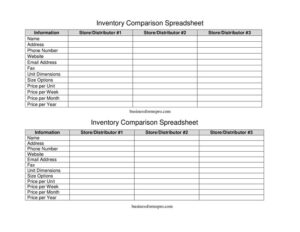
Inventory Comparison Spreadsheet
Compare suppliers side by side with a free Inventory Comparison Spreadsheet template—track prices, sizes, and contacts in PDF or DOCX free download.
PDF
DOCX
0
likes
Download Files
- DOCX
An Inventory Comparison Spreadsheet is a side-by-side worksheet that lets you compare the same product or supply across multiple stores or distributors, so you can spot the best price, size, and terms at a glance. People most often use it to shop the same item across two or three vendors before placing a bulk or recurring order. It’s free to download here in both PDF and DOCX formats, with no signup required.
What Is an Inventory Comparison Spreadsheet?
An Inventory Comparison Spreadsheet is a simple purchasing and procurement tool used by business owners, office managers, restaurant operators, retailers, and anyone who buys supplies regularly. It documents the same set of items as offered by several stores or distributors, lining up each vendor’s contact details, pricing, and product specifications in parallel columns. Rather than juggling separate quotes, emails, and catalog pages, you record everything in one place so the comparison becomes obvious. The form captures both the product facts—size options, unit dimensions, price per unit—and the supplier facts—name, address, phone, email, and website. The result is a clear, repeatable snapshot you can revisit each time you reorder or renegotiate.
When Do You Need an Inventory Comparison Spreadsheet?
This worksheet earns its keep any time price or terms vary between sellers and the difference adds up over time. Common situations include:
- Choosing a primary supplier — comparing Store/Distributor #1, #2, and #3 for the same product before committing to a long-term account.
- Recurring orders — deciding which vendor offers the best price per week, per month, or per year for items you reorder constantly.
- Bulk purchasing — evaluating price per unit across vendors when buying cases, pallets, or large quantities.
- Matching size and packaging — confirming that competing products share comparable size options and unit dimensions so you’re comparing apples to apples.
- Annual budget reviews — re-shopping existing suppliers to confirm you’re still getting competitive pricing.
- Switching vendors — building a documented case when a current supplier raises prices and you want to justify a change to ownership or finance.
What an Inventory Comparison Spreadsheet Should Have
A useful comparison sheet keeps every vendor on equal footing. At minimum it should include three vendor columns (Store/Distributor #1, #2, and #3) with complete contact information—name, address, phone number, fax, email, and website—so you can follow up quickly. It needs identical product specifications for each vendor: size options and unit dimensions, ensuring you’re comparing the same item. Most important, it should capture pricing in the units that matter to your decision: price per unit, plus price per week, per month, and per year for ongoing supply arrangements. A free-form information or notes field rounds it out, giving you room to record delivery terms, minimum orders, or discounts.
How to Fill Out an Inventory Comparison Spreadsheet
- Label each vendor. Under Store/Distributor #1, #2, and #3, enter the supplier Name at the top of each column so the comparison is clearly organized.
- Add contact details. For each vendor, fill in the Address, Phone Number, Fax, Email Address, and Website so anyone can reach out without hunting for the data later.
- Describe the product specs. Enter the Size Options and Unit Dimensions for the item each vendor offers, confirming they match before comparing prices.
- Record the pricing. Fill in Price per Unit, then Price per Week, Price per Month, and Price per Year where applicable to capture both one-time and recurring costs.
- Capture context. Use the Information field to note delivery times, minimum order quantities, payment terms, or any discount that affects the true cost.
- Compare and decide. Read across the columns, highlight the best value in each pricing row, and identify the supplier that wins overall.
How to Compare Vendors Fairly
The biggest risk in any supplier comparison is comparing items that aren’t truly the same. Before you trust a price, confirm that the size options and unit dimensions line up across all three columns—a lower price per unit means nothing if one vendor’s “unit” is smaller. Convert everything to a common measure when packaging differs; for example, calculate cost per ounce, per sheet, or per case so the numbers are directly comparable. Then look beyond the sticker price: shipping fees, minimum order requirements, and payment terms recorded in the Information field can flip which vendor is cheapest. For recurring purchases, weigh the price per year rather than the price per unit, since small per-unit differences multiply quickly over twelve months.
Keeping Your Comparison Current
Supplier pricing changes, so treat the spreadsheet as a living document rather than a one-time exercise. Date each comparison and save a copy when you place an order, building a simple price history you can reference at your next budget review. If you fill out the DOCX version, you can duplicate the sheet for different product categories—office paper, cleaning supplies, packaging materials—and keep a small library of comparisons. The PDF version is ideal for printing and circulating to a manager or owner who needs to approve the purchase. Either way, revisiting the sheet quarterly helps you catch creeping price increases early.
Common Mistakes to Avoid
- Comparing different sizes. Always confirm size options and unit dimensions match before trusting a price difference.
- Ignoring recurring costs. A low price per unit can still lose on price per year once frequency and volume are factored in.
- Leaving contact fields blank. Missing phone, email, or website details slow you down when it’s time to actually place the order.
- Forgetting hidden fees. Shipping, handling, and minimum-order charges belong in the Information field, not left out.
- Not dating the sheet. Without a date, you can’t tell whether a quote is still valid weeks later.
- Stopping at three vendors when more exist. If a fourth supplier is relevant, add a column rather than skipping a potentially better deal.
Frequently Asked Questions
What is an Inventory Comparison Spreadsheet used for? It’s used to evaluate the same product across multiple stores or distributors so you can choose the best combination of price, size, and terms. Buyers rely on it for bulk orders, recurring supplies, and annual vendor reviews. By lining up vendors side by side, it turns scattered quotes into one clear decision.
How do I fill out the spreadsheet? Start by entering each vendor’s name and contact details—address, phone, fax, email, and website—in the Store/Distributor #1, #2, and #3 columns. Then record matching product specs (size options and unit dimensions) and the pricing fields (per unit, per week, per month, and per year). Use the Information field for notes like delivery terms or minimums, then compare across the columns.
Is this spreadsheet free to download? Yes. The Inventory Comparison Spreadsheet template is completely free to download in both PDF and DOCX formats, with no account or signup required. You can print it or edit it in your preferred word processor.
Can I compare more than three vendors? The template includes three vendor columns by default, but the DOCX version can be edited to add more. If you regularly shop four or five suppliers, simply duplicate a column so no competitive option is left out of the comparison.
Should I compare price per unit or price per year? It depends on how you buy. For one-time or occasional purchases, price per unit is usually the deciding factor; for supplies you reorder constantly, the price per year better reflects the true cost. Recording all pricing fields lets you choose the right lens for each decision.
Does this form need to be signed or notarized? No. An Inventory Comparison Spreadsheet is an internal planning and purchasing tool, not a contract, so it requires no signature, witness, or notarization. Any binding terms would come later, on the supplier’s invoice or purchase agreement.
This template is provided as a general example for informational purposes only and does not constitute financial, procurement, or legal advice. Pricing, terms, and supplier requirements vary by vendor and jurisdiction—verify all figures directly with each supplier and consult a qualified professional before making significant purchasing decisions.
Related Forms
- Nanny Daily Log
- Employee Computer Accounts Tracker
- Auction Sell List
- Pest Sighting
- Home Repair Bid Comparison
- Store Opening Procedure Checklist
Browse more in Log and Inventory.