
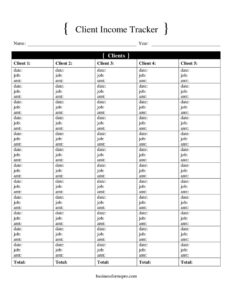
Client Income Tracker
Track payments, invoices, and earnings per client with this free Client Income Tracker template — organize your income for free download in PDF and DOCX.
PDF
DOCX
5 downloads
0
likes
Download Files
- DOCX
A Client Income Tracker is a simple worksheet that records the money you earn from each client over time, so you always know who paid, how much, and when. Freelancers, consultants, and small business owners use it most often to keep a running tally of income for budgeting, invoicing follow-up, and tax season. It’s free to download here in both PDF and DOCX, with no signup required.
What Is a Client Income Tracker?
A Client Income Tracker is a record-keeping document that captures every payment received from each of your clients in one organized place. It’s typically maintained by self-employed professionals, small agencies, or anyone who bills multiple customers. Rather than digging through bank statements or scattered invoices, you log each transaction as it happens — date, client name, amount, payment method, and status. The tracker turns a jumble of individual payments into a clear picture of your earnings. It helps you see which clients generate the most revenue, spot unpaid invoices, and total your income by month or quarter. Whether you keep it on paper, in a printed binder, or as an editable digital file, the goal is the same: a reliable, up-to-date summary of money coming in.
When Do You Need a Client Income Tracker?
This tool earns its place any time you handle income from more than one source and need to stay on top of it. Common situations include:
- Freelancing or contracting — recording payments from several clients so nothing slips through the cracks.
- Preparing for tax season — totaling your annual earnings and matching them against the forms clients send you.
- Chasing overdue payments — flagging which invoices are still outstanding and how long they’ve been unpaid.
- Monthly budgeting — comparing actual income against your targets to plan spending and savings.
- Evaluating clients — seeing which relationships are most profitable and which require the most chasing for little return.
- Applying for a loan or mortgage — showing a lender a clear, organized summary of your self-employment income.
What a Client Income Tracker Should Have
A useful tracker balances simplicity with enough detail to be meaningful. At a minimum it should capture the client’s name or business, the date of each payment or invoice, the amount, and a payment status such as paid or pending. Adding the invoice number, payment method, and a short description of the work makes reconciliation far easier later. A column for the date received versus the date due helps you measure how promptly clients pay. Finally, a running total or monthly subtotal section transforms the raw entries into figures you can actually act on. The best tracker is the one detailed enough to answer your questions but simple enough that you’ll actually keep it current.
How to Fill Out a Client Income Tracker
Work through the tracker one row at a time as payments and invoices arrive:
- Enter the client name. Write the client’s name or business exactly as it appears on the invoice so entries are easy to group later.
- Add the invoice or reference number. Note the invoice number tied to the payment so you can match the row back to source documents.
- Record the date. Log the invoice date and, in a separate column, the date payment was actually received.
- Describe the work. Add a brief line about the project or service the payment covers.
- Fill in the amount. Enter the gross amount billed, and a net amount if fees or taxes were deducted.
- Note the payment method. Record whether it came by bank transfer, card, check, or cash.
- Set the status. Mark each entry as paid, pending, or overdue.
- Update your totals. Tally the column at the bottom or per month so your running income figure stays accurate.
Keeping Your Tracker Accurate Over Time
A tracker only helps if it reflects reality, so build a small habit around it. Update it the moment a payment lands rather than waiting until the end of the month, when details blur. Reconcile your tracker against your bank statement at least once a month — every entry marked “paid” should match a real deposit, and any gaps point to an error or a missing payment. Keep digital backups of the file and store copies of the underlying invoices alongside it. If you charge sales tax or VAT, consider a separate column so the taxable portion is clear. Color-coding or a simple status note for overdue rows makes follow-up obvious at a glance.
How It Differs From an Invoice or Accounting Software
A Client Income Tracker is not an invoice — an invoice requests payment, while the tracker records whether that payment arrived. It’s also lighter than full accounting software: there are no automated bank feeds, double-entry ledgers, or tax filings. That simplicity is the point. For a solo freelancer or a side business with a handful of clients, a single spreadsheet or printable sheet is faster to maintain and easier to understand than a full bookkeeping platform. As your business grows, the tracker often becomes the bridge you use to migrate into dedicated software, since the columns map naturally onto income categories.
Common Mistakes to Avoid
- Logging invoices but not payments. Recording what you billed without confirming what was actually received gives a falsely rosy income figure.
- Mixing personal and business income. Keep the tracker strictly to client revenue so totals stay clean.
- Forgetting the date received. Without it you can’t tell which clients pay slowly or whether income falls in the right tax period.
- Letting entries pile up. Batch-entering weeks of payments from memory leads to missed or duplicated rows.
- Ignoring the running total. The tracker’s value comes from the summary; skip it and you’ve just made a list.
- No backup. A single unsaved file or a lost paper sheet can wipe out a year of records.
Frequently Asked Questions
What is a Client Income Tracker used for? It’s used to record and total the money you earn from each client in one organized place. Freelancers and small business owners rely on it to monitor outstanding invoices, plan budgets, and prepare income figures for tax time. It turns scattered payments into a clear, reviewable summary.
How do I fill out a Client Income Tracker? Add a new row each time you issue an invoice or receive a payment, entering the client name, date, amount, payment method, and status. Update the status to “paid” when the money arrives and keep the bottom total current. The key is consistency — log entries promptly rather than from memory.
Is this the same as an invoice? No. An invoice is a request you send a client asking for payment, while a Client Income Tracker is your internal record of which payments you’ve actually received. Many people reference invoice numbers inside the tracker so the two documents stay linked.
Can I use this for taxes? A tracker is an excellent supporting record because it summarizes your earnings by client and date, but it isn’t an official tax return. Keep your underlying invoices and bank records too, and reconcile them against the tracker. Tax rules vary, so confirm requirements with a qualified professional.
Does a Client Income Tracker need to be signed or notarized? No. It’s a personal record-keeping tool, not a contract or legal filing, so no signatures, witnesses, or notarization are required. Its only job is to be accurate and consistently maintained.
How much does this template cost? Nothing — it’s completely free to download in both PDF and DOCX formats with no signup. Use the PDF for a printable sheet or the DOCX if you want to edit the columns to match how you bill your clients.
This template is provided as a general example for informational purposes only and does not constitute financial, accounting, or tax advice. Record-keeping and tax requirements vary by jurisdiction, so consult a qualified accountant or tax professional about your specific situation.
Official resource: for the rules that apply to your situation, see the Consumer Financial Protection Bureau.
Related Forms
- Fraud Alert Request
- Car Insurance Exchange Form
- Credit Change Notice
- Consumer Equity Form
- Accounts Receivable Aging
- Furniture Cash Envelope
Browse more in Money.