
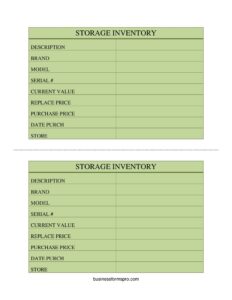
Computers Storage Inventory Card
Track every stored computer and device with this free Computer Storage Inventory Card template, available as a free download in PDF and DOCX.
PDF
DOCX
6 downloads
0
likes
Download Files
- DOCX
A Computer Storage Inventory Card is a single-record tracking sheet used to document each computer or storage device kept in inventory, including its description, brand, model, serial number, and value. People most often use it to keep an accurate, item-by-item record of equipment held in stockrooms, warehouses, or off-site storage so nothing gets lost or misvalued. It is free to download here in both PDF and DOCX formats, with no signup required.
What Is a Computer Storage Inventory Card?
A Computer Storage Inventory Card is a record that captures the key identifying and financial details of one stored computer or related device. It is typically filled out by an inventory clerk, IT asset manager, office administrator, or small-business owner whenever a unit is placed into storage or counted during an audit. The card documents what the item is, where it lives, when it was bought, and how much it is worth now versus what it would cost to replace. Together, a stack of these cards forms a clear, searchable inventory that supports asset tracking, insurance claims, tax reporting, and routine reconciliation. Because each card covers a single item, it is easy to update, file, or pull when a unit is moved or retired.
When Do You Need a Computer Storage Inventory Card?
This card is useful any time computer equipment is held outside of active daily use and needs to be accounted for. Common situations include:
- Stocking a storeroom or warehouse with new or spare desktops, laptops, drives, and servers awaiting deployment.
- Conducting a periodic physical inventory or year-end audit where every stored device must be counted and verified.
- Documenting assets for insurance so you can prove ownership, value, and replacement cost after theft, fire, or water damage.
- Tracking depreciation or book value by comparing each item’s purchase price against its current value over time.
- Managing surplus or decommissioned equipment being stored before resale, donation, or disposal.
- Relocating an office or data closet, where items must be logged at the source and matched at the destination store location.
What a Computer Storage Inventory Card Should Have
A complete card leaves no ambiguity about which physical unit it represents and what that unit is worth. The essential elements are a clear Description of the item, its Brand and Model, a unique Serial Number, and the Store or storage location where it is kept. On the financial side, it should record the Purchase Price and Date Purchased, the estimated Current Value, and the Replace Price needed to buy an equivalent today. These details transform a vague pile of equipment into a verifiable, auditable record. A consistent format across every card is what makes the whole inventory reliable.
How to Fill Out a Computer Storage Inventory Card
- Description: Write a plain-language name for the item, such as “Dell desktop tower” or “external 2TB hard drive.” Be specific enough that someone reading the card later can identify it without seeing it.
- Brand: Enter the manufacturer name exactly as printed on the device, for example Dell, HP, Lenovo, Apple, or Western Digital.
- Model: Record the model name or number, usually found on the manufacturer label or product sticker.
- Serial #: Copy the serial number precisely; this is the unique identifier that ties the card to one physical unit and is essential for warranty and insurance claims.
- Current Value: Estimate what the item is worth today, accounting for age and wear.
- Replace Price: Note the cost to purchase a comparable new replacement.
- Purchase Price: Enter the original amount paid when the item was bought.
- Date Purch: Record the purchase date so you can calculate age and depreciation.
- Store: Identify the storage location, shelf, room, or facility where the unit is physically kept.
Tracking Value: Purchase, Current, and Replacement
One of the most useful aspects of this card is that it captures three separate dollar figures, and each serves a different purpose. The Purchase Price reflects historical cost and is often the figure used for accounting and depreciation schedules. The Current Value estimates today’s market or book value, which naturally drops as equipment ages and newer models appear. The Replace Price answers a forward-looking question: if this unit were lost or destroyed, how much would it cost to buy an equivalent right now? Keeping all three visible on one card helps with budgeting, insurance coverage decisions, and deciding whether an aging device is worth keeping in storage or should be sold off.
Keeping Your Inventory Accurate Over Time
An inventory card is only as good as its maintenance. Update the Current Value at least once a year, since technology depreciates quickly. When an item is moved, immediately revise the Store field so the location always matches reality. If a unit is sold, retired, or scrapped, mark the card accordingly and pull it from your active file rather than deleting the history entirely. Storing the completed cards in a consistent order, by serial number, location, or category, makes physical audits far faster and reduces the chance of double-counting or overlooking a device.
Common Mistakes to Avoid
- Skipping the serial number or copying it incorrectly, which makes the card useless for warranty, theft recovery, or distinguishing identical models.
- Confusing the three value fields by entering replacement cost where current value belongs, which distorts your totals.
- Leaving the Store location vague, so staff waste time hunting for the unit during an audit.
- Forgetting to update Current Value, leaving years-old figures that overstate what the equipment is actually worth.
- Using inconsistent descriptions across cards, making it hard to search or group similar items.
- Never reconciling the cards against the physical shelf, allowing missing or extra units to go unnoticed.
Frequently Asked Questions
What is a Computer Storage Inventory Card used for? It is used to document a single stored computer or device, recording its description, brand, model, serial number, location, and value. Together, a set of cards forms a complete inventory that supports audits, insurance, and asset management. It keeps each item traceable from purchase to disposal.
How do I fill out the value fields correctly? Enter the original amount you paid under Purchase Price, the item’s estimated worth today under Current Value, and the cost of buying an equivalent new unit under Replace Price. Keeping these three distinct gives you an accurate financial picture for both accounting and insurance purposes.
Why is the serial number so important? The serial number is the unique fingerprint that ties the card to one specific physical device. It is essential for warranty service, theft reports, and telling apart units that share the same brand and model. Always copy it exactly as printed on the device.
How often should I update the cards? Review and update them whenever an item is moved, sold, or retired, and refresh the Current Value at least annually. Regular reconciliation against the physical storage area ensures the records stay accurate and trustworthy over time.
Is this template legally binding? No, an inventory card is an internal record-keeping tool, not a contract. It documents what you own and where it is, which can support insurance and accounting, but it does not create legal obligations on its own.
Is this Computer Storage Inventory Card free to download? Yes. You can download it here for free in both PDF and DOCX formats with no signup required. Print blank copies for handwriting or edit the DOCX version to match your own categories and layout.
This template is provided as a general example for informational purposes only and does not constitute legal, financial, tax, or accounting advice. Inventory, valuation, and recordkeeping requirements vary by organization and jurisdiction; consult a qualified professional for guidance specific to your situation.
Related Forms
- Inventory Schedule
- Coupon Codes Tracker
- Book Inventory
- Monthly Editorial Calendar
- Casino Earnings Log
- Vehicle Repair Log
Browse more in Log and Inventory.