
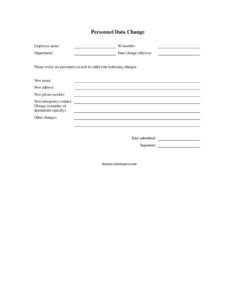
Employee Personnel Data Change
Use this free Employee Personnel Data Change form to update name, address, phone, and emergency contacts—free download in PDF and DOCX, no signup.
PDF
DOCX
4 downloads
0
likes
Download Files
- DOCX
An Employee Personnel Data Change form is a simple internal document employees use to request updates to the information their employer keeps on file—such as a new name, address, phone number, emergency contact, or number of dependents. It’s the standard way to keep HR records accurate after a life event, and you can download it free here in both PDF and DOCX formats with no signup required.
What Is an Employee Personnel Data Change Form?
An Employee Personnel Data Change form is a written request submitted by an employee to their human resources or payroll department asking that specific personnel records be revised. It documents who is making the change, which records are affected, and when the update should take effect. Because employers rely on this information for payroll, benefits enrollment, tax withholding, and emergency notification, a signed paper trail protects both parties: the employee has proof they requested the change, and HR has authorization to edit official records. The form is typically a one-page document kept in the employee’s personnel file alongside their original onboarding paperwork.
When Do You Need an Employee Personnel Data Change Form?
Life changes constantly, and employer records need to keep up. You’ll typically reach for this form in situations like these:
- A legal name change after marriage, divorce, or a court order that needs to match payroll and tax documents.
- Moving to a new home, which affects mailing of pay stubs, tax forms, and benefits correspondence—and may change local tax withholding.
- Getting a new phone number so HR and managers can reach you during scheduling changes or emergencies.
- Updating an emergency contact after a change in relationship status, a contact moving away, or the birth of a child.
- A change in dependents, such as a new baby, an adoption, or a dependent aging off coverage, which can affect benefits and withholding elections.
- Correcting an error discovered in existing records, like a misspelled name or transposed digits in an ID or phone number.
What an Employee Personnel Data Change Form Should Have
A complete form clearly identifies the employee, states exactly what is changing, and includes authorization. The essentials are: the employee’s full current name and ID number, the department they work in, the effective date of the change, a labeled space for each type of update (name, address, phone, emergency contact, dependents, and an open “other” line), the date the request was submitted, and the employee’s signature. Together these elements make the request unambiguous and traceable, so HR can act on it confidently and file it for the record.
How to Fill Out an Employee Personnel Data Change Form
Work through the form top to bottom, completing only the fields that actually change:
- Employee name: Write your current full name as it appears in existing records, so HR can locate your file.
- ID number: Enter your employee or payroll ID number to confirm your identity and link the request to the correct file.
- Department: List the department you work in, which helps route the form to the right approver.
- Date change effective: Note when the change should take effect—this may be today, a future move-in date, or the date of a legal event.
- New name: If your name is changing, write the new legal name exactly as it should appear going forward.
- New address: Provide the complete new mailing address, including unit number and ZIP code.
- New phone number: Enter your updated primary contact number.
- New emergency contact: List the person’s name, relationship, and phone number.
- Change in number of dependents: Specify the new total and the reason, such as “added one—newborn.”
- Other changes: Use this line for anything not covered above.
- Date submitted and Signature: Date and sign the form to authorize the update.
Documentation You May Need to Attach
Some changes require supporting documents before HR will finalize them. A legal name change usually calls for a copy of a marriage certificate, divorce decree, or updated Social Security card. A change in dependents may need a birth certificate or adoption paperwork to update benefits or tax withholding. While a phone number or emergency contact update rarely requires proof, attaching documentation for name and dependent changes speeds up processing and reduces follow-up questions. When in doubt, ask your HR department which items they require and submit copies, not originals.
How This Differs From Other HR Forms
It’s easy to confuse this form with related paperwork. A Personnel Data Change form simply updates your existing records; it does not change your tax withholding elections on its own—that typically requires a separate tax withholding form. Likewise, a change in dependents recorded here may signal a qualifying life event, but you usually still need to complete a benefits enrollment or change form within your plan’s window to actually adjust coverage. Think of the Personnel Data Change form as the master notice that triggers other updates, not a replacement for them.
Common Mistakes to Avoid
- Leaving the effective date blank, which leaves HR guessing when to apply the change.
- Filling in fields that haven’t changed, creating confusion about what you actually want updated.
- Forgetting to sign and date the form, which makes it unenforceable as authorization.
- Writing an incomplete address that omits the apartment number or ZIP, delaying mail and tax updates.
- Assuming this form updates benefits or withholding automatically without filing the separate required forms.
- Not keeping a copy of the submitted form for your own records.
Frequently Asked Questions
What is an Employee Personnel Data Change form used for? It is used to formally request that your employer update the personal information they keep on file, such as your name, address, phone number, emergency contact, or number of dependents. The signed form gives HR authorization to revise official records and creates a paper trail for both sides.
How do I fill out the form? Start by identifying yourself with your current name, ID number, and department, then enter the effective date. Complete only the fields that are actually changing, attach any required documentation, and sign and date the bottom to authorize the update.
Does this form need to be notarized or witnessed? No. An internal personnel data change is an administrative request between you and your employer and generally does not require notarization or a witness. Your signature and the submission date are normally sufficient.
Will this form change my tax withholding or benefits? Not by itself. It updates your records and can flag a qualifying life event, but adjusting tax withholding or benefits enrollment usually requires separate forms filed within specific deadlines—check with your HR or payroll team.
Do I need to provide proof of the change? It depends on the change. Name and dependent changes often require supporting documents like a marriage certificate or birth certificate, while address and phone updates typically do not. Ask your HR department what they require.
Is this form free to download? Yes. You can download the Employee Personnel Data Change template free here in both PDF and DOCX formats with no signup, then print it or edit it to match your organization’s needs.
This template is a general example provided for informational purposes only and is not legal, financial, or tax advice. Recordkeeping and employment requirements vary by jurisdiction and by employer policy. Consult a qualified HR or legal professional for guidance specific to your situation.
Official resource: for the rules that apply to your situation, see the U.S. Department of Labor.
Related Forms
- Check Driving Record
- Employee Evaluation Form
- Organizational Chart
- Bi-Weekly Time Card With Approval
- Absentee Report Form
- Letter Of Demotion
Browse more in Employment.