
Job Interview Schedule
Organize hiring days with a free Job Interview Schedule template that tracks times, applicants, and interviewers — free download in PDF and DOCX.
PDF
DOCX
1 downloads
0
likes
Download Files
- DOCX
A Job Interview Schedule is a simple planning document that lists who is being interviewed, when, by whom, and where during a hiring day or recruitment cycle. Hiring teams use it most often to coordinate back-to-back candidate meetings without double-booking interviewers or rooms. You can download it free in PDF and DOCX, with no signup required.
What Is a Job Interview Schedule?
A Job Interview Schedule is a structured timetable used by recruiters, HR coordinators, and hiring managers to organize the order and timing of candidate interviews. It documents each applicant’s appointment slot, the role they are applying for, the assigned interviewer, and the meeting location. Rather than relying on scattered emails or calendar invites, the schedule consolidates every interview into one clean reference sheet. It helps everyone — front-desk staff, panel members, and candidates — know exactly what is happening and when. The form is equally useful for a single afternoon of interviews or a multi-day hiring event spanning several open positions.
When Do You Need a Job Interview Schedule?
This form is valuable any time more than one interview needs coordinating, or when multiple people are involved in the hiring process. Common situations include:
- High-volume hiring days where a dozen or more candidates are seen back-to-back for the same role.
- Panel or multi-round interviews in which a candidate meets several interviewers in sequence and each handoff must be timed.
- Campus or job-fair recruiting with tight 20- or 30-minute slots that have to stay on track.
- Filling several open positions at once, where different applicants, roles, and interviewers overlap on the same day.
- Remote or hybrid interviews that mix in-person rooms with video links, all needing a clear start and end time.
- Shared front-desk or reception coordination, so staff can greet each applicant by name and direct them to the right location.
What a Job Interview Schedule Should Have
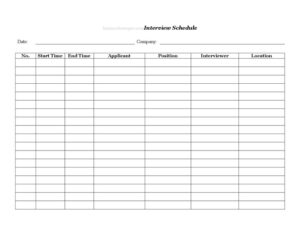
A complete schedule leaves no ambiguity about any single interview slot. At minimum it should capture the date of the interviews, the company hosting them, and a sequential number for each slot so rows can be referenced quickly. Each entry needs a start time and end time to define the window, the applicant’s name, and the position they are interviewing for. It should also name the assigned interviewer and the location — whether that is a conference room, office number, or video meeting link. Together these fields make the schedule self-explanatory at a glance.
How to Fill Out a Job Interview Schedule
Work through the template row by row, completing each field for every candidate:
- Date: Enter the day the interviews take place. If your event spans multiple days, use one sheet per day for clarity.
- Company: Write your organization’s name at the top so the schedule is identifiable when shared or printed.
- No.: Number each interview slot sequentially (1, 2, 3…) to make rows easy to reference and reorder.
- Start Time: Record when each interview begins, using a consistent format such as 9:00 AM.
- End Time: Note when the slot closes, leaving buffer time between candidates for notes and transitions.
- Applicant: Enter the candidate’s full name exactly as it appears on their application.
- Position: List the specific role being interviewed for, especially useful when several openings run the same day.
- Interviewer: Name the person or panel responsible for that slot so everyone knows their assignments.
- Location: Specify the room, office, building, or virtual meeting link for the interview.
Once filled, distribute the schedule to interviewers and front-desk staff, and confirm the times with each applicant in advance.
Tips for Building a Schedule That Runs Smoothly
A schedule only works if it accounts for real-world friction. Build in buffer time of at least 5 to 10 minutes between slots so interviewers can jot notes, refill water, and reset before the next candidate. Order interviews logically — group candidates for the same position together, or cluster interviews by interviewer to minimize room-hopping. If your interviewers are seeing many people, consider giving each one a personalized copy that highlights only their assigned rows. For virtual interviews, paste the meeting link directly into the Location field and test it the morning of, so no slot stalls waiting on a connection.
Sharing and Updating the Schedule
Because hiring days rarely go perfectly to plan, treat the schedule as a living document. Use the DOCX version if you expect last-minute changes — cancellations, reschedules, or an added candidate — so you can edit and reprint quickly. Use the PDF version when you want a clean, locked copy to email to interviewers or post at the front desk. Keep one master copy with a single owner (usually the recruiter or HR coordinator) who is responsible for all edits, so everyone is working from the same version rather than conflicting copies. After the day ends, the completed schedule also serves as a useful record of who interviewed whom and when.
Common Mistakes to Avoid
- Forgetting buffer time — packing slots end-to-end causes delays that cascade through the whole day.
- Leaving the location vague — “upstairs” or “the usual room” confuses candidates and wastes time.
- Double-booking an interviewer across two overlapping slots without noticing.
- Misspelling applicant names, which looks unprofessional and can cause mix-ups at reception.
- Omitting the position when several roles are interviewed the same day, leaving interviewers unsure of context.
- Failing to confirm times with candidates, leading to no-shows or late arrivals that derail the sequence.
Frequently Asked Questions
What is a Job Interview Schedule used for? It is used to organize and coordinate multiple candidate interviews into a single, clear timetable. The schedule shows each applicant’s slot, the position, the assigned interviewer, and the location, so the hiring team and front desk can run the day without confusion or double-booking.
How do I fill out the Job Interview Schedule template? Enter the date and company at the top, then complete one row per interview with a slot number, start and end times, the applicant’s name, the position, the interviewer, and the location. Number the slots sequentially and keep your time format consistent throughout.
Is this Job Interview Schedule free to download? Yes. The template is completely free to download in both PDF and DOCX formats, with no signup or account required. You can print it as-is or edit the DOCX version to match your organization’s needs.
Can I use it for virtual or hybrid interviews? Absolutely. For video interviews, simply enter the meeting link in the Location field, and for in-person ones, list the room or office. The same schedule can mix both types as long as each slot’s location is clearly noted.
How much buffer time should I leave between interviews? A common practice is 5 to 15 minutes between slots, depending on interview length and how many notes interviewers need to record. Buffers also absorb small overruns so a single long interview does not delay every candidate after it.
Who should own and update the schedule? Assign one person — usually the recruiter or HR coordinator — to maintain the master copy. Centralizing edits prevents conflicting versions and ensures every interviewer and reception staff member is working from the same up-to-date document.
This template is a general example provided for informational purposes only and does not constitute legal, HR, or employment advice. Hiring practices and recordkeeping requirements vary by jurisdiction and organization — consult a qualified professional to ensure your process meets applicable rules.
Official resource: for the rules that apply to your situation, see the U.S. Department of Labor.
Related Forms
- Monthly Time Card With Approval
- Employee Orientation Checklist
- Personnel Emergency Contact Record
- Consent To Drug Test
- Key Assignment Form
- Employee Benefits Sheet
Browse more in Employment.