
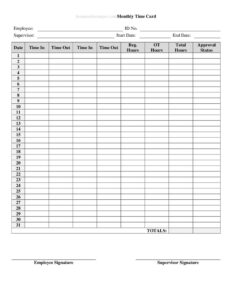
Monthly Time Card With Approval
Track employee hours and get supervisor sign-off with a Monthly Time Card With Approval — a free template you can download in PDF and DOCX.
PDF
DOCX
2 downloads
0
likes
Download Files
- DOCX
A Monthly Time Card With Approval is a one-page record that captures every hour an employee works across a calendar month and includes a signature line where a supervisor confirms the totals are correct. People most often use it to document hours for payroll while creating a clear, approved paper trail. You can download it free in PDF and DOCX, with no signup required.
What Is a Monthly Time Card With Approval?
A Monthly Time Card With Approval is a timekeeping document that logs an employee’s daily start and end times, breaks, and total hours for an entire month, then adds an approval section for a manager or supervisor to review and sign. Employers, HR departments, and small business owners use it to verify hours before processing payroll and to keep an auditable record of attendance. Unlike an informal spreadsheet, the built-in approval block makes the document official: it shows that someone with authority checked the entries and agreed they are accurate. It works for hourly staff, salaried employees tracking overtime, contractors billing by the hour, and remote workers logging time from home.
When Do You Need a Monthly Time Card With Approval?
This form fits any situation where hours must be recorded and formally confirmed before money changes hands. Common scenarios include:
- Monthly payroll runs — when your business pays staff once a month and needs verified totals before issuing checks.
- Hourly and part-time employees — to track exact hours worked, including any overtime or short days.
- Contractors and freelancers — who bill by the hour and need a client-approved summary to attach to an invoice.
- Remote and field workers — where a supervisor cannot physically observe attendance and relies on a signed record.
- Audits and disputes — to provide documented, approved evidence of hours worked if a wage question ever arises.
- Project cost tracking — when labor hours must be allocated to a job, department, or grant for accurate reporting.
What a Monthly Time Card Should Have
A complete monthly time card balances detail with readability. At a minimum it should identify the employee and the pay period, provide a row for each day of the month, and leave room for daily and monthly totals. The strongest versions also include:
- Employee name, ID or department, and supervisor name.
- The month and year the card covers.
- A line per day with date, time in, time out, and break or lunch deductions.
- A column for regular hours and a separate column for overtime.
- A running monthly total of hours worked.
- Signature and date lines for both the employee and the approving supervisor.
Together these elements turn a list of times into a defensible payroll record.
How to Fill Out a Monthly Time Card With Approval
- Enter the header details. Write the employee’s full name, employee ID or department, the supervisor’s name, and the month and year the card covers.
- Record each workday. For every date, fill in the time the employee clocked in and the time they clocked out, using a consistent format such as 8:00 AM and 5:00 PM.
- Deduct breaks. Note any unpaid lunch or break time so the daily total reflects only hours actually worked.
- Calculate daily hours. Subtract breaks from the time-in/time-out span and write the result in the regular hours column.
- Separate overtime. If hours exceed the standard threshold, record them in the overtime column rather than mixing them with regular time.
- Mark days off. Indicate weekends, holidays, vacation, or sick days clearly so there are no unexplained gaps.
- Total the month. Add all daily entries to produce the monthly total of regular and overtime hours.
- Sign as the employee. The worker signs and dates the card to confirm the entries are truthful.
- Obtain approval. The supervisor reviews the totals, then signs and dates the approval section before the card goes to payroll.
Tips for Accurate Monthly Timekeeping
Accuracy is easier when you build small habits into the month rather than reconstructing everything on the final day. Encourage employees to log time daily instead of relying on memory at month-end, which is the most common source of errors. Use a single, consistent time format throughout the card so totals are easy to verify. If your workplace rounds time to the nearest quarter hour, apply the same rule to every entry. Keep the completed and signed card on file for the period required by your local labor regulations, since approved time records are often the first document requested during a wage inquiry. For digital workflows, the DOCX version lets you build formulas or distribute the file electronically, while the PDF version prints cleanly for handwritten entries and physical signatures.
How It Differs From a Weekly Time Sheet
A weekly time sheet covers seven days and is typically submitted four or five times a month, while a monthly time card consolidates the entire month onto one page. The monthly format reduces paperwork and is ideal for businesses that pay on a monthly cycle or that simply prefer fewer documents to file. Because a month covers more days, the approval signature carries more weight — a supervisor is confirming a larger block of hours at once. If your payroll runs weekly or biweekly, a shorter time sheet may suit you better; if it runs monthly, this card keeps everything in one approved place.
Common Mistakes to Avoid
- Forgetting the approval signature — an unsigned card is just a draft and may not satisfy payroll or auditors.
- Mixing overtime into regular hours — this can cause underpayment and compliance problems; keep the columns separate.
- Leaving unexplained blank days — always mark days off, holidays, or absences so gaps look intentional.
- Inconsistent time formats — switching between AM/PM and 24-hour notation invites calculation errors.
- Submitting late — turning in the card after the payroll cutoff can delay the entire month’s pay.
- Not keeping a copy — retain a signed copy for your records in case the original is lost or questioned.
Frequently Asked Questions
What is a Monthly Time Card With Approval used for? It is used to record an employee’s hours for an entire month and to capture a supervisor’s signed confirmation that those hours are accurate. Businesses rely on it to verify time before running payroll and to keep a documented attendance record. It works for hourly staff, salaried employees logging overtime, and contractors alike.
How do I fill out the approval section? The employee signs and dates the card first to confirm the entries are truthful, then the supervisor reviews the daily and monthly totals and signs the approval line. Approval should happen before the card is submitted to payroll. The signature shows that someone with authority checked and accepted the figures.
Does a time card need to be notarized or witnessed? No. A time card is an internal payroll document, not a legal contract, so it does not require notarization or witnesses. The employee and supervisor signatures are all that is needed to make it official within your organization.
Is this monthly time card legally binding? It is a record rather than a contract, but a signed, approved card can serve as important evidence of hours worked in a wage dispute or audit. Its value comes from accuracy and timely signatures. Keep completed cards on file for the period your local rules require.
How much does this template cost? Nothing — it is completely free to download from Business Forms Pro in both PDF and DOCX formats, with no signup or account required. You can print it for handwritten use or edit the DOCX version to match your company’s needs.
Can I customize the form for my business? Yes. The DOCX version is fully editable, so you can add your company logo, adjust the columns, change the overtime threshold, or add fields such as project codes or department names. The PDF version is best when you want a fixed, ready-to-print layout.
This template is a general example provided for informational purposes only and is not legal, financial, or tax advice. Timekeeping and wage recordkeeping requirements vary by jurisdiction and by employer policy — consult a qualified professional or your HR and payroll advisors to ensure your practices comply with applicable laws.
Official resource: for the rules that apply to your situation, see the U.S. Department of Labor.
Related Forms
- Employee Complaint Form
- Grievance Report
- Manual Timecard Bi-Weekly Mini
- Employee Fired For Cause
- Job Description Template
- Check Driving Record
Browse more in Employment.