
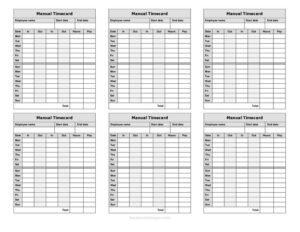
Manual Timecard Bi-Weekly Mini
Track two weeks of employee hours with our free Manual Timecard Bi-Weekly Mini template, available as a free download in PDF and DOCX.
PDF
DOC
2 downloads
0
likes
Download Files
- DOC
A Manual Timecard Bi-Weekly Mini is a compact paper or printable form used to record an employee’s daily work hours across a two-week pay period. People most often use it to track hours by hand when a digital time clock isn’t available or practical, then total those hours for payroll. It’s free to download in PDF and DOCX, with no signup required.
What Is a Manual Timecard Bi-Weekly Mini?
A Manual Timecard Bi-Weekly Mini is a simple time-tracking document that captures the hours an employee works over a 14-day span — typically two consecutive work weeks that make up a single bi-weekly pay cycle. It is usually completed by the employee and reviewed or signed off by a supervisor. The “mini” format keeps the layout small and focused: just the essential columns for date, time in, time out, breaks, and daily totals. Employers, small business owners, and household managers use it to document attendance, calculate regular and overtime hours, and create a clear paper trail for payroll. Because it is filled out manually, it works anywhere a pen and paper are available.
When Do You Need a Manual Timecard Bi-Weekly Mini?
This form fits a wide range of situations where hours must be tracked simply and reliably:
- Small businesses without time-clock software that still need accurate records for each bi-weekly payroll run.
- Hourly and part-time staff whose schedules change week to week and need to be totaled before pay is issued.
- Backup tracking when an electronic system goes down or a worker forgets to clock in or out.
- Field, remote, or job-site crews who work away from the main office and submit hours by hand.
- Household or domestic employers who pay nannies, caregivers, or housekeepers and must keep wage records.
- Temporary or seasonal workers hired for short stretches where setting up a digital account isn’t worth it.
In each case, the bi-weekly layout means a single sheet covers a full pay period, reducing paperwork while keeping the record auditable.
What a Manual Timecard Should Have
A complete and usable bi-weekly timecard includes a few core elements that make the totals trustworthy. At minimum it should identify the employee and the pay period, capture daily entries, and provide a place for verification:
- Employee name and, where relevant, an ID or department.
- The pay period start and end dates covering the full two weeks.
- A row for each day with date, time in, time out, and break or lunch deductions.
- A daily total column and weekly subtotals.
- A grand total of regular hours, plus a line for overtime if applicable.
- Signature lines for both the employee and the approving supervisor.
How to Fill Out a Manual Timecard Bi-Weekly Mini
Work through the form one section at a time so the totals come out clean:
- Enter the employee name at the top, along with any ID, department, or job title your workplace requires.
- Write the pay period dates — the first and last day of the two-week cycle so it’s clear which days the card covers.
- Fill in each date down the left side, one line per day for both weeks.
- Record the time in when work starts each day, using a consistent format such as 8:00 AM.
- Record the time out when work ends, including any mid-day departures.
- Note breaks or lunch that are unpaid so they can be subtracted from the daily figure.
- Calculate the daily total hours worked after deducting unpaid breaks.
- Subtotal each week, then add both weeks for the period grand total and separate any overtime hours.
- Sign and date the card as the employee, and have a supervisor review and sign to approve it before payroll processing.
Tips for Accurate Manual Time Tracking
Manual timecards are only as good as the habits behind them. Record times as they happen rather than reconstructing the whole period from memory at the end. Use the same time format throughout — either all 12-hour with AM/PM or all 24-hour — to avoid math errors. Round consistently if your workplace rounds to the nearest quarter hour, and apply the same rule every day. Keep a photo or copy of each completed card before handing it in, so there’s a backup if the original is lost. Finally, submit the card promptly at the end of the pay period so payroll has time to process it without rushing the calculations.
Manual Timecard vs. Digital Time Clock
A manual timecard and a digital time-tracking system serve the same goal but suit different needs. The manual version requires no software, no logins, and no cost, and it works during power or internet outages — ideal for very small teams, occasional use, or as a paper backup. A digital clock automates totals and reduces transcription errors but involves setup and ongoing fees. Many small employers keep this printable timecard on hand as a fallback even when they use software, so a missed clock-in never leaves a gap in the record.
Common Mistakes to Avoid
- Leaving the pay period dates blank, which makes it impossible to know which two weeks the card represents.
- Mixing AM and PM or forgetting the designation, leading to wildly wrong daily totals.
- Forgetting to subtract unpaid breaks, which overstates hours and pay.
- Adding the two weeks incorrectly — always double-check the math before signing.
- Skipping the supervisor approval signature, leaving the hours unverified.
- Filling it out from memory days later, which introduces guesswork and disputes.
Frequently Asked Questions
What is a Manual Timecard Bi-Weekly Mini used for? It is used to record an employee’s daily work hours over a two-week pay period by hand. Employers then total those hours to calculate pay. The compact “mini” format keeps everything on one easy-to-read sheet.
How do I calculate hours on this timecard? For each day, subtract the time in from the time out, then deduct any unpaid breaks or lunch to get the daily total. Add all daily totals within each week for a weekly subtotal, then combine both weeks for the period total. Separate any hours beyond your standard schedule as overtime if your workplace tracks it.
Does a manual timecard need to be signed? While signatures aren’t legally required everywhere, it’s strongly recommended that both the employee and a supervisor sign the card. The employee signature confirms the hours are accurate, and the supervisor signature approves them for payroll. This creates a clear record if questions arise later.
Is a handwritten timecard legally valid? A handwritten timecard can serve as a valid wage record as long as it accurately reflects hours worked and is retained per applicable rules. Many jurisdictions require employers to keep time and pay records for a set number of years. Wage and recordkeeping requirements vary, so check your local labor rules.
How much does this timecard template cost? Nothing — it is completely free to download from Business Forms Pro in both PDF and DOCX formats. There is no signup or account required. You can print it as-is or open the DOCX to customize fields for your workplace.
Can I edit the template to match my company’s needs? Yes. The DOCX version can be opened in common word processors so you can add a logo, department fields, or extra columns. The PDF is ready to print and fill in by hand if you prefer a no-edit option.
This Manual Timecard Bi-Weekly Mini template is a general example provided for informational purposes only and is not legal, financial, or tax advice. Wage, overtime, and recordkeeping requirements vary by jurisdiction and over time. Consult a qualified payroll or employment professional to ensure your time-tracking practices comply with the laws that apply to you.
Official resource: for the rules that apply to your situation, see the U.S. Department of Labor.
Related Forms
- Employee Termination Notice
- Employee Self Evaluation
- Sexual Harassment Complaint
- Applicant Interview Schedule
- Employee Evaluation
- Letter Of Demotion
Browse more in Employment.