
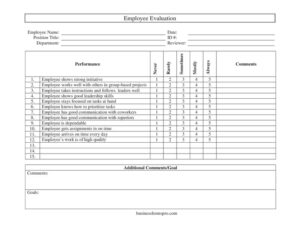
Employee Evaluation
Download a free Employee Evaluation form template in PDF and DOCX to rate performance, communication, and goals fairly — free download, no signup required.
PDF
DOC
6 downloads
0
likes
Download Files
- DOC
An Employee Evaluation is a structured performance review form a manager or reviewer uses to rate an employee against clear, consistent criteria. People most often reach for it during scheduled performance reviews to document strengths, flag areas for growth, and set goals on paper. It’s free to download here in both PDF and DOCX, with no signup required.
What Is an Employee Evaluation?
An Employee Evaluation is a written assessment that records how well a team member is meeting expectations across areas like initiative, teamwork, communication, dependability, and work quality. It’s typically completed by a direct supervisor, manager, or HR reviewer and shared with the employee as part of an ongoing feedback cycle. The form documents a snapshot in time, using a rating scale alongside written comments so the review is both measurable and personal. Beyond rating past performance, a good evaluation captures forward-looking goals. It becomes a reference point for promotions, raises, training plans, and — when necessary — performance improvement discussions, giving both the employer and employee a fair, dated record of what was discussed.
When Do You Need an Employee Evaluation?
This form is useful any time you need a consistent, documented way to assess performance rather than relying on memory or informal conversation. Common situations include:
- Annual or quarterly reviews — the standard cadence most organizations use to assess each employee on a regular schedule.
- End of a probationary period — to decide whether a new hire should continue past their initial trial months.
- Before promotions or raises — to justify pay decisions with documented performance ratings.
- Performance improvement plans — to identify specific weaknesses and set measurable goals for the next period.
- Project wrap-ups — to evaluate how an individual contributed to a team-based effort and where they can improve.
- Manager transitions — when a new supervisor needs a baseline record of an employee’s strengths and challenges.
What an Employee Evaluation Should Have
A complete evaluation balances objective ratings with context. The essentials include employee identification details so the record is unmistakably tied to the right person, a clear rating scale applied consistently across every criterion, specific performance statements that cover behavior and output, room for written comments that explain each score, and a forward-looking goals section. Together these elements turn vague impressions into a fair, defensible document. This template builds all of that in, using a five-point frequency scale — Never, Rarely, Sometimes, Mostly, Always — applied to twelve plainly worded performance statements, plus dedicated space for comments and goals.
How to Fill Out an Employee Evaluation
- Enter the Employee Name, Date of the review, Position Title, ID #, and Department at the top so the form is properly attributed.
- Record the Reviewer — the manager or HR representative completing the assessment.
- Work down the Performance statements and, for each one, mark Never, Rarely, Sometimes, Mostly, or Always. The statements cover initiative, working well in group projects, following instructions, leadership, staying focused, prioritizing tasks, communication with coworkers and superiors, dependability, meeting deadlines, punctuality, and quality of work.
- Use the Comments column beside each item to note a specific example that supports your rating — concrete instances are far more useful than a number alone.
- Complete the Additional Comments/Goal area to summarize overall performance and highlight recurring themes.
- In the Comments and Goals fields, write a short overall summary and list clear, measurable objectives for the next review period.
How to Use the Rating Scale Fairly
The five-point frequency scale works best when every rater applies it the same way. Treat Always as consistently exceeding the expectation and Never as a genuine, repeated gap — not a one-time slip. Reserve the extremes for situations the comments can actually back up. Sometimes and Mostly are honest, common ratings; resist the urge to inflate everyone to the top of the scale, which makes the document meaningless and unfair to high performers. Where a statement doesn’t apply to the role — for example, leadership skills for an early-career individual contributor — note that in the comment rather than guessing at a score.
Turning Ratings Into Goals
The most valuable part of any evaluation is what happens next. Use the lower ratings to shape the Goals section: if an employee scored Rarely on prioritizing tasks, a useful goal might define a specific time-management approach to revisit at the next review. Strong scores deserve attention too — pair them with stretch goals that build on existing strengths. Keep goals specific, observable, and tied to a timeframe so both parties know what success looks like before the next cycle begins.
Common Mistakes to Avoid
- Rating without examples — leaving the comment fields blank makes scores hard to defend and easy to dispute.
- Recency bias — judging the whole period based only on the last few weeks instead of the full review window.
- Inflating every score — marking Always across the board removes the form’s usefulness and signals you didn’t review carefully.
- Skipping the goals section — an evaluation without forward-looking objectives gives the employee nothing to act on.
- Forgetting identifying details — an unsigned, undated form with no ID number is hard to file or rely on later.
- No conversation — handing over a completed form without discussing it misses the entire point of feedback.
Frequently Asked Questions
What is an Employee Evaluation form used for? It is used to document and rate an employee’s performance across consistent criteria such as initiative, communication, dependability, and work quality. Managers use it during reviews to give structured feedback, justify decisions like raises or promotions, and set goals for the upcoming period.
How do I fill out the rating scale? For each performance statement, mark one of the five options — Never, Rarely, Sometimes, Mostly, or Always — based on how consistently the employee demonstrates that behavior. Add a note in the adjacent comments field to back up each rating with a real example so the assessment is fair and clear.
Who should complete the evaluation? Usually the employee’s direct supervisor or manager completes it, sometimes with input from HR. The form includes a Reviewer field to record who performed the assessment, which keeps the record accountable and traceable.
Is an Employee Evaluation legally binding? An evaluation is an internal performance document rather than a contract, but it can become an important part of an employee’s record and may be referenced in employment decisions or disputes. Keep ratings accurate, factual, and consistent, and follow your organization’s HR policies for how evaluations are stored and shared.
How much does this template cost? Nothing — it is completely free to download here in both PDF and DOCX formats, with no signup required. You can use it as-is or edit the DOCX version to match your company’s roles and criteria.
Can I customize the performance statements? Yes. Download the editable DOCX version to add, remove, or reword the twelve statements so they reflect the specific responsibilities of the role you’re evaluating. Keep the rating scale consistent across employees so reviews remain comparable.
This Employee Evaluation template is a general example provided for informational purposes only and is not legal, HR, or professional advice. Employment review requirements and best practices vary by jurisdiction and organization — consult a qualified HR or legal professional to ensure your process complies with applicable laws and company policy.
Official resource: for the rules that apply to your situation, see the U.S. Department of Labor.
Related Forms
- Interview Invitation
- Salary Verification Request Letter
- Employee Separation Report
- Employee Pay Rate and Title History Change
- Employee Evaluation Form
- Job Offer Letter
Browse more in Employment.